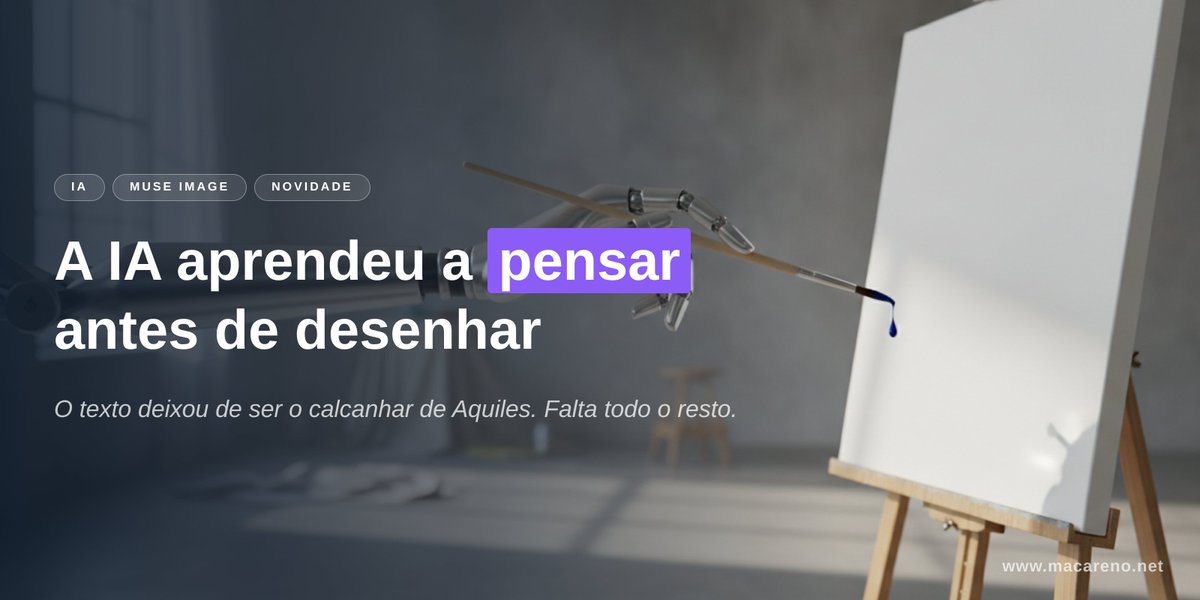
AI Thinking Before Drawing Banner
A cinematic tech-news banner showing a robotic brush facing a blank canvas with bold Portuguese headline text about AI learning to think before drawing.
이것은 그래픽 및 포스터 에 대한 GPT Image 2 프롬프트 사례입니다. 아래의 복사 가능한 프롬프트를 사용하여 유사한 시각 자료를 생성하고, 재사용하기 전에 Awesome GPT Image 2 Prompts 의 저작자 표시 및 상업적 사용 권한을 검토하십시오.
전체 프롬프트 세트가 필요하신가요? 다음을 사용하세요. 그래픽 및 포스터 더 많은 관련 예시를 보려면 주제 허브를 열거나 다음을 열어보세요. GPT Image 2 프롬프트 카탈로그 전체 예제 색인, 재사용 가능한 구조 및 출처 표기는 다음을 참조하십시오.
Free 1K preview
Generate one preview image instantly, no sign-up required.
2645/4000
프롬프트
복사 준비 프롬프트
Goal: Create a cinematic horizontal website/social banner about AI image generation and accurate text rendering, with a moody studio atmosphere and clear Portuguese typography.

Canvas: Wide 2:1 banner, approximately 1200×600 px. Dark, soft-focus photographic background with strong depth of field. Leave the left half for text and the right half for the visual metaphor.

Background and subject: A dim artist studio with cool gray-blue lighting, a blurred window on the far left, concrete wall, soft shadows on the floor, and an easel on the right holding a blank white canvas. In the upper center-right, show a delicate mechanical drawing arm or robotic brush holder reaching toward the canvas, holding a thin brush that has a single dark blue paint droplet at its tip. The canvas should be bright white and mostly empty, slightly angled, with a subtle shadow. Use realistic lighting, shallow depth of field, and a premium editorial tech aesthetic.

Layout: Place all main text on the left side over a dark translucent gradient overlay for legibility. Use exactly 3 small rounded pill tags above the headline, aligned horizontally: “IA”, “MUSE IMAGE”, and “NOVIDADE”. Below them, place a large bold headline in two lines: “A IA aprendeu a pensar” on the first line and “antes de desenhar” on the second line. Highlight only the word “pensar” with a vivid purple rectangular label behind the word, white text on purple. Under the headline, add one smaller italic subtitle: “O texto deixou de ser o calcanhar de Aquiles. Falta todo o resto.” Add a small website URL in the bottom-right corner: “www.macareno.net”.

Text content: Use {argument name="headline text" default="A IA aprendeu a pensar antes de desenhar"}, with the word {argument name="highlighted word" default="pensar"} highlighted in purple. Use {argument name="subtitle text" default="O texto deixou de ser o calcanhar de Aquiles. Falta todo o resto."}. Use {argument name="tag labels" default="IA, MUSE IMAGE, NOVIDADE"}. Use {argument name="website URL" default="www.macareno.net"}.

Visual style: Minimal, polished, cinematic, realistic, high contrast between white typography and dark background, with a modern tech-news landing-page feel. Typography should be clean sans serif; headline extra bold, subtitle light italic, tags uppercase with letter spacing. Keep text sharp and perfectly spelled.

Constraints: Include exactly 3 pill tags, exactly 1 highlighted word, exactly 1 subtitle line, exactly 1 URL, exactly 1 easel canvas, exactly 1 robotic drawing arm, exactly 1 brush, and exactly 1 visible paint droplet. Do not add extra logos, people, icons, or additional text.
프롬프트 변수
프롬프트에 있는 편집 가능한 인수 자리 표시자와 해당 기본값입니다.
변하기 쉬운
headline text
기본
A IA aprendeu a pensar antes de desenhar
변하기 쉬운
highlighted word
기본
pensar
변하기 쉬운
subtitle text
기본
O texto deixou de ser o calcanhar de Aquiles. Falta todo o resto.
변하기 쉬운
tag labels
기본
IA, MUSE IMAGE, NOVIDADE
변하기 쉬운
website URL
기본
www.macareno.net
Best for
- - 그래픽 및 포스터 visual exploration
- - Image generation and reference-image edits
- - Reusable briefs that keep source attribution visible
Change these parts
- - Subject, product, character, or scene
- - Aspect ratio, camera, lighting, and background
- - Brand, text, color, and output constraints
Recommended model and settings
- - Model: gpt-image-2
- - Input mode: 텍스트 to 이미지
- - Aspect ratio: source
- - Commercial status: review original source
How to use this prompt
- 1. Copy the prompt and preserve its structure for the first test.
- 2. Replace the subject, context, and publishing channel.
- 3. Change one camera, lighting, or style variable per iteration.
- 4. Inspect the output, source, text, and rights before reuse.
Limitations, source, and reuse cautions
- - Generated output is an editable draft, not factual, legal, or rights evidence.
- - Review the linked source, people, brands, logos, text, and third-party media before commercial use.
Awesome GPT Image 2 Prompts 에서 가져왔습니다. 출처 표기가 필요합니다. 상업적 이용 가능 여부는 allowed 입니다. 유료 사용 전에 원저작권 정보를 확인하세요.
이 범주에 속하는 더 많은 사례
범주, 입력 방식 호환성, 품질 및 위험도에 따라 우선순위가 정해집니다.






재사용 및 출처 참고 사항
사례를 미리 확인한 후 이 안내 메시지를 안전하게 사용하십시오.
- 1.프롬프트를 복사하거나 Dovoo의 생성 버튼을 사용하여 직접 엽니다.
- 2.사용 사례에 맞게 변수, 화면 비율 및 참조 이미지를 조정하십시오.
- 3.출판 또는 유료 사용 전에 저작권, 출처 표기 요건 및 브랜드 또는 초상권 관련 위험을 확인하십시오.