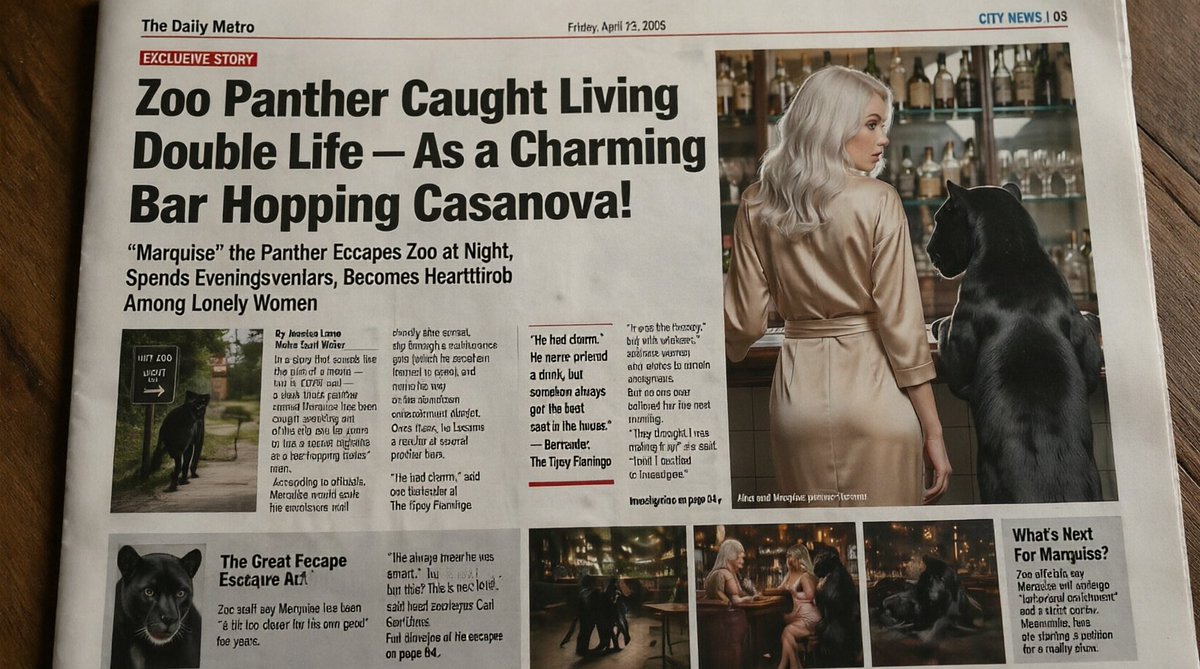
황당한 타블로이드 신문 '팬서' 1면
이 프롬프트는 비밀스러운 밤문화를 즐기는 검은 표범에 대한 사실적이고 코믹한 타블로이드 신문 1면을 생성합니다. 풍자적인 사설이나 바이럴 가짜 헤드라인 이미지 제작에 유용합니다.
이것은 그래픽 및 포스터 에 대한 GPT Image 2 프롬프트 사례입니다. 아래의 복사 가능한 프롬프트를 사용하여 유사한 시각 자료를 생성하고, 재사용하기 전에 Awesome GPT Image 2 Prompts 의 저작자 표시 및 상업적 사용 권한을 검토하십시오.
전체 프롬프트 세트가 필요하신가요? 다음을 사용하세요. 그래픽 및 포스터 더 많은 관련 예시를 보려면 주제 허브를 열거나 다음을 열어보세요. GPT Image 2 프롬프트 카탈로그 전체 예제 색인, 재사용 가능한 구조 및 출처 표기는 다음을 참조하십시오.
Free 1K preview
Generate one preview image instantly, no sign-up required.
2492/4000
프롬프트
복사 준비 프롬프트
A realistic, slightly humorous tabloid newspaper front page photographed from above on a wooden table, designed to look like a printed broadsheet with subtle paper texture, fold marks, and mild lens distortion. The masthead at top left reads “The Daily Metro”, the date line near the top center reads “Friday, April 22, 2005”, and the top-right section marker reads “CITY NEWS | 05”. A red banner near the upper left says “EXCLUSIVE STORY”. The dominant oversized black headline spans multiple lines: “Zoo Panther Caught Living Double Life – As a Charming Bar Hopping Casanova!” Below it, a large subheadline reads: ““Marquise” the Panther Escapes Zoo at Night, Spends Eveningsvlenlars, Becomes Heartthrob Among Lonely Women”. The page layout should mimic a sensational tabloid with 1 huge headline area, 1 large main photo on the upper right, 1 small inset photo under the main text on the left, 3 narrow text columns with dense newspaper copy in the center-left, 1 pull-quote box in the middle, 1 lower-left secondary story block with a panther portrait, 3 small bottom photo thumbnails in a row, and 1 right-side sidebar box titled “What’s Next For Mamquiss?”. Keep most body text tiny and partly nonsensical or pseudo-legible like AI-generated newspaper filler, but preserve the major visible headlines exactly.

The main photo on the upper right shows the back view of a glamorous blonde woman in a silky champagne-colored dress standing at a bar beside a large black panther upright on a stool or standing with forepaws elevated near the counter. The bar background contains many liquor bottles and glassware on shelves, warmly lit. Show every face clearly with natural, detailed facial features. The panther is sleek, glossy, and realistically rendered. The inset photo under the headline at left shows the black panther near a zoo exit or pathway sign at night. The lower-left portrait shows a close-up of the panther’s face. The 3 bottom thumbnails show nightlife scenes: the panther moving through a bar interior, the panther seated near two women at a small round table, and the panther lounging in dim warm light.

Use an early-2000s tabloid aesthetic, high-contrast black headline typography, off-white newsprint, red accent rules, narrow columns, and slightly messy authentic newspaper composition. The overall tone is deadpan absurdist journalism, realistic enough to glance as a real newspaper, with the page filling most of the frame and photographed in natural indoor light.
Best for
- - 그래픽 및 포스터 visual exploration
- - Image generation and reference-image edits
- - Reusable briefs that keep source attribution visible
Change these parts
- - Subject, product, character, or scene
- - Aspect ratio, camera, lighting, and background
- - Brand, text, color, and output constraints
Recommended model and settings
- - Model: gpt-image-2
- - Input mode: 텍스트 to 이미지
- - Aspect ratio: source
- - Commercial status: review original source
How to use this prompt
- 1. Copy the prompt and preserve its structure for the first test.
- 2. Replace the subject, context, and publishing channel.
- 3. Change one camera, lighting, or style variable per iteration.
- 4. Inspect the output, source, text, and rights before reuse.
Limitations, source, and reuse cautions
- - Generated output is an editable draft, not factual, legal, or rights evidence.
- - Review the linked source, people, brands, logos, text, and third-party media before commercial use.
Awesome GPT Image 2 Prompts 에서 가져왔습니다. 출처 표기가 필요합니다. 상업적 이용 가능 여부는 allowed 입니다. 유료 사용 전에 원저작권 정보를 확인하세요.
이 범주에 속하는 더 많은 사례
범주, 입력 방식 호환성, 품질 및 위험도에 따라 우선순위가 정해집니다.






재사용 및 출처 참고 사항
사례를 미리 확인한 후 이 안내 메시지를 안전하게 사용하십시오.
- 1.프롬프트를 복사하거나 Dovoo의 생성 버튼을 사용하여 직접 엽니다.
- 2.사용 사례에 맞게 변수, 화면 비율 및 참조 이미지를 조정하십시오.
- 3.출판 또는 유료 사용 전에 저작권, 출처 표기 요건 및 브랜드 또는 초상권 관련 위험을 확인하십시오.