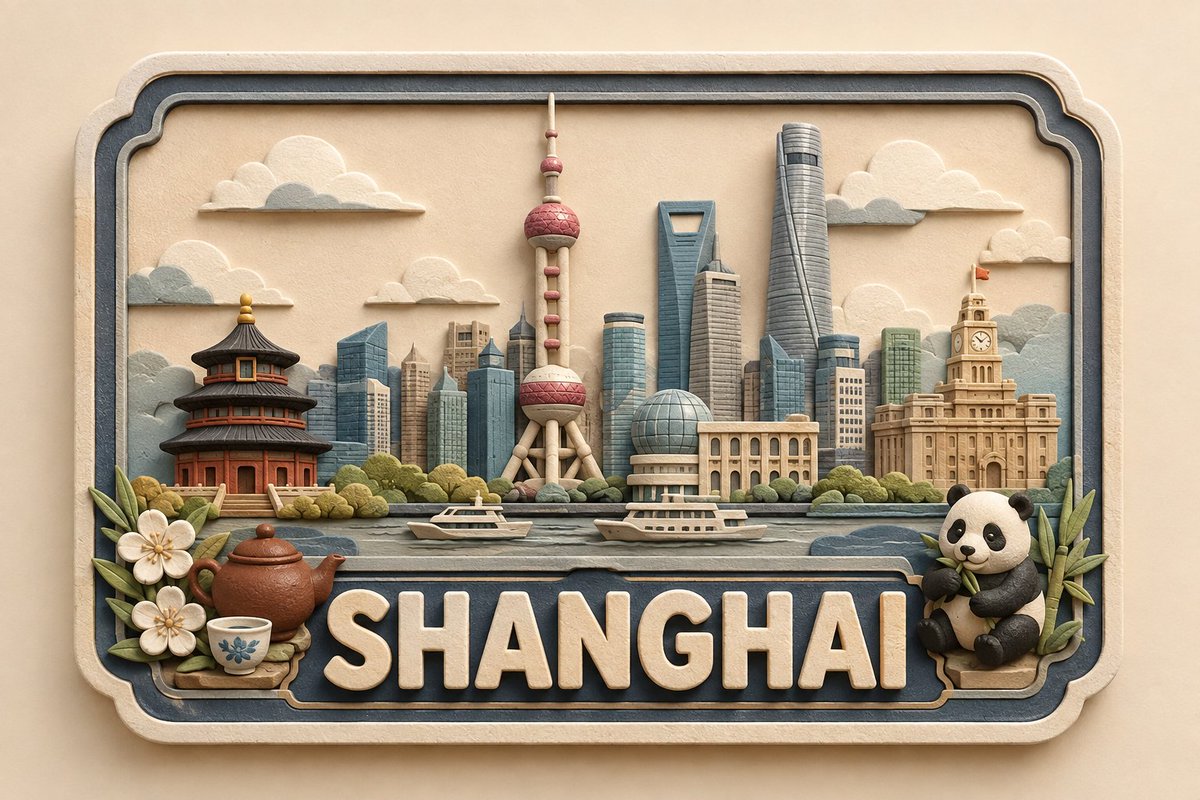
3D Handcrafted Clay Destination Plaque
A complex technical prompt for generating a series of consistent handcrafted 3D paper and clay destination plaques for global locations.
이것은 제품 및 상업 에 대한 GPT Image 2 프롬프트 사례입니다. 아래의 복사 가능한 프롬프트를 사용하여 유사한 시각 자료를 생성하고, 재사용하기 전에 Awesome GPT Image 2 Prompts 의 저작자 표시 및 상업적 사용 권한을 검토하십시오.
전체 프롬프트 세트가 필요하신가요? 다음을 사용하세요. 제품 및 상업 더 많은 관련 예시를 보려면 주제 허브를 열거나 다음을 열어보세요. GPT Image 2 프롬프트 카탈로그 전체 예제 색인, 재사용 가능한 구조 및 출처 표기는 다음을 참조하십시오.
Free 1K preview
Generate one preview image instantly, no sign-up required.
2849/4000
프롬프트
복사 준비 프롬프트
Create a premium, cute, handcrafted 3D paper-and-soft-clay destination plaque for {argument name="location" default="[LOCATION]"}, designed as part of one consistent global collectible series.

COMPOSITION & GEOMETRY: Use a fixed horizontal framed layout on a normalized 100%100 grid. Frame: x=5–95, y=8–92. Landmark zone: y=18–58. Foreground: y=48–67. Location-name zone: y=68–88. Bottom margin: y=88–92. Keep these proportions identical for every location.

LANDMARK HIERARCHY: Place 1 centered hero landmark at x=50, occupying 34–38% height; 2 supporting landmarks at x=25 and x=75, each 22–28% height; 2–4 smaller background elements across x=10–90, each 12–20% height; and 1–3 subtle local foreground details, no more than 14% height. Use only the most recognizable and geographically appropriate features of {argument name="location" default="[LOCATION]"}. Preserve defining silhouettes while simplifying details and avoiding clutter, clichés, or stereotypes.

TYPOGRAPHY: Display exactly “{argument name="location text" default="[LOCATION]"}”, centered and unobstructed. The lettering should span approximately 82–86% of the plaque width and 17–20% of the canvas height. Use large, raised, embossed, rounded sans-serif lettering in warm ivory with a matte finish. Maintain consistent weight, spacing, alignment, and baseline across the entire series.

MATERIAL & STYLE: Approximately 70% layered paper and 30% soft matte clay. Create a shallow-relief handcrafted appearance with visible paper fibers, subtle clay texture, rounded handmade edges, delicate layer shadows, and small natural imperfections. Avoid glossy plastic, metallic materials, photorealism, or a generic CGI appearance.

COLOR PALETTE: Warm ivory/cream foundation, soft beige and natural paper tones, muted blue-gray secondary accents, plus minimal muted colors inspired by the specific location.

CAMERA & LIGHTING: Straight-on centered camera with fixed perspective and scale. Use a warm neutral background, soft diffused studio lighting, gentle shadows, consistent depth, and subtle dimensional separation. No reflections, dramatic perspective, or surrounding environment.

SERIES CONSISTENCY: Keep the frame, composition, grid, typography, landmark scale, hierarchy, object density, materials, palette, lighting, camera angle, depth, shadows, and negative space identical across every location. Change only the landmarks, culturally/environmentally relevant details, and restrained location-specific accent colors.

FINAL QUALITY CHECK: {argument name="location text" default="[LOCATION]"} must be instantly recognizable, correctly spelled, visually balanced, and free of unnecessary text. Maintain the fixed landmark hierarchy, unobstructed lettering, consistent proportions, premium handcrafted texture, cute collectible aesthetic, and cohesive global-series identity.
프롬프트 변수
프롬프트에 있는 편집 가능한 인수 자리 표시자와 해당 기본값입니다.
변하기 쉬운
location
기본
[LOCATION]
변하기 쉬운
location text
기본
[LOCATION]
Best for
- - 제품 및 상업 visual exploration
- - Image generation and reference-image edits
- - Reusable briefs that keep source attribution visible
Change these parts
- - Subject, product, character, or scene
- - Aspect ratio, camera, lighting, and background
- - Brand, text, color, and output constraints
Recommended model and settings
- - Model: gpt-image-2
- - Input mode: 텍스트 to 이미지
- - Aspect ratio: source
- - Commercial status: review original source
How to use this prompt
- 1. Copy the prompt and preserve its structure for the first test.
- 2. Replace the subject, context, and publishing channel.
- 3. Change one camera, lighting, or style variable per iteration.
- 4. Inspect the output, source, text, and rights before reuse.
Limitations, source, and reuse cautions
- - Generated output is an editable draft, not factual, legal, or rights evidence.
- - Review the linked source, people, brands, logos, text, and third-party media before commercial use.
Awesome GPT Image 2 Prompts 에서 가져왔습니다. 출처 표기가 필요합니다. 상업적 이용 가능 여부는 allowed 입니다. 유료 사용 전에 원저작권 정보를 확인하세요.
이 범주에 속하는 더 많은 사례
범주, 입력 방식 호환성, 품질 및 위험도에 따라 우선순위가 정해집니다.




재사용 및 출처 참고 사항
사례를 미리 확인한 후 이 안내 메시지를 안전하게 사용하십시오.
- 1.프롬프트를 복사하거나 Dovoo의 생성 버튼을 사용하여 직접 엽니다.
- 2.사용 사례에 맞게 변수, 화면 비율 및 참조 이미지를 조정하십시오.
- 3.출판 또는 유료 사용 전에 저작권, 출처 표기 요건 및 브랜드 또는 초상권 관련 위험을 확인하십시오.