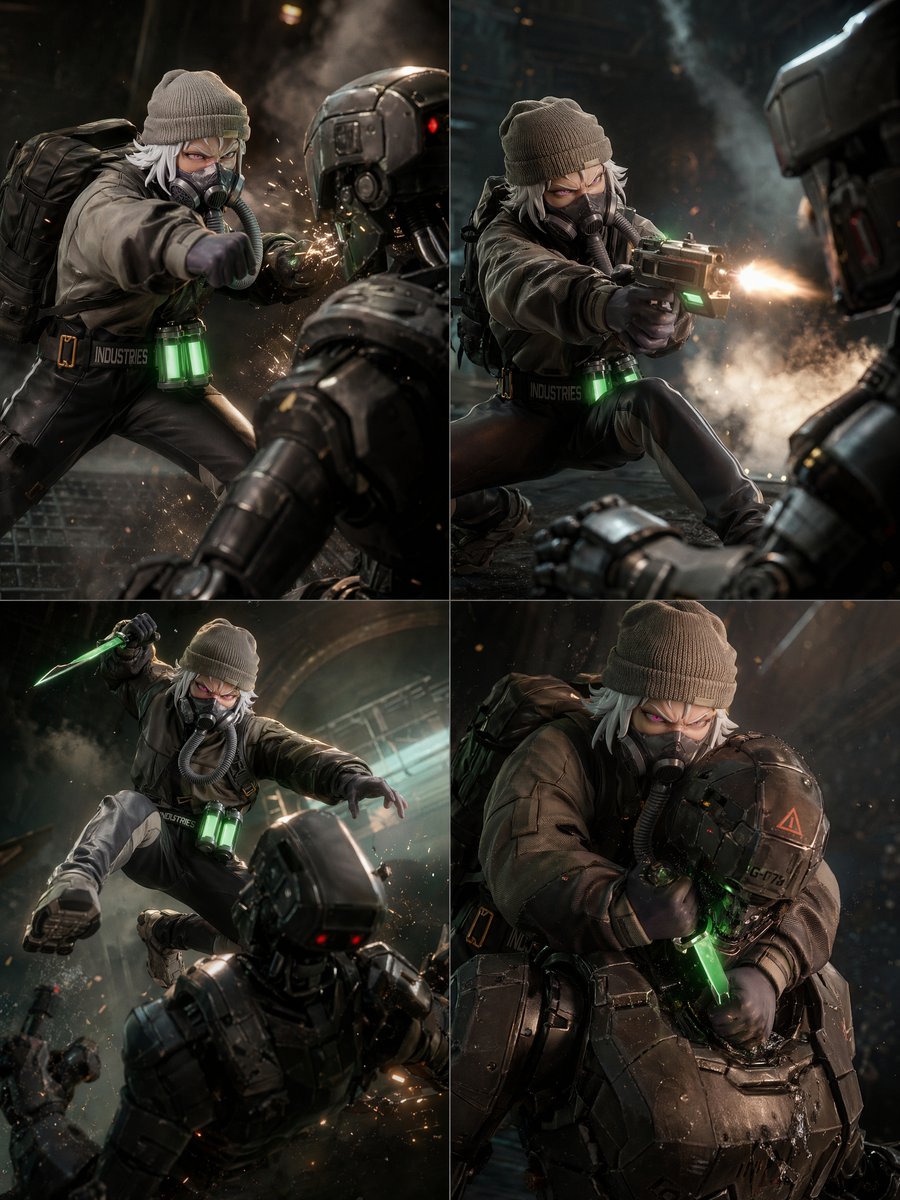
2x2 공상과학 전투 액션 그리드
가면을 쓴 전술 전투기가 장갑 로봇과 싸우는 모습을 묘사한 4컷짜리 영화 같은 SF 액션 콜라주로, 여러 컷으로 구성된 구도와 역동적인 액션의 일관성을 테스트하기에 이상적입니다.
이것은 인물과 캐릭터 에 대한 GPT Image 2 프롬프트 사례입니다. 아래의 복사 가능한 프롬프트를 사용하여 유사한 시각 자료를 생성하고, 재사용하기 전에 Awesome GPT Image 2 Prompts 의 저작자 표시 및 상업적 사용 권한을 검토하십시오.
전체 프롬프트 세트가 필요하신가요? 다음을 사용하세요. 인물과 캐릭터 더 많은 관련 예시를 보려면 주제 허브를 열거나 다음을 열어보세요. GPT Image 2 프롬프트 카탈로그 전체 예제 색인, 재사용 가능한 구조 및 출처 표기는 다음을 참조하십시오.
Free 1K preview
Generate one preview image instantly, no sign-up required.
3039/4000
프롬프트
복사 준비 프롬프트
{
  "type": "2x2 cinematic action grid",
  "style": "ultra-detailed sci-fi action film stills, photorealistic, dramatic lighting, high contrast, sparks, smoke, shallow depth of field",
  "subject": {
    "character": "androgynous white-haired fighter wearing a gray knit beanie, dark tactical jacket, gloves, fitted black pants, combat boots, a black backpack, and a respirator mask with hose tubing",
    "accessories": [
      "gray knit beanie",
      "respirator mask",
      "black tactical backpack",
      "glowing green vial canisters at the waist with 2 visible capsules",
      "utility belt with the text INDUSTRIES"
    ],
    "weapons": [
      "compact futuristic pistol with green accent light",
      "glowing green combat knife"
    ]
  },
  "opponents": {
    "count": 4,
    "description": "heavily armored black humanoid robots with red sensor lights and hard-surface plating"
  },
  "environment": {
    "location": "dark industrial interior or underground facility",
    "details": [
      "metal walls",
      "haze and smoke plumes",
      "floating embers",
      "cinematic backlight",
      "wet or reflective floor"
    ]
  },
  "layout": {
    "grid": "2x2 with thin white dividers",
    "sections": [
      {
        "title": "top left",
        "position": "top-left",
        "count": 1,
        "labels": [
          "close-quarters punch into robot face, impact sparks exploding, low angle, robot in foreground"
        ]
      },
      {
        "title": "top right",
        "position": "top-right",
        "count": 1,
        "labels": [
          "kneeling gunfight, character aiming pistol at robot, bright muzzle flash, smoke behind"
        ]
      },
      {
        "title": "bottom left",
        "position": "bottom-left",
        "count": 1,
        "labels": [
          "midair leap attack, raised glowing green knife, descending toward robot below, dynamic foreshortening"
        ]
      },
      {
        "title": "bottom right",
        "position": "bottom-right",
        "count": 1,
        "labels": [
          "grappling clinch with robot, stabbing glowing green knife into chest or neck area, intimate close combat"
        ]
      }
    ]
  },
  "camera": {
    "framing": "each panel is a tight cinematic action shot",
    "lenses": [
      "close-up action perspective",
      "medium shot with foreground robot silhouette",
      "low-angle dynamic shot"
    ],
    "motion": "frozen peak-action moments with debris and sparks"
  },
  "lighting": {
    "key": "moody teal-orange industrial lighting",
    "effects": [
      "weapon muzzle flash",
      "green glow from knife and waist canisters",
      "rim lighting on armor",
      "volumetric smoke"
    ]
  },
  "color_palette": {
    "dominant": [
      "charcoal black",
      "gunmetal gray",
      "olive gray",
      "warm orange sparks",
      "neon green highlights"
    ]
  },
  "quality": {
    "render": "highly polished blockbuster concept art / premium game key art",
    "aspect_ratio": "portrait 4:5"
  }
}
Best for
- - 인물과 캐릭터 visual exploration
- - Image generation and reference-image edits
- - Reusable briefs that keep source attribution visible
Change these parts
- - Subject, product, character, or scene
- - Aspect ratio, camera, lighting, and background
- - Brand, text, color, and output constraints
Recommended model and settings
- - Model: gpt-image-2
- - Input mode: 텍스트 to 이미지
- - Aspect ratio: source
- - Commercial status: review original source
How to use this prompt
- 1. Copy the prompt and preserve its structure for the first test.
- 2. Replace the subject, context, and publishing channel.
- 3. Change one camera, lighting, or style variable per iteration.
- 4. Inspect the output, source, text, and rights before reuse.
Limitations, source, and reuse cautions
- - Generated output is an editable draft, not factual, legal, or rights evidence.
- - Review the linked source, people, brands, logos, text, and third-party media before commercial use.
Awesome GPT Image 2 Prompts 에서 가져왔습니다. 출처 표기가 필요합니다. 상업적 이용 가능 여부는 allowed 입니다. 유료 사용 전에 원저작권 정보를 확인하세요.
이 범주에 속하는 더 많은 사례
범주, 입력 방식 호환성, 품질 및 위험도에 따라 우선순위가 정해집니다.






재사용 및 출처 참고 사항
사례를 미리 확인한 후 이 안내 메시지를 안전하게 사용하십시오.
- 1.프롬프트를 복사하거나 Dovoo의 생성 버튼을 사용하여 직접 엽니다.
- 2.사용 사례에 맞게 변수, 화면 비율 및 참조 이미지를 조정하십시오.
- 3.출판 또는 유료 사용 전에 저작권, 출처 표기 요건 및 브랜드 또는 초상권 관련 위험을 확인하십시오.