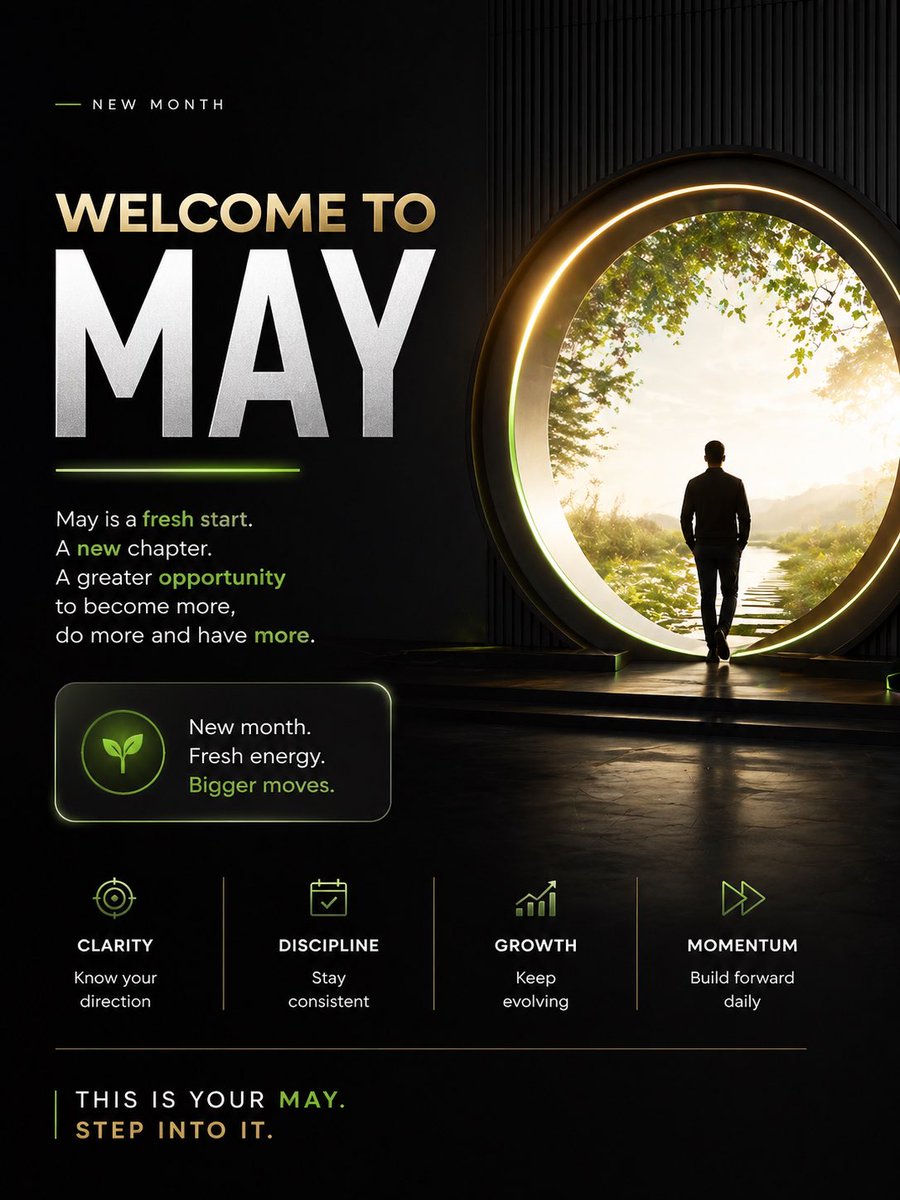
5月へようこそ!やる気を起こさせるポスター
映画のようなダークな雰囲気のインスピレーションを与えるポスター。新しい月のモチベーションを高めるのに最適で、ソーシャルメディアへの投稿、パーソナルブランディング、マインドセットに関するコンテンツに活用できます。
これはグラフィック&ポスター向けのGPT Image 2プロンプトケースです。以下のコピー可能なプロンプトを使用して同様のビジュアルを生成し、再利用する前にAwesome GPT Image 2 Prompts帰属表示と商用利用権を確認してください。
プロンプトセット全体が必要ですか? グラフィック&ポスター 関連する例をもっと見るにはトピックハブを開くか、 GPT Image 2 プロンプトカタログ 完全な例の索引、再利用可能な構造、および出典の明記については、こちらをご覧ください。
Free 1K preview
Generate one preview image instantly, no sign-up required.
3117/4000
プロンプト
コピー準備完了プロンプト
Design a premium motivational social media poster in a dark cinematic editorial style, vertical 4:5 format. The composition is split into 2 main zones: a left text-heavy layout and a right aspirational visual scene. Use a black to deep charcoal background with subtle texture, faint vertical ribbed wall detail on the right, glossy floor reflections, and elegant neon-lime accent lighting mixed with warm gold highlights.

On the right side, show 1 human figure: a man in silhouette from behind, wearing a fitted dark jacket and pants, walking toward a giant circular portal doorway. The portal should be large, glowing with a warm golden ring and soft inner halo, positioned slightly right of center. Beyond the portal is a bright peaceful nature scene with 1 narrow stepping-stone path leading forward through grass, soft sunlight, distant haze, and leafy green tree branches framing the upper edge. The figure should feel purposeful and contemplative, stepping into a new beginning.

On the left side, create a clean motivational typography layout. At the top, include a small header reading "NEW MONTH" in spaced uppercase sans serif, with a short thin lime line to its left. Below it, place the main headline in 2 lines: "WELCOME TO" in large warm beige uppercase, and "{argument name="headline text" default="MAY"}" in extremely large bold white uppercase, dominating the left half. Add a short glowing lime underline beneath the large month word.

Under the headline, add a motivational paragraph in white sans serif with selected words highlighted in lime green: "May is a fresh start. A new chapter. A greater opportunity to become more, do more and have more." Highlight the words "fresh start," "new," "opportunity," and "more" in lime green.

Below that, place 1 rounded rectangular callout card with a subtle border glow. Inside the card, put 1 circular icon badge containing a simple leaf symbol in lime green. To the right of the icon, add 3 stacked lines of text: "New month.", "Fresh energy.", and "Bigger moves." with the last line in lime green.

Across the lower middle, create 4 evenly spaced value pillars separated by thin vertical dividers. Each pillar contains 1 minimalist lime icon, 1 uppercase title, and 1 short caption. Use these exact 4 items from left to right: 1) target icon, title "CLARITY", caption "Know your direction". 2) calendar icon, title "DISCIPLINE", caption "Stay consistent". 3) upward bar chart icon, title "GROWTH", caption "Keep evolving". 4) fast-forward arrows icon, title "MOMENTUM", caption "Build forward daily".

At the bottom, add a thin horizontal divider line. Under it, place a closing statement in uppercase: "THIS IS YOUR {argument name="month name" default="MAY"}." on one line and "{argument name="closing line" default="STEP INTO IT."}" on the next line. Render most text in white or warm beige, with "MAY" and select accents in lime green.

Overall mood: inspirational, modern, luxurious, focused, forward-moving, social-media-ready, with crisp sans serif typography, high contrast, cinematic glow, and a polished personal development brand aesthetic.
プロンプト変数
プロンプトに表示される編集可能な引数プレースホルダーと、それらのデフォルト値。
変数
headline text
デフォルト
MAY
変数
month name
デフォルト
MAY
変数
closing line
デフォルト
STEP INTO IT.
Best for
- - グラフィック&ポスター visual exploration
- - Image generation and reference-image edits
- - Reusable briefs that keep source attribution visible
Change these parts
- - Subject, product, character, or scene
- - Aspect ratio, camera, lighting, and background
- - Brand, text, color, and output constraints
Recommended model and settings
- - Model: gpt-image-2
- - Input mode: テキストから画像
- - Aspect ratio: source
- - Commercial status: review original source
How to use this prompt
- 1. Copy the prompt and preserve its structure for the first test.
- 2. Replace the subject, context, and publishing channel.
- 3. Change one camera, lighting, or style variable per iteration.
- 4. Inspect the output, source, text, and rights before reuse.
Limitations, source, and reuse cautions
- - Generated output is an editable draft, not factual, legal, or rights evidence.
- - Review the linked source, people, brands, logos, text, and third-party media before commercial use.
Awesome GPT Image 2 Promptsからインポートされました。出典の明記が必要です。商用利用の可否はallowedです。有料利用の前に、出典元の権利をご確認ください。
このカテゴリーのその他の事例
カテゴリー、入力モードの互換性、品質、およびリスクの低さに基づいて優先順位付けされています。






再利用と出典に関する注記
ケースを事前に確認してから、このプロンプトを安全に使用してください。
- 1.プロンプトをコピーするか、生成ボタンを使ってDovooで直接開いてください。
- 2.ご自身の用途に合わせて、変数、アスペクト比、および参照画像を調整してください。
- 3.公開または有料利用の前に、情報源の権利、帰属表示の要件、およびブランドまたは肖像権に関するリスクを確認してください。