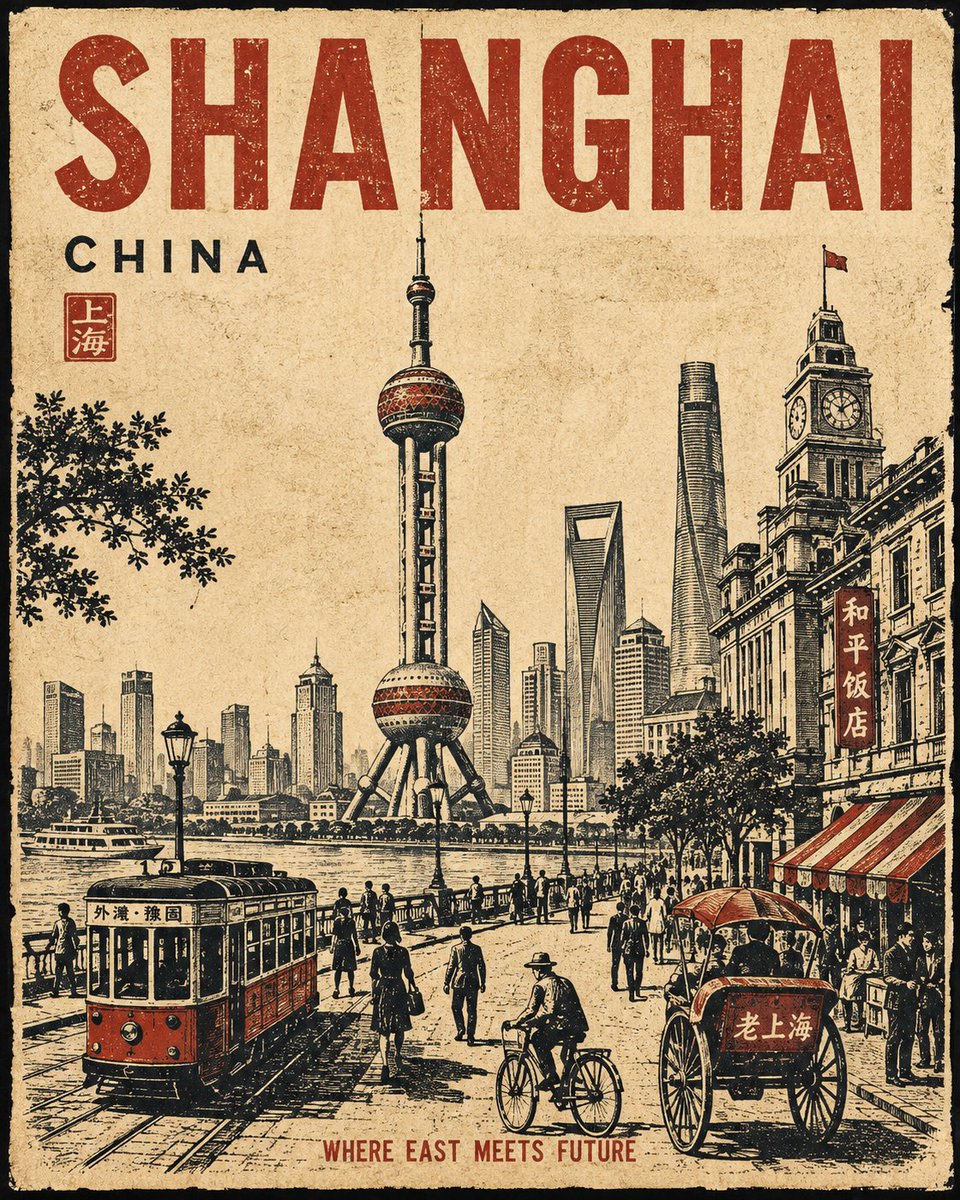
Vintage Travel Poster Series Generator
A detailed system for generating consistent, high-quality vintage linocut travel posters for any city, maintaining strict composition and layout rules.
これはグラフィック&ポスター向けのGPT Image 2プロンプトケースです。以下のコピー可能なプロンプトを使用して同様のビジュアルを生成し、再利用する前にAwesome GPT Image 2 Prompts帰属表示と商用利用権を確認してください。
プロンプトセット全体が必要ですか? グラフィック&ポスター 関連する例をもっと見るにはトピックハブを開くか、 GPT Image 2 プロンプトカタログ 完全な例の索引、再利用可能な構造、および出典の明記については、こちらをご覧ください。
Free 1K preview
Generate one preview image instantly, no sign-up required.
3253/4000
プロンプト
コピー準備完了プロンプト
Create a premium 4:5 vertical vintage travel poster for {argument name="city" default="[CITY]"}, {argument name="country" default="[COUNTRY]"}. Follow the same visual structure, composition, proportions, and artistic treatment in every generation. The result must feel like part of one consistent collectible poster series.

FIXED COMPOSITION
Use a single unified street-level scene, not a collage. Place one dominant central architectural or cultural subject as the visual anchor, occupying approximately 50–60% of the central image area. Integrate 2–4 recognizable {argument name="city" default="[CITY]"} landmarks or architectural details naturally into the same environment, with clear foreground, middle-ground, and background depth. Never make landmarks appear as floating objects or separate illustrations.

Add subtle authentic city-life elements around the main subject: characteristic transportation, streets, buildings, cafés, shops, signs, pedestrians, cyclists, local objects, food, trees, and surrounding landscape. Only include details that genuinely belong to {argument name="city" default="[CITY]"}.

FIXED LAYOUT
Keep generous negative space around the main subject. Maintain a strong visual hierarchy:
CITY NAME → MAIN SUBJECT → SUPPORTING CITY DETAILS → SMALL SECONDARY TEXT.
Do not change the overall placement or scale relationship between these elements between generations.

FIXED MATERIAL & COLOR
Use an aged warm-ivory paper background with visible fibers, subtle stains, faded areas, rough edges, and authentic printed-paper texture. Use only three dominant colors: warm ivory, charcoal/black, and one signature accent color associated with {argument name="city" default="[CITY]"}. The accent color must remain selective and never dominate the entire image.

FIXED ART STYLE
Handmade vintage linocut + screen-print travel poster. Bold carved shapes, strong silhouettes, limited-color printing, rough ink texture, distressed halftone grain, slight ink misregistration, imperfect hand-cut edges, subtle fading, expressive perspective, and sophisticated editorial composition. Keep the artwork intentionally tactile and slightly imperfect.

TYPOGRAPHY
Integrate {argument name="city" default="[CITY]"} as large, bold, hand-printed typography in a consistent prominent position. Add {argument name="city phrase" default="[SHORT CITY PHRASE]"} as smaller secondary text. Typography must look physically printed into the artwork—slightly distressed, imperfect, and naturally integrated. Keep the wording exactly as provided; do not invent additional text.

CITY IDENTITY
The composition must immediately communicate {argument name="city" default="[CITY]"} through its architecture, street atmosphere, transportation, objects, landscape, and cultural details—not merely through famous landmarks. Select details that naturally coexist in one believable scene.

DO NOT
Do not use photorealism, glossy 3D rendering, gradients, excessive colors, modern digital effects, random landmarks, floating objects, tourist-collage layouts, excessive text, or ultra-clean vector graphics. Do not change the established composition, palette, typography hierarchy, or artistic style.

FINAL GOAL
A bold, sophisticated, culturally authentic vintage c
プロンプト変数
プロンプトに表示される編集可能な引数プレースホルダーと、それらのデフォルト値。
変数
city
デフォルト
[CITY]
変数
country
デフォルト
[COUNTRY]
変数
city phrase
デフォルト
[SHORT CITY PHRASE]
Best for
- - グラフィック&ポスター visual exploration
- - Image generation and reference-image edits
- - Reusable briefs that keep source attribution visible
Change these parts
- - Subject, product, character, or scene
- - Aspect ratio, camera, lighting, and background
- - Brand, text, color, and output constraints
Recommended model and settings
- - Model: gpt-image-2
- - Input mode: テキストから画像
- - Aspect ratio: source
- - Commercial status: review original source
How to use this prompt
- 1. Copy the prompt and preserve its structure for the first test.
- 2. Replace the subject, context, and publishing channel.
- 3. Change one camera, lighting, or style variable per iteration.
- 4. Inspect the output, source, text, and rights before reuse.
Limitations, source, and reuse cautions
- - Generated output is an editable draft, not factual, legal, or rights evidence.
- - Review the linked source, people, brands, logos, text, and third-party media before commercial use.
Awesome GPT Image 2 Promptsからインポートされました。出典の明記が必要です。商用利用の可否はallowedです。有料利用の前に、出典元の権利をご確認ください。
このカテゴリーのその他の事例
カテゴリー、入力モードの互換性、品質、およびリスクの低さに基づいて優先順位付けされています。





再利用と出典に関する注記
ケースを事前に確認してから、このプロンプトを安全に使用してください。
- 1.プロンプトをコピーするか、生成ボタンを使ってDovooで直接開いてください。
- 2.ご自身の用途に合わせて、変数、アスペクト比、および参照画像を調整してください。
- 3.公開または有料利用の前に、情報源の権利、帰属表示の要件、およびブランドまたは肖像権に関するリスクを確認してください。