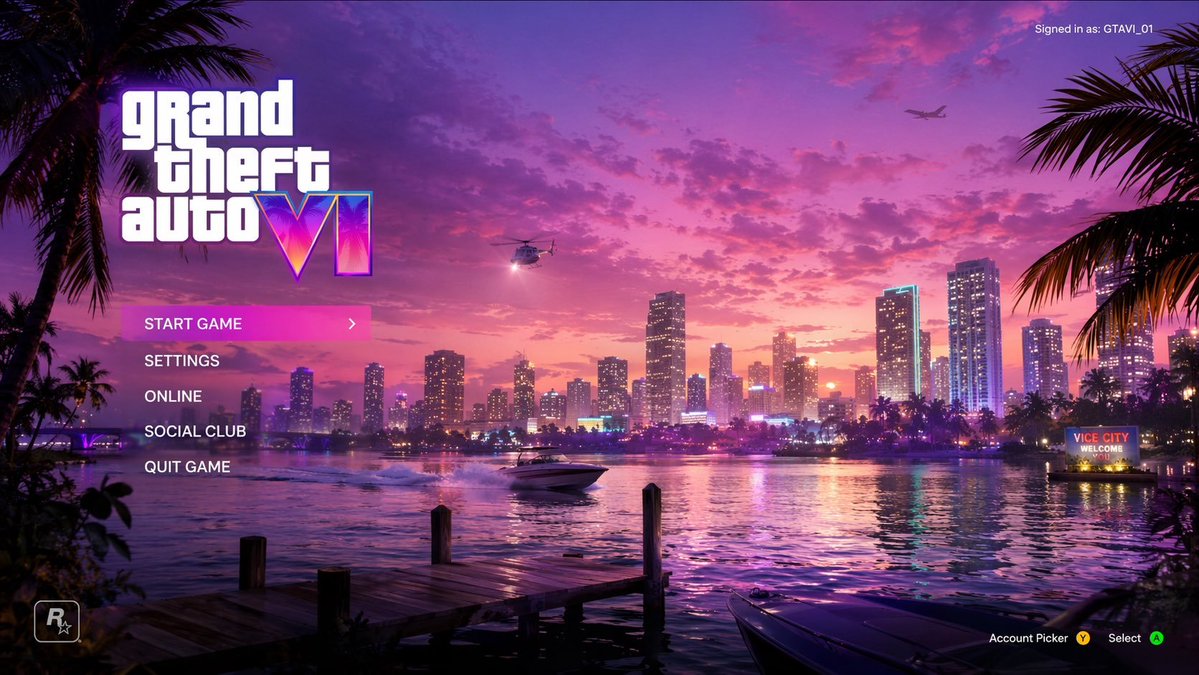
バイスシティサンセット ゲームメニューモックアップ
海岸沿いの街の夕日とカスタマイズ可能なUI要素を特徴とする、鮮やかなシンセウェーブ風のビデオゲームのメインメニュー画面を生成します。
これはアニメ&ゲーム向けのGPT Image 2プロンプトケースです。以下のコピー可能なプロンプトを使用して同様のビジュアルを生成し、再利用する前にAwesome GPT Image 2 Prompts帰属表示と商用利用権を確認してください。
プロンプトセット全体が必要ですか? アニメ&ゲーム 関連する例をもっと見るにはトピックハブを開くか、 GPT Image 2 プロンプトカタログ 完全な例の索引、再利用可能な構造、および出典の明記については、こちらをご覧ください。
Free 1K preview
Generate one preview image instantly, no sign-up required.
1335/4000
プロンプト
コピー準備完了プロンプト
{
  "type": "ビデオゲームメインメニューUIモックアップ",
  "background_scene": {
    "setting": "マイアミスタイルに似た、鮮やかなピンクと紫色の空、穏やかな水面に街の明かりが反射する夕暮れの海辺の都市のスカイライン",
    "foreground": "左下隅に木製の桟橋があり、右下隅に黒いスピードボートが停泊し、両側をヤシの木のシルエットが囲んでいる",
    "midground": "スピードボートが水面を進み、波紋を残し、右岸のネオンサインには'{argument name=\"city sign\" default=\"VICE CITY WELCOME\"}'と表示される",
    "sky": "散らばった雲、明るいサーチライトを備えたヘリコプター、遠くの飛行機"
  },
  "ui_elements": {
    "main_logo": {
      "position": "左上隅",
      "text": "{argument name=\"game title\" default=\"grand theft auto VI\"}",
      "style": "メインタイトルは、古典的な白い小文字のフォント、巨大なローマ数字スタイルで、内部にネオンピンク/紫/オレンジのグラデーションとヤシの木のシルエットを使用する"
    },
    "main_menu": {
      "position": "メインロゴの下の左中央",
      "count": 5,
      "items": [
        "{argument name=\"menu option 1\" default=\"START GAME\"} (明るいピンク色の背景と白い右矢印で強調表示)",
        "{argument name=\"menu option 2\" default=\"SETTINGS\"}",
        "ONLINE",
        "SOCIAL CLUB",
        "QUIT GAME"
      ]
    },
    "user_info": {
      "position": "右上隅",
      "text": "現在ログインしているユーザー: {argument name=\"username\" default=\"GTAVI_01\"}"
    },
    "developer_logo": {
      "position": "左下隅",
      "description": "R*ロゴ(星付き)"
    },
    "button_prompts": {
      "position": "右下隅",
      "count": 2,
      "items": [
        "アカウント選択(黄色のYボタンアイコン付き)",
        "選択(緑色のAボタンアイコン付き)"
      ]
    }
  }
}
プロンプト変数
プロンプトに表示される編集可能な引数プレースホルダーと、それらのデフォルト値。
変数
city sign
デフォルト
VICE CITY WELCOME
変数
game title
デフォルト
grand theft auto VI
変数
menu option 1
デフォルト
START GAME
変数
menu option 2
デフォルト
SETTINGS
変数
username
デフォルト
GTAVI_01
Best for
- - アニメ&ゲーム visual exploration
- - Image generation and reference-image edits
- - Reusable briefs that keep source attribution visible
Change these parts
- - Subject, product, character, or scene
- - Aspect ratio, camera, lighting, and background
- - Brand, text, color, and output constraints
Recommended model and settings
- - Model: gpt-image-2
- - Input mode: テキストから画像
- - Aspect ratio: source
- - Commercial status: review original source
How to use this prompt
- 1. Copy the prompt and preserve its structure for the first test.
- 2. Replace the subject, context, and publishing channel.
- 3. Change one camera, lighting, or style variable per iteration.
- 4. Inspect the output, source, text, and rights before reuse.
Limitations, source, and reuse cautions
- - Generated output is an editable draft, not factual, legal, or rights evidence.
- - Review the linked source, people, brands, logos, text, and third-party media before commercial use.
Awesome GPT Image 2 Promptsからインポートされました。出典の明記が必要です。商用利用の可否はallowedです。有料利用の前に、出典元の権利をご確認ください。
このカテゴリーのその他の事例
カテゴリー、入力モードの互換性、品質、およびリスクの低さに基づいて優先順位付けされています。






再利用と出典に関する注記
ケースを事前に確認してから、このプロンプトを安全に使用してください。
- 1.プロンプトをコピーするか、生成ボタンを使ってDovooで直接開いてください。
- 2.ご自身の用途に合わせて、変数、アスペクト比、および参照画像を調整してください。
- 3.公開または有料利用の前に、情報源の権利、帰属表示の要件、およびブランドまたは肖像権に関するリスクを確認してください。