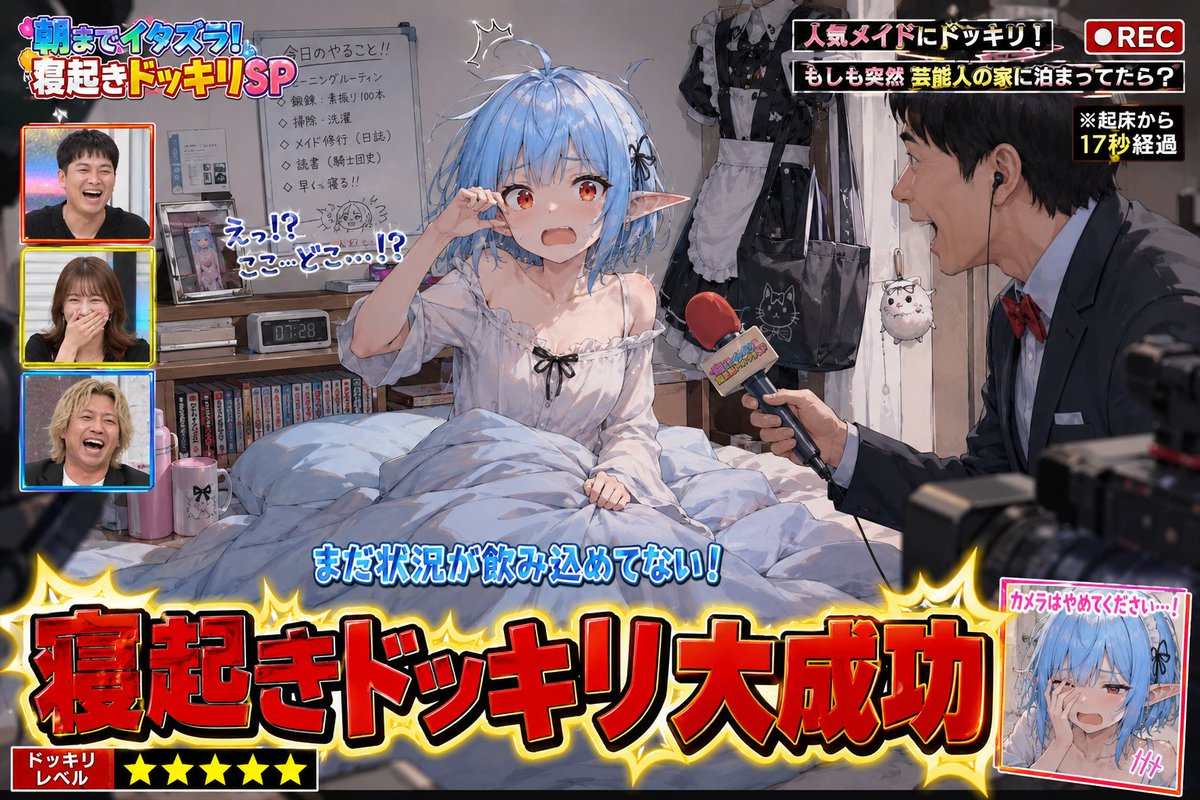
Variety Show Surprise Prank Anime Screenshot
A complex prompt for generating humorous anime screenshots of a TV 'wake-up prank,' including on-screen captions, reporters, and messy bedroom details.
これはアニメ&ゲーム向けのGPT Image 2プロンプトケースです。以下のコピー可能なプロンプトを使用して同様のビジュアルを生成し、再利用する前にAwesome GPT Image 2 Prompts帰属表示と商用利用権を確認してください。
プロンプトセット全体が必要ですか? アニメ&ゲーム 関連する例をもっと見るにはトピックハブを開くか、 GPT Image 2 プロンプトカタログ 完全な例の索引、再利用可能な構造、および出典の明記については、こちらをご覧ください。
Free 1K preview
Generate one preview image instantly, no sign-up required.
Free text preview doesn’t preserve reference-image consistency.
2898/4000
プロンプト
コピー準備完了プロンプト
Please use the provided image as a base reference for the character.

Depict a scene of "{argument name="prank scenario" default="a successful surprise wake-up prank on a popular variety show"}" with the character from the reference image as the main subject.

This is not a poster.
This is not a main visual.
This is a genuine screenshot of a prank video broadcast on a TV show.

The character must be in a just-woken-up state.
Naturally express surprise, confusion, sleepiness, embarrassment, and the reaction of not yet understanding the situation after being suddenly awakened.
Depict messy hair, disheveled bedding, a slumped posture, and a room full of life.
Do not tidy up pajamas or sleeping posture.
Naturally infer based on the reference character's personality, profession, worldview, daily attire, and lifestyle.
Make the scene look like a glimpse into the character's private life.

Place some personal items around the desk, shelves, bed, and bedside table that would be embarrassing if seen by others.
Naturally infer these items based on the reference character's personality, profession, hobbies, worldview, and lifestyle.
Do not limit yourself to typical otaku-related items.
Embarrassing personal items are elements that express the character's unique personality; do not repeatedly place only figure shelves or anime merchandise.
Add elements that will make the audience think, "Oh, he has this hobby" or "Oh, this is his private life."
Do not set the entire room as an otaku room.
Naturally infer the room itself based on the reference character's lifestyle.

Add TV show-style production effects to the scene.
Display "{argument name="caption content" default="Wake-up Prank Success!"}" in large subtitles.
Add decorations, subtitles (telop), onomatopoeic text, transition effects, station logos, and compositions showing the filming in progress that are unique to TV shows.
Include a prank reporter.
If there is only one reference image: generate an original TV reporter that fits the worldview.
If there are multiple reference images: use the first image as the prank target and the second image as the prank reporter.
The reporter should be holding a microphone, excitedly commentating or pointing the microphone at the target.
Production elements that suggest the presence of TV staff or a filming crew can be added.
Emphasize a comical and fun atmosphere in the expressions.
Describe it as a scene that looks like it is being broadcast live on TV.
Prioritize making the current situation understandable at a glance for viewers on social media.
{argument name="style" default="High-quality anime illustration"}.
Natural expression depiction.
Rich detail depiction.
Abundant TV show production effects.
A comical and fun atmosphere of a prank show.
Focus on depicting scenes that allow viewers to glimpse the character's unexpected side or private life and smile knowingly.
プロンプト変数
プロンプトに表示される編集可能な引数プレースホルダーと、それらのデフォルト値。
変数
prank scenario
デフォルト
a successful surprise wake-up prank on a popular variety show
変数
caption content
デフォルト
Wake-up Prank Success!
変数
style
デフォルト
High-quality anime illustration
Best for
- - アニメ&ゲーム visual exploration
- - Image generation and reference-image edits
- - Reusable briefs that keep source attribution visible
Change these parts
- - Subject, product, character, or scene
- - Aspect ratio, camera, lighting, and background
- - Brand, text, color, and output constraints
Recommended model and settings
- - Model: gpt-image-2
- - Input mode: 画像から画像
- - Aspect ratio: source
- - Commercial status: review original source
How to use this prompt
- 1. Copy the prompt and preserve its structure for the first test.
- 2. Replace the subject, context, and publishing channel.
- 3. Change one camera, lighting, or style variable per iteration.
- 4. Inspect the output, source, text, and rights before reuse.
Limitations, source, and reuse cautions
- - Generated output is an editable draft, not factual, legal, or rights evidence.
- - Review the linked source, people, brands, logos, text, and third-party media before commercial use.
Awesome GPT Image 2 Promptsからインポートされました。出典の明記が必要です。商用利用の可否はallowedです。有料利用の前に、出典元の権利をご確認ください。
このカテゴリーのその他の事例
カテゴリー、入力モードの互換性、品質、およびリスクの低さに基づいて優先順位付けされています。






再利用と出典に関する注記
ケースを事前に確認してから、このプロンプトを安全に使用してください。
- 1.プロンプトをコピーするか、生成ボタンを使ってDovooで直接開いてください。
- 2.ご自身の用途に合わせて、変数、アスペクト比、および参照画像を調整してください。
- 3.公開または有料利用の前に、情報源の権利、帰属表示の要件、およびブランドまたは肖像権に関するリスクを確認してください。