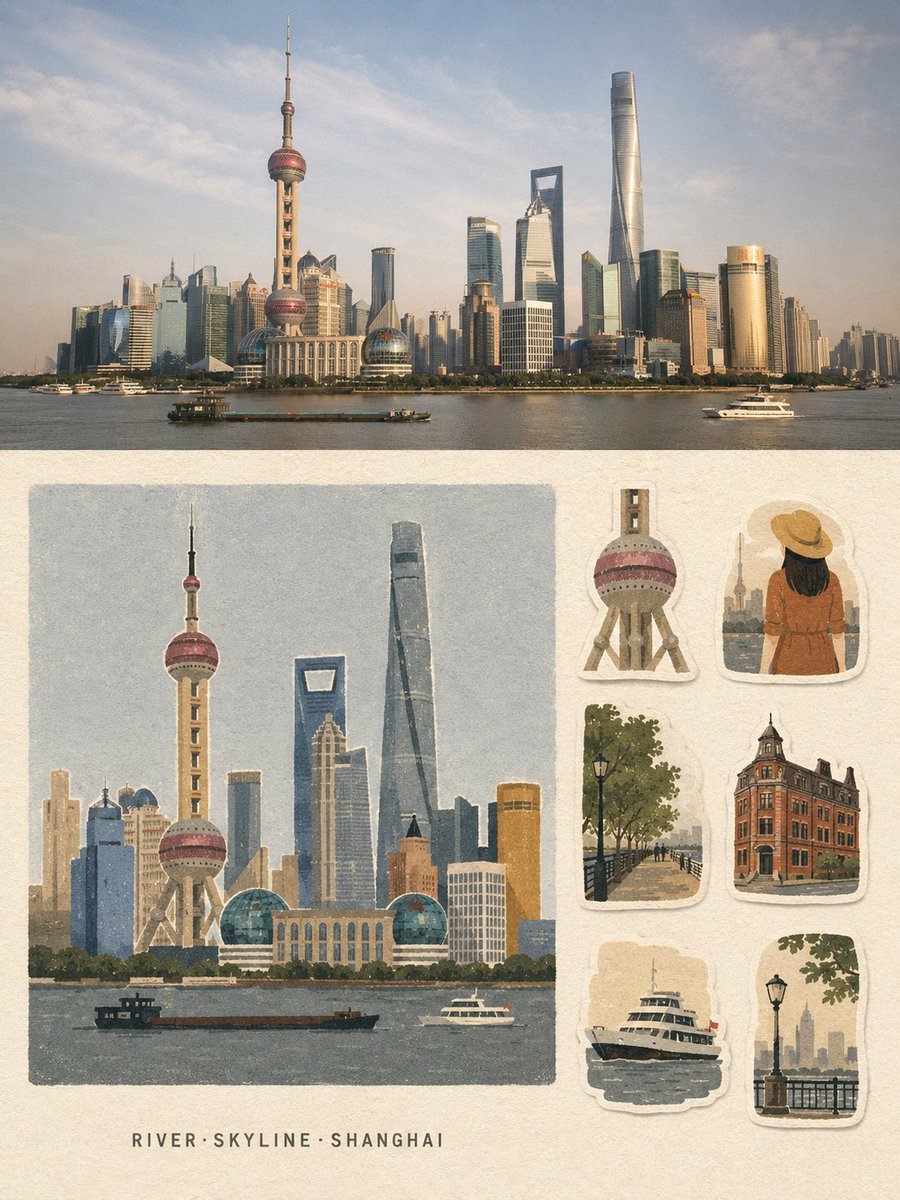
Vintage Travel Memory Poster
Generates a dual-layout travel poster combining a cinematic photograph with a handmade journal-style sticker sheet illustration.
これはグラフィック&ポスター向けのGPT Image 2プロンプトケースです。以下のコピー可能なプロンプトを使用して同様のビジュアルを生成し、再利用する前にAwesome GPT Image 2 Prompts帰属表示と商用利用権を確認してください。
プロンプトセット全体が必要ですか? グラフィック&ポスター 関連する例をもっと見るにはトピックハブを開くか、 GPT Image 2 プロンプトカタログ 完全な例の索引、再利用可能な構造、および出典の明記については、こちらをご覧ください。
Free 1K preview
Generate one preview image instantly, no sign-up required.
2432/4000
プロンプト
コピー準備完了プロンプト
Create a strict 3:4 vertical travel-memory collage poster based entirely on the written description of {argument name="location" default="[LOCATION]"}.

Divide the poster into two horizontal halves.

TOP HALF - ~50%: Create a premium travel photograph-style scene of {argument name="location" default="[LOCATION]"}, showing its most recognizable landmark, environment, atmosphere, architecture, and local character. Make the scene realistic, cinematic, naturally composed, and geographically recognizable.

BOTTOM HALF — ~50%: Create a handmade travel-memory illustration of the same location on warm off-white uncoated paper, with a continuous 4–5% blank margin. On the left 66–68%, place one large, near-square, borderless illustration featuring the main recognizable landmark or subject. Below it, leave a pale paper strip and center exactly 3 short English keywords in the format “Keyword1·Keyword2·Keyword3”.

On the right 30–32%, arrange exactly 6 separate travel-journal stickers inspired by authentic visual elements of {argument name="location" default="[LOCATION]"}: landmark detail, person/animal variation, environment, architecture/structure, functional object, and atmosphere/scale element. Give each sticker a slightly irregular warm-white hand-cut border and subtle paper shadow.

Use a unified {argument name="aesthetic style" default="matte gouache + cut-paper + risograph/screen-print"} aesthetic with coarse grain, slightly rough edges, subtle print-registration shifts, generous negative space, and only 5–8 low-saturation colors. Reduce the scene into large clean shapes, calm color fields, grouped vegetation, flat architectural forms, and simple faceless silhouettes.

Keep the most recognizable landmark of {argument name="location" default="[LOCATION]"} as the Identification Anchor, preserving its distinctive silhouette, proportions, and signature colors. Fully redraw everything in the same flat, grainy medium.

Include only the 3 keywords and, if essential, one landmark word. No other readable text, titles, dates, captions, addresses, prices, watermarks, or signatures.

Avoid gradients, 3D effects, anime, polished vector art, clip-art, watercolor bloom, wet-marker texture, photographic rendering in the illustration half, or unrelated elements.

The final design should feel quiet, restrained, vintage, handmade, tactile, and premium - a travel postcard combined with a collectible sticker sheet.
プロンプト変数
プロンプトに表示される編集可能な引数プレースホルダーと、それらのデフォルト値。
変数
location
デフォルト
[LOCATION]
変数
aesthetic style
デフォルト
matte gouache + cut-paper + risograph/screen-print
Best for
- - グラフィック&ポスター visual exploration
- - Image generation and reference-image edits
- - Reusable briefs that keep source attribution visible
Change these parts
- - Subject, product, character, or scene
- - Aspect ratio, camera, lighting, and background
- - Brand, text, color, and output constraints
Recommended model and settings
- - Model: gpt-image-2
- - Input mode: テキストから画像
- - Aspect ratio: source
- - Commercial status: review original source
How to use this prompt
- 1. Copy the prompt and preserve its structure for the first test.
- 2. Replace the subject, context, and publishing channel.
- 3. Change one camera, lighting, or style variable per iteration.
- 4. Inspect the output, source, text, and rights before reuse.
Limitations, source, and reuse cautions
- - Generated output is an editable draft, not factual, legal, or rights evidence.
- - Review the linked source, people, brands, logos, text, and third-party media before commercial use.
Awesome GPT Image 2 Promptsからインポートされました。出典の明記が必要です。商用利用の可否はallowedです。有料利用の前に、出典元の権利をご確認ください。
このカテゴリーのその他の事例
カテゴリー、入力モードの互換性、品質、およびリスクの低さに基づいて優先順位付けされています。






再利用と出典に関する注記
ケースを事前に確認してから、このプロンプトを安全に使用してください。
- 1.プロンプトをコピーするか、生成ボタンを使ってDovooで直接開いてください。
- 2.ご自身の用途に合わせて、変数、アスペクト比、および参照画像を調整してください。
- 3.公開または有料利用の前に、情報源の権利、帰属表示の要件、およびブランドまたは肖像権に関するリスクを確認してください。