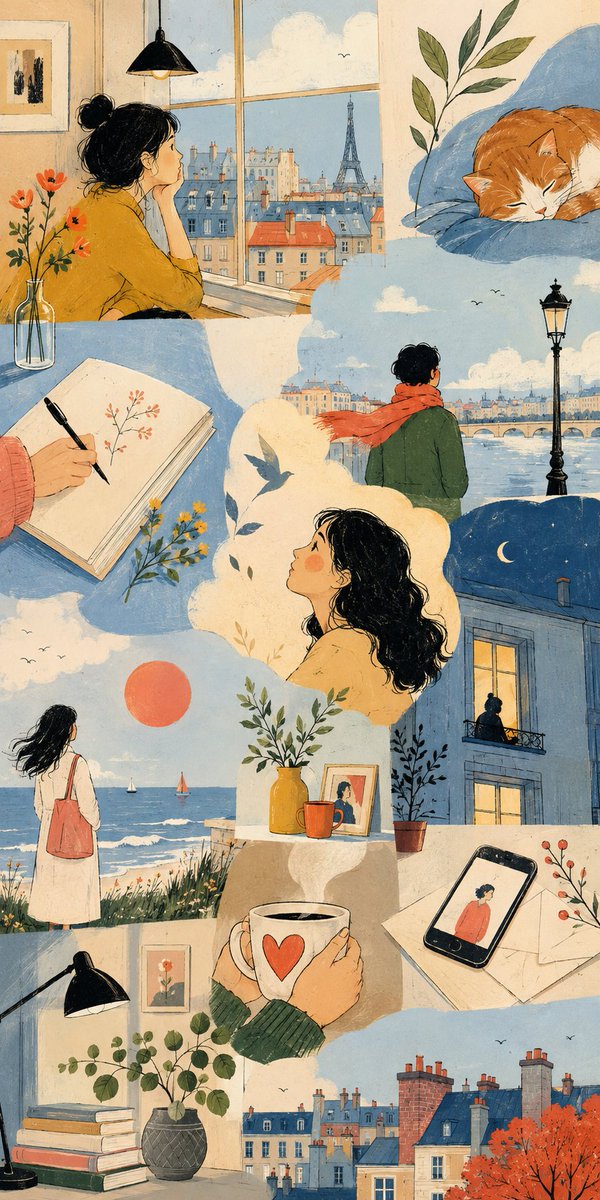
Thematic Artistic Collage Template
An extensive template for creating artistic multi-scene collages based on a specific theme, allowing for varied layouts and visual scale while maintaining harmony.
これはイラスト&アート向けのGPT Image 2プロンプトケースです。以下のコピー可能なプロンプトを使用して同様のビジュアルを生成し、再利用する前にAwesome GPT Image 2 Prompts帰属表示と商用利用権を確認してください。
プロンプトセット全体が必要ですか? イラスト&アート 関連する例をもっと見るにはトピックハブを開くか、 GPT Image 2 プロンプトカタログ 完全な例の索引、再利用可能な構造、および出典の明記については、こちらをご覧ください。
Free 1K preview
Generate one preview image instantly, no sign-up required.
2926/4000
プロンプト
コピー準備完了プロンプト
THEME = {argument name="theme" default="enter theme"}
STYLE = {argument name="style" default="enter the style you want"}
PALETTE = {argument name="palette" default="enter the color palette"}
ASPECT RATIO = {argument name="aspect ratio" default="enter the aspect ratio you want"}

DO:
  Create an artistic multi-scene collage built entirely around THEME.
  Derive subjects, environments, objects, characters and visual events naturally from THEME.
  Derive the emotional tone, atmosphere and energy naturally from THEME.
  Use people, animals, objects, landscapes, architecture, abstract forms or any combination of them when they meaningfully support THEME.
  Treat each scene as a distinct emotional or conceptual fragment from the same world.
  Build the composition like an expressive editorial art spread rather than a storyboard or regular panel grid.
  Freely vary the number, scale, proportions and placement of scenes.
  Combine large dominant images with narrow vertical fragments, wide horizontal crops, small detail scenes and partially cropped compositions.
  Stagger scene edges and shift their alignments to create an irregular visual rhythm.
  Let some scenes extend fully to the canvas edge while others terminate against neighboring imagery.
  Use occasional L-shaped, stepped or offset arrangements created naturally by neighboring scene proportions.
  Avoid repeating the same rectangle size or alignment across the composition.
  Keep scenes visually separate without visible frames or empty gaps between them.
  Let neighboring scenes meet through irregular crop relationships while keeping their environments independent.
  Do not blend separate locations into one continuous environment.
  Keep the main subjects of each scene visually contained within that scene.
  Use architecture, large color fields and negative space to shape the overall composition.
  Connect neighboring scenes through color relationships, visual rhythm and thematic echoes rather than physically merging their content.
  Choose environments and situations specifically suited to THEME.
  Include occasional intimate fragments such as hands, objects, windows, silhouettes, architectural details or empty spaces when they strengthen THEME.
  Give each scene a different visual scale, point of view and conceptual focus.
  Use expressive lighting, shape, perspective and negative space according to STYLE.
  Vary the emphasis of PALETTE from scene to scene while preserving overall harmony.
  Maintain consistency whenever subjects, characters, objects or locations recur.
  Keep the final composition visually clean, sophisticated and intentionally irregular.

CAMERA: varied editorial framing, environmental wides, cropped medium views, isolated details, unusual negative-space compositions, overhead fragments and off-center perspectives chosen according to THEME

RULES:
  Use STYLE as the authority for medium, linework, text
プロンプト変数
プロンプトに表示される編集可能な引数プレースホルダーと、それらのデフォルト値。
変数
theme
デフォルト
enter theme
変数
style
デフォルト
enter the style you want
変数
palette
デフォルト
enter the color palette
変数
aspect ratio
デフォルト
enter the aspect ratio you want
Best for
- - イラスト&アート visual exploration
- - Image generation and reference-image edits
- - Reusable briefs that keep source attribution visible
Change these parts
- - Subject, product, character, or scene
- - Aspect ratio, camera, lighting, and background
- - Brand, text, color, and output constraints
Recommended model and settings
- - Model: gpt-image-2
- - Input mode: テキストから画像
- - Aspect ratio: source
- - Commercial status: review original source
How to use this prompt
- 1. Copy the prompt and preserve its structure for the first test.
- 2. Replace the subject, context, and publishing channel.
- 3. Change one camera, lighting, or style variable per iteration.
- 4. Inspect the output, source, text, and rights before reuse.
Limitations, source, and reuse cautions
- - Generated output is an editable draft, not factual, legal, or rights evidence.
- - Review the linked source, people, brands, logos, text, and third-party media before commercial use.
Awesome GPT Image 2 Promptsからインポートされました。出典の明記が必要です。商用利用の可否はallowedです。有料利用の前に、出典元の権利をご確認ください。
このカテゴリーのその他の事例
カテゴリー、入力モードの互換性、品質、およびリスクの低さに基づいて優先順位付けされています。




再利用と出典に関する注記
ケースを事前に確認してから、このプロンプトを安全に使用してください。
- 1.プロンプトをコピーするか、生成ボタンを使ってDovooで直接開いてください。
- 2.ご自身の用途に合わせて、変数、アスペクト比、および参照画像を調整してください。
- 3.公開または有料利用の前に、情報源の権利、帰属表示の要件、およびブランドまたは肖像権に関するリスクを確認してください。