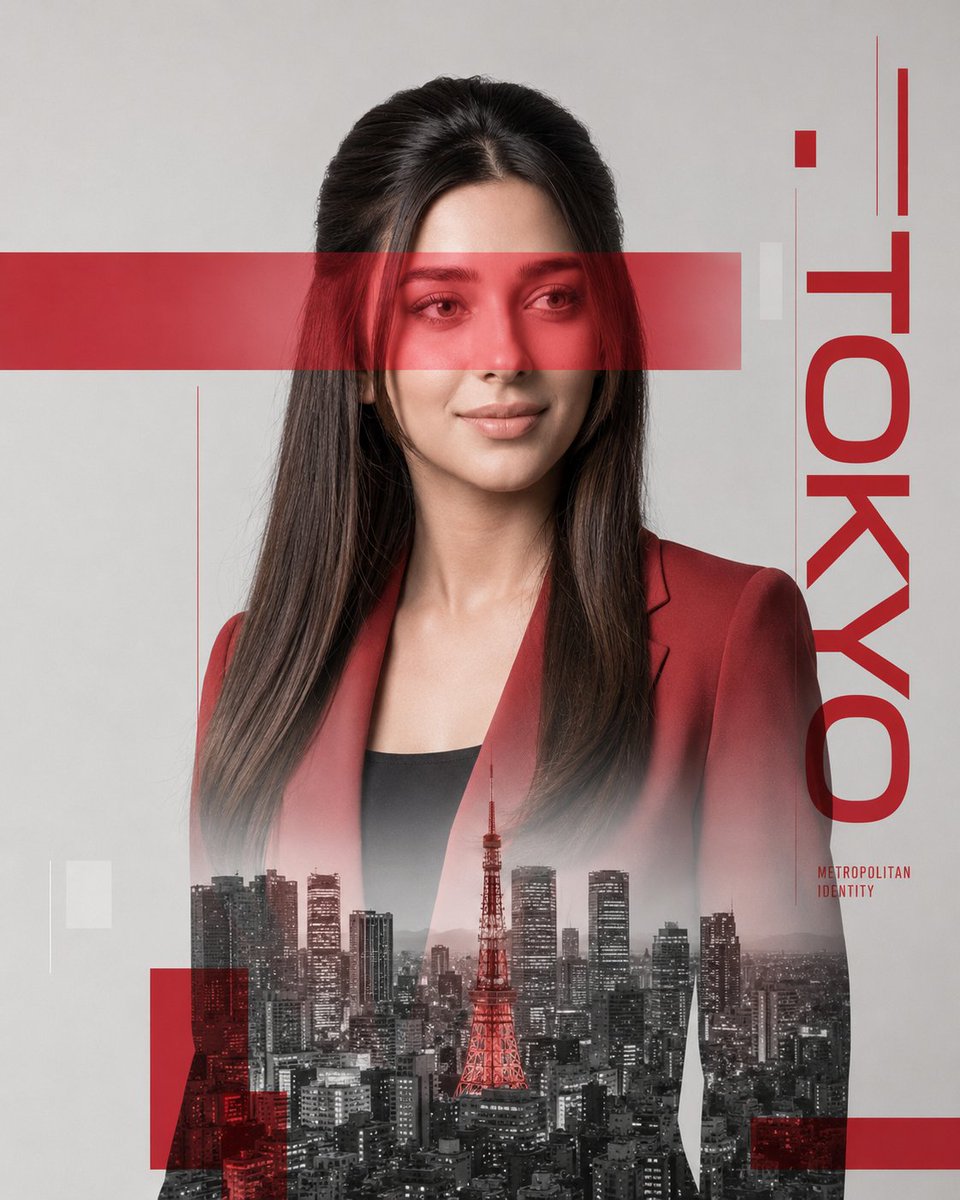
Swiss Graphic Design Double Exposure
A complex prompt using a JSON structure to create a minimal Swiss-style poster with double exposure effects and city silhouettes.
これはグラフィック&ポスター向けのGPT Image 2プロンプトケースです。以下のコピー可能なプロンプトを使用して同様のビジュアルを生成し、再利用する前にAwesome GPT Image 2 Prompts帰属表示と商用利用権を確認してください。
プロンプトセット全体が必要ですか? グラフィック&ポスター 関連する例をもっと見るにはトピックハブを開くか、 GPT Image 2 プロンプトカタログ 完全な例の索引、再利用可能な構造、および出典の明記については、こちらをご覧ください。
Free 1K preview
Generate one preview image instantly, no sign-up required.
Free text preview doesn’t preserve reference-image consistency.
2730/4000
プロンプト
コピー準備完了プロンプト
{
  "identity": {
    "reference": "Use the uploaded face photo as the STRICT identity reference.",
    "priority": "ABSOLUTE",
    "preserve": [
      "exact facial identity",
      "facial proportions",
      "eyes",
      "eyebrows",
      "nose",
      "lips",
      "jawline",
      "ears",
      "skin tone",
      "hairline",
      "hairstyle",
      "recognizable appearance"
    ],
    "gender": "Automatically adapt naturally for male or female."
  },

  "image": {
    "title": "Metropolitan Identity",
    "aspect_ratio": "4:5",
    "style": [
      "Ultra Photorealistic",
      "Luxury Editorial",
      "Swiss Graphic Design",
      "Double Exposure",
      "Fine Art Portrait",
      "Minimal Poster Design"
    ],
    "composition": {
      "shot": "Waist-up portrait.",
      "camera_angle": "Three-quarter profile.",
      "background": "Clean light gray studio backdrop.",
      "framing": "Centered minimalist editorial composition."
    },
    "subject": {
      "expression": {
        "emotion": "Calm, elegant, confident.",
        "eyes": "Looking slightly downward into the distance.",
        "overall": "Professional luxury fashion model."
      },
      "hair": {
        "style": "Natural premium editorial styling."
      },
      "wardrobe": {
        "description": "Minimal tailored blazer matching the accent color."
      }
    },
    "double_exposure": {
      "city": "{argument name="city" default="New York"}",
      "placement": "Modern skyscrapers are visible only inside the silhouette of the subject's clothing and lower body. The face remains clean and fully recognizable.",
      "blend": "Soft realistic double exposure with architectural transparency."
    },
    "graphic_design": {
      "style": "Modern Swiss typography layout",
      "accent_color": "{argument name="accent color" default="Electric Blue"}",
      "elements": [
        "large translucent horizontal rectangle crossing the eyes",
        "minimal geometric blocks",
        "clean vertical typography",
        "subtle transparent overlays"
      ],
      "text": "{argument name="city name" default="NYC"}"
    }
  },
  "lighting": {
    "style": "Soft studio beauty lighting.",
    "contrast": "Medium.",
    "quality": "Luxury editorial."
  },
  "camera": {
    "body": "Phase One XF",
    "lens": "80mm",
    "aperture": "f/5.6"
  },
  "color": {
    "base": "Monochrome black and white.",
    "accent": "<ACCENT COLOR ONLY>",
    "rule": "Only the graphic elements, eye bar, typography accents, jacket highlights and selected design overlays use the accent color."
  },
  "quality": [
    "Ultra Photorealistic",
    "Luxury Magazine Cover",
    "Fine Art",
    "HDR",
    "8K",
    "Extreme Detail"
  ]
}
プロンプト変数
プロンプトに表示される編集可能な引数プレースホルダーと、それらのデフォルト値。
変数
city
デフォルト
New York
変数
accent color
デフォルト
Electric Blue
変数
city name
デフォルト
NYC
Best for
- - グラフィック&ポスター visual exploration
- - Image generation and reference-image edits
- - Reusable briefs that keep source attribution visible
Change these parts
- - Subject, product, character, or scene
- - Aspect ratio, camera, lighting, and background
- - Brand, text, color, and output constraints
Recommended model and settings
- - Model: gpt-image-2
- - Input mode: 画像から画像
- - Aspect ratio: source
- - Commercial status: review original source
How to use this prompt
- 1. Copy the prompt and preserve its structure for the first test.
- 2. Replace the subject, context, and publishing channel.
- 3. Change one camera, lighting, or style variable per iteration.
- 4. Inspect the output, source, text, and rights before reuse.
Limitations, source, and reuse cautions
- - Generated output is an editable draft, not factual, legal, or rights evidence.
- - Review the linked source, people, brands, logos, text, and third-party media before commercial use.
Awesome GPT Image 2 Promptsからインポートされました。出典の明記が必要です。商用利用の可否はallowedです。有料利用の前に、出典元の権利をご確認ください。
このカテゴリーのその他の事例
カテゴリー、入力モードの互換性、品質、およびリスクの低さに基づいて優先順位付けされています。






再利用と出典に関する注記
ケースを事前に確認してから、このプロンプトを安全に使用してください。
- 1.プロンプトをコピーするか、生成ボタンを使ってDovooで直接開いてください。
- 2.ご自身の用途に合わせて、変数、アスペクト比、および参照画像を調整してください。
- 3.公開または有料利用の前に、情報源の権利、帰属表示の要件、およびブランドまたは肖像権に関するリスクを確認してください。