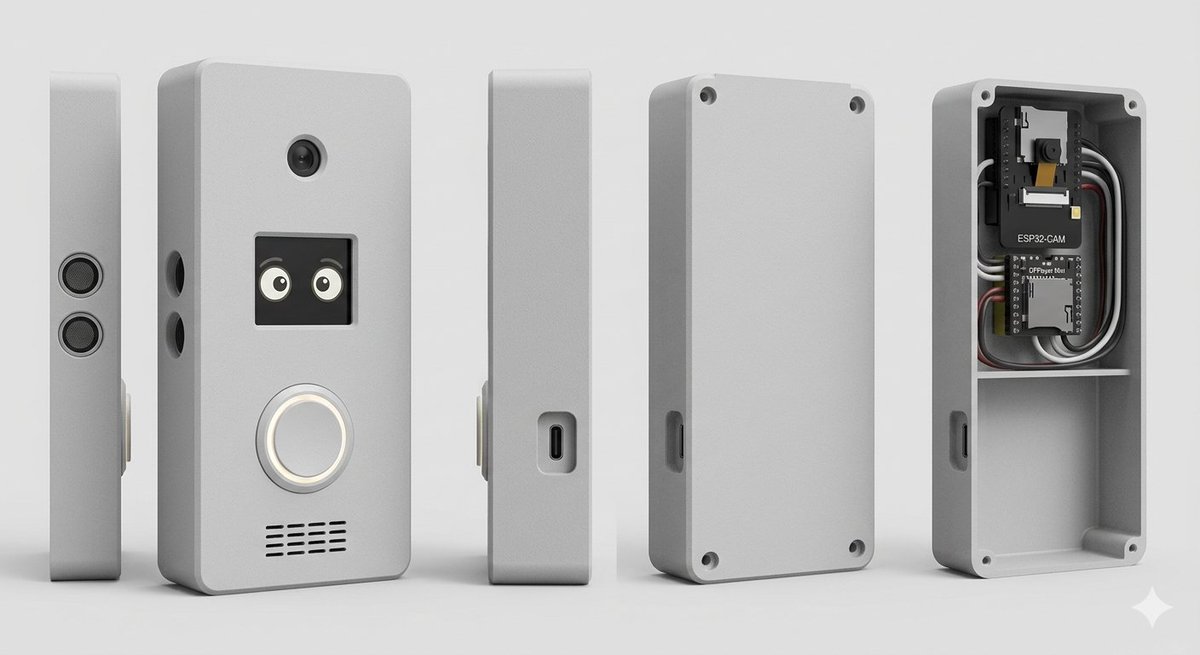
スマートドアベル筐体製品レンダリング
内部の電子機器が見えるDIYスマートドアベル筐体の、フォトリアリスティックなマルチビューCADスタイルのレンダリングを生成するための構造化されたプロンプト。
これは製品および商業向けのGPT Image 2プロンプトケースです。以下のコピー可能なプロンプトを使用して同様のビジュアルを生成し、再利用する前にAwesome GPT Image 2 Prompts帰属表示と商用利用権を確認してください。
プロンプトセット全体が必要ですか? 製品および商業 関連する例をもっと見るにはトピックハブを開くか、 GPT Image 2 プロンプトカタログ 完全な例の索引、再利用可能な構造、および出典の明記については、こちらをご覧ください。
Free 1K preview
Generate one preview image instantly, no sign-up required.
2523/4000
プロンプト
コピー準備完了プロンプト
Goal: Create a clean studio product render of a custom DIY smart doorbell / intercom enclosure, shown as an exploded multi-view product lineup.

Canvas: Wide horizontal 16:9 composition on a light gray seamless studio background, soft floor shadow, orthographic product-render look, no people, no branding watermark.

Subject: A compact rectangular electronics enclosure with rounded corners, matte {argument name="enclosure color" default="light gray"} plastic, slightly beveled edges, realistic 3D CAD rendering, subtle rough texture.

Layout: Show exactly 5 discrete enclosure views arranged left to right with even spacing: 1) a very thin left side profile standing upright with two stacked circular speaker or sensor grilles; 2) the main front face standing upright, slightly angled, with visible functional details; 3) a narrow side profile with a recessed USB-C port; 4) the rear cover plate standing upright with four corner screw holes and a side cutout; 5) the open back housing/case interior showing electronics installed in the top compartment and an empty lower compartment.

Front face details: On the main front view, include exactly 4 visible feature groups: a small round camera lens near the top center; a square black display/window below it showing two cute cartoon eyes; a large circular illuminated doorbell button below the display with a white glowing ring; and a horizontal speaker grille near the bottom made of short black slits in multiple rows. Add two small round side holes on the left edge of the main body.

Interior electronics: In the open back housing, include exactly 2 circuit boards and visible wiring: the top board is labeled {argument name="camera module label" default="ESP32-CAM"} with a small camera module, and the lower board is labeled {argument name="controller board label" default="DFPlayer Mini"}. Add neatly routed black, white, gray, and red wires around the boards. The interior should have a horizontal divider shelf separating the electronics bay from a larger empty lower cavity. Add four corner screw posts/holes inside the open case.

Style: Photorealistic 3D product visualization, high-detail industrial design concept, soft studio lighting from upper left, gentle ambient occlusion, crisp edges, realistic plastic material, neutral gray palette, shallow but clear shadows, centered composition.

Constraints: Use exactly 5 product views, keep all objects upright, no hands, no extra text beyond the two board labels, no logos, no decorative background objects.
プロンプト変数
プロンプトに表示される編集可能な引数プレースホルダーと、それらのデフォルト値。
変数
enclosure color
デフォルト
light gray
変数
camera module label
デフォルト
ESP32-CAM
変数
controller board label
デフォルト
DFPlayer Mini
Best for
- - 製品および商業 visual exploration
- - Image generation and reference-image edits
- - Reusable briefs that keep source attribution visible
Change these parts
- - Subject, product, character, or scene
- - Aspect ratio, camera, lighting, and background
- - Brand, text, color, and output constraints
Recommended model and settings
- - Model: gpt-image-2
- - Input mode: テキストから画像
- - Aspect ratio: source
- - Commercial status: review original source
How to use this prompt
- 1. Copy the prompt and preserve its structure for the first test.
- 2. Replace the subject, context, and publishing channel.
- 3. Change one camera, lighting, or style variable per iteration.
- 4. Inspect the output, source, text, and rights before reuse.
Limitations, source, and reuse cautions
- - Generated output is an editable draft, not factual, legal, or rights evidence.
- - Review the linked source, people, brands, logos, text, and third-party media before commercial use.
Awesome GPT Image 2 Promptsからインポートされました。出典の明記が必要です。商用利用の可否はallowedです。有料利用の前に、出典元の権利をご確認ください。
このカテゴリーのその他の事例
カテゴリー、入力モードの互換性、品質、およびリスクの低さに基づいて優先順位付けされています。






再利用と出典に関する注記
ケースを事前に確認してから、このプロンプトを安全に使用してください。
- 1.プロンプトをコピーするか、生成ボタンを使ってDovooで直接開いてください。
- 2.ご自身の用途に合わせて、変数、アスペクト比、および参照画像を調整してください。
- 3.公開または有料利用の前に、情報源の権利、帰属表示の要件、およびブランドまたは肖像権に関するリスクを確認してください。