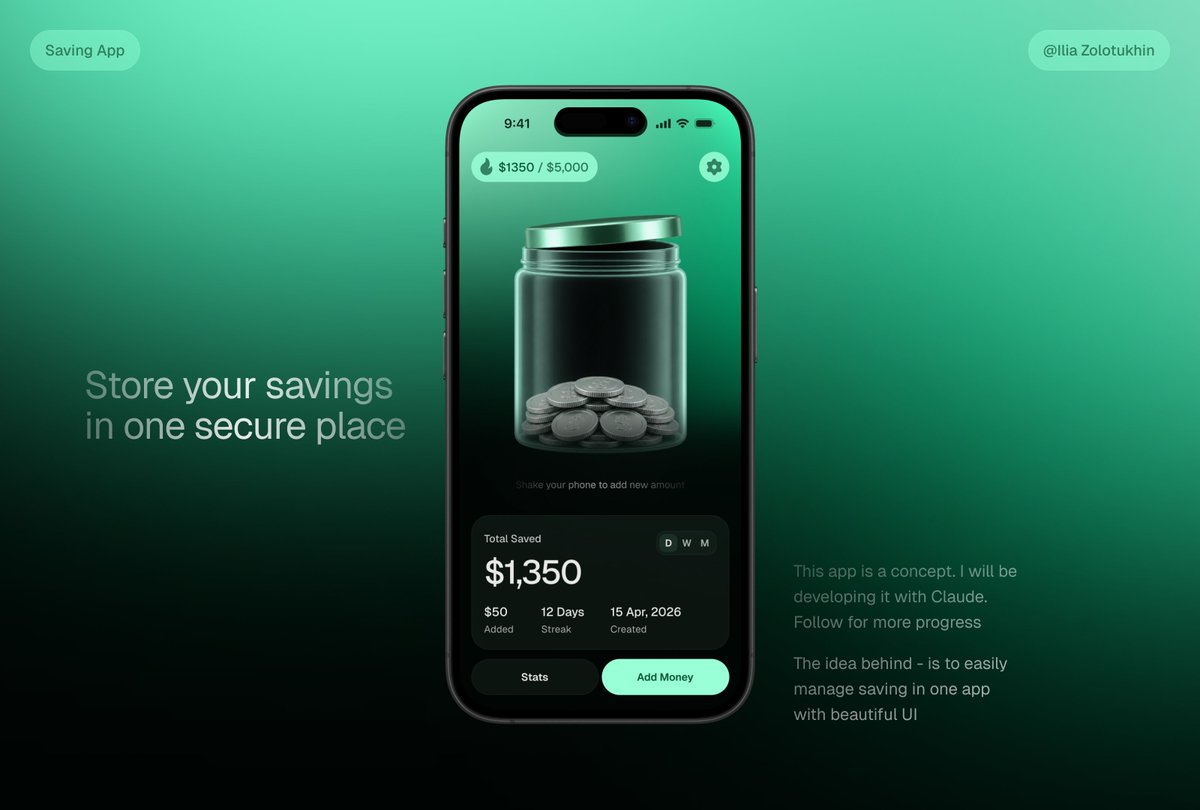
3D貯蓄アプリのJar UIモックアップ
スマートフォンのUI、ガラス製のコインジャー、ポートフォリオやローンチ時のビジュアルに使用できるマーケティングテキストなどを特徴とする、洗練されたフィンテック貯蓄アプリのコンセプトを生成します。
これは製品および商業向けのGPT Image 2プロンプトケースです。以下のコピー可能なプロンプトを使用して同様のビジュアルを生成し、再利用する前にAwesome GPT Image 2 Prompts帰属表示と商用利用権を確認してください。
プロンプトセット全体が必要ですか? 製品および商業 関連する例をもっと見るにはトピックハブを開くか、 GPT Image 2 プロンプトカタログ 完全な例の索引、再利用可能な構造、および出典の明記については、こちらをご覧ください。
Free 1K preview
Generate one preview image instantly, no sign-up required.
3755/4000
プロンプト
コピー準備完了プロンプト
{
  "type": "premium fintech app concept hero mockup",
  "style": "sleek 3D glassmorphism UI, dark mint green gradients, realistic smartphone render, soft studio lighting, high contrast, polished product-design presentation, subtle blur and glow, cinematic shadows",
  "canvas": {
    "aspect_ratio": "16:9 landscape",
    "background": "smooth teal-to-emerald gradient fading to near-black at the bottom, minimalist tech presentation backdrop"
  },
  "layout": {
    "centerpiece": "one large black iPhone-style smartphone centered slightly right, front-facing, rounded corners, dynamic-island camera cutout, thin black bezel, realistic side buttons and reflections",
    "left_text_block": {
      "position": "left middle",
      "headline": "{argument name=\"headline text\" default=\"Store your savings in one secure place\"}",
      "style": "large light-gray sans-serif text, two lines, soft opacity"
    },
    "right_text_block": {
      "position": "lower right",
      "paragraph_count": 2,
      "text": [
        "This app is a concept. I will be developing it with Claude. Follow for more progress",
        "The idea behind - is to easily manage saving in one app with beautiful UI"
      ],
      "style": "small muted gray sans-serif text"
    },
    "top_badges": {
      "count": 2,
      "items": [
        {
          "position": "top left",
          "text": "Saving App",
          "shape": "rounded translucent mint pill"
        },
        {
          "position": "top right",
          "text": "{argument name=\"creator handle\" default=\"@Ilia Zolotukhin\"}",
          "shape": "rounded translucent mint pill"
        }
      ]
    }
  },
  "phone_screen": {
    "status_bar": {
      "time": "9:41",
      "icons": "cell signal, Wi-Fi, battery",
      "count": 4
    },
    "top_controls": {
      "count": 2,
      "items": [
        {
          "position": "top left",
          "text": "{argument name=\"savings progress\" default=\"$1350 / $5,000\"}",
          "icon": "small flame or droplet icon",
          "shape": "mint translucent rounded pill"
        },
        {
          "position": "top right",
          "icon": "settings gear",
          "shape": "mint circular button"
        }
      ]
    },
    "main_visual": "large translucent glass jar with metallic mint lid, centered on screen, jar filled at the bottom with stacked silver coins; glossy refractions, vertical highlights, 3D depth, dark green interior background",
    "micro_instruction": "Shake your phone to add new amount",
    "stats_card": {
      "position": "bottom of phone screen",
      "shape": "large dark rounded rectangle glass card",
      "title": "Total Saved",
      "main_amount": "{argument name=\"saved amount\" default=\"$1,350\"}",
      "time_toggle": {
        "count": 3,
        "labels": [
          "D",
          "W",
          "M"
        ],
        "active": "D"
      },
      "metrics": {
        "count": 3,
        "items": [
          {
            "value": "$50",
            "label": "Added"
          },
          {
            "value": "12 Days",
            "label": "Streak"
          },
          {
            "value": "15 Apr, 2026",
            "label": "Created"
          }
        ]
      }
    },
    "bottom_buttons": {
      "count": 2,
      "items": [
        {
          "text": "Stats",
          "style": "dark rounded button"
        },
        {
          "text": "Add Money",
          "style": "bright mint rounded button"
        }
      ]
    }
  },
  "rendering_notes": "make the jar the visual focus, realistic glass transparency and coin geometry, clean modern typography, balanced negative space, no clutter, product-shot quality, suitable for a savings app landing-page teaser"
}
プロンプト変数
プロンプトに表示される編集可能な引数プレースホルダーと、それらのデフォルト値。
変数
headline text
デフォルト
Store your savings in one secure place
変数
creator handle
デフォルト
@Ilia Zolotukhin
変数
savings progress
デフォルト
$1350 / $5,000
変数
saved amount
デフォルト
$1,350
Best for
- - 製品および商業 visual exploration
- - Image generation and reference-image edits
- - Reusable briefs that keep source attribution visible
Change these parts
- - Subject, product, character, or scene
- - Aspect ratio, camera, lighting, and background
- - Brand, text, color, and output constraints
Recommended model and settings
- - Model: gpt-image-2
- - Input mode: テキストから画像
- - Aspect ratio: source
- - Commercial status: review original source
How to use this prompt
- 1. Copy the prompt and preserve its structure for the first test.
- 2. Replace the subject, context, and publishing channel.
- 3. Change one camera, lighting, or style variable per iteration.
- 4. Inspect the output, source, text, and rights before reuse.
Limitations, source, and reuse cautions
- - Generated output is an editable draft, not factual, legal, or rights evidence.
- - Review the linked source, people, brands, logos, text, and third-party media before commercial use.
Awesome GPT Image 2 Promptsからインポートされました。出典の明記が必要です。商用利用の可否はallowedです。有料利用の前に、出典元の権利をご確認ください。
このカテゴリーのその他の事例
カテゴリー、入力モードの互換性、品質、およびリスクの低さに基づいて優先順位付けされています。






再利用と出典に関する注記
ケースを事前に確認してから、このプロンプトを安全に使用してください。
- 1.プロンプトをコピーするか、生成ボタンを使ってDovooで直接開いてください。
- 2.ご自身の用途に合わせて、変数、アスペクト比、および参照画像を調整してください。
- 3.公開または有料利用の前に、情報源の権利、帰属表示の要件、およびブランドまたは肖像権に関するリスクを確認してください。