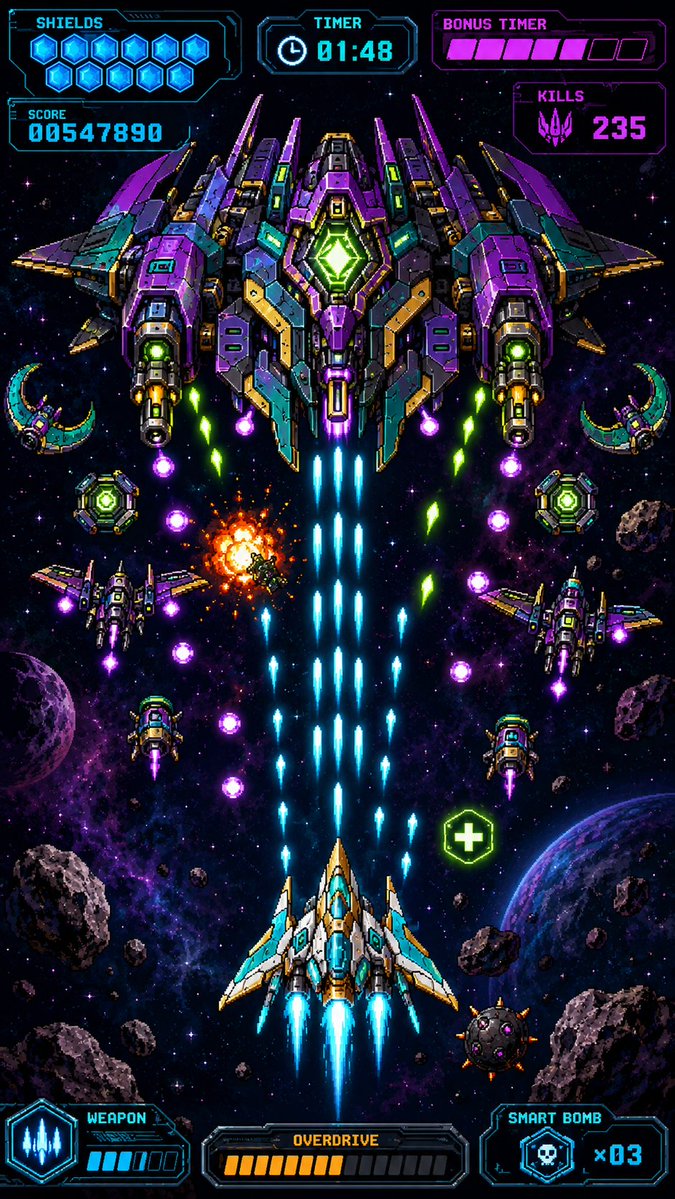
レトロピクセルスペースシューターHUD
ネオンカラーの弾幕シューティングゲームのボス戦と詳細なHUD要素を描いた、縦長のピクセルアートのモバイルゲームのスクリーンショットを生成します。
これはアニメ&ゲーム向けのGPT Image 2プロンプトケースです。以下のコピー可能なプロンプトを使用して同様のビジュアルを生成し、再利用する前にAwesome GPT Image 2 Prompts帰属表示と商用利用権を確認してください。
プロンプトセット全体が必要ですか? アニメ&ゲーム 関連する例をもっと見るにはトピックハブを開くか、 GPT Image 2 プロンプトカタログ 完全な例の索引、再利用可能な構造、および出典の明記については、こちらをご覧ください。
Free 1K preview
Generate one preview image instantly, no sign-up required.
2671/4000
プロンプト
コピー準備完了プロンプト
Create a premium vertical mobile game screenshot for a retro pixel-art space shooter, portrait 9:16. The image must look like an actual in-game scene, not a poster or asset sheet. Use crisp high-resolution pixel art with dense neon detail, black space background, purple nebula clouds, star field, scattered asteroids, and two visible planets near the lower left and lower right edges. Center the action vertically: at the bottom center is the player ship, a white, cyan, and gold angular fighter with three bright cyan engine flames and blue cockpit glass, firing a thick central stream of cyan laser bullets upward. At the top center is one enormous symmetrical boss battleship in purple, teal, dark gray, gold, and neon green, with wide wings, many armor panels, two large side cannons, glowing green core diamond in the middle, and blue exhaust trails beneath it. The scene shows intense bullet-hell combat: exactly 1 player ship, exactly 1 giant boss ship, exactly 4 smaller enemy fighters around the middle area, exactly 2 crescent-shaped drones near the upper left and upper right sides, exactly 2 round green shield drones near the mid-left and mid-right, exactly 1 orange explosion slightly left of center, exactly 1 green health pickup icon with a plus sign on the lower right, many cyan player shots rising in columns, and multiple purple and green enemy projectiles descending diagonally. Overlay a futuristic cyan and magenta pixel HUD with transparent dark panels and sharp sci-fi borders. Top left HUD: label “SHIELDS” with exactly 10 glowing blue hex shield icons, and below it a score panel reading “SCORE” and {argument name="score value" default="00547890"}. Top center HUD: label “TIMER” with a clock icon and {argument name="timer value" default="01:48"}. Top right HUD: label “BONUS TIMER” with a segmented magenta bar showing exactly 6 filled pink segments and 3 empty dark segments, and below it a “KILLS” panel with a purple alien skull icon and {argument name="kills value" default="235"}. Bottom left HUD: “WEAPON” panel with a cyan three-shot weapon icon and a small charge meter with exactly 4 filled cyan bars and 2 empty bars. Bottom center HUD: “OVERDRIVE” panel with exactly 10 filled orange bars and 8 empty dark bars. Bottom right HUD: “SMART BOMB” panel with a skull bomb icon and {argument name="smart bomb count" default="x03"}. Keep all UI text pixelated, legible, and aligned to the screen edges like a real mobile arcade game interface. Use vibrant cyan, violet, magenta, green, and orange glow effects, strong contrast, symmetrical composition, no watermark, no extra logos, no realistic 3D rendering, no blurred painterly style.プロンプト変数
プロンプトに表示される編集可能な引数プレースホルダーと、それらのデフォルト値。
変数
score value
デフォルト
00547890
変数
timer value
デフォルト
01:48
変数
kills value
デフォルト
235
変数
smart bomb count
デフォルト
x03
Best for
- - アニメ&ゲーム visual exploration
- - Image generation and reference-image edits
- - Reusable briefs that keep source attribution visible
Change these parts
- - Subject, product, character, or scene
- - Aspect ratio, camera, lighting, and background
- - Brand, text, color, and output constraints
Recommended model and settings
- - Model: gpt-image-2
- - Input mode: テキストから画像
- - Aspect ratio: source
- - Commercial status: review original source
How to use this prompt
- 1. Copy the prompt and preserve its structure for the first test.
- 2. Replace the subject, context, and publishing channel.
- 3. Change one camera, lighting, or style variable per iteration.
- 4. Inspect the output, source, text, and rights before reuse.
Limitations, source, and reuse cautions
- - Generated output is an editable draft, not factual, legal, or rights evidence.
- - Review the linked source, people, brands, logos, text, and third-party media before commercial use.
Awesome GPT Image 2 Promptsからインポートされました。出典の明記が必要です。商用利用の可否はallowedです。有料利用の前に、出典元の権利をご確認ください。
このカテゴリーのその他の事例
カテゴリー、入力モードの互換性、品質、およびリスクの低さに基づいて優先順位付けされています。






再利用と出典に関する注記
ケースを事前に確認してから、このプロンプトを安全に使用してください。
- 1.プロンプトをコピーするか、生成ボタンを使ってDovooで直接開いてください。
- 2.ご自身の用途に合わせて、変数、アスペクト比、および参照画像を調整してください。
- 3.公開または有料利用の前に、情報源の権利、帰属表示の要件、およびブランドまたは肖像権に関するリスクを確認してください。