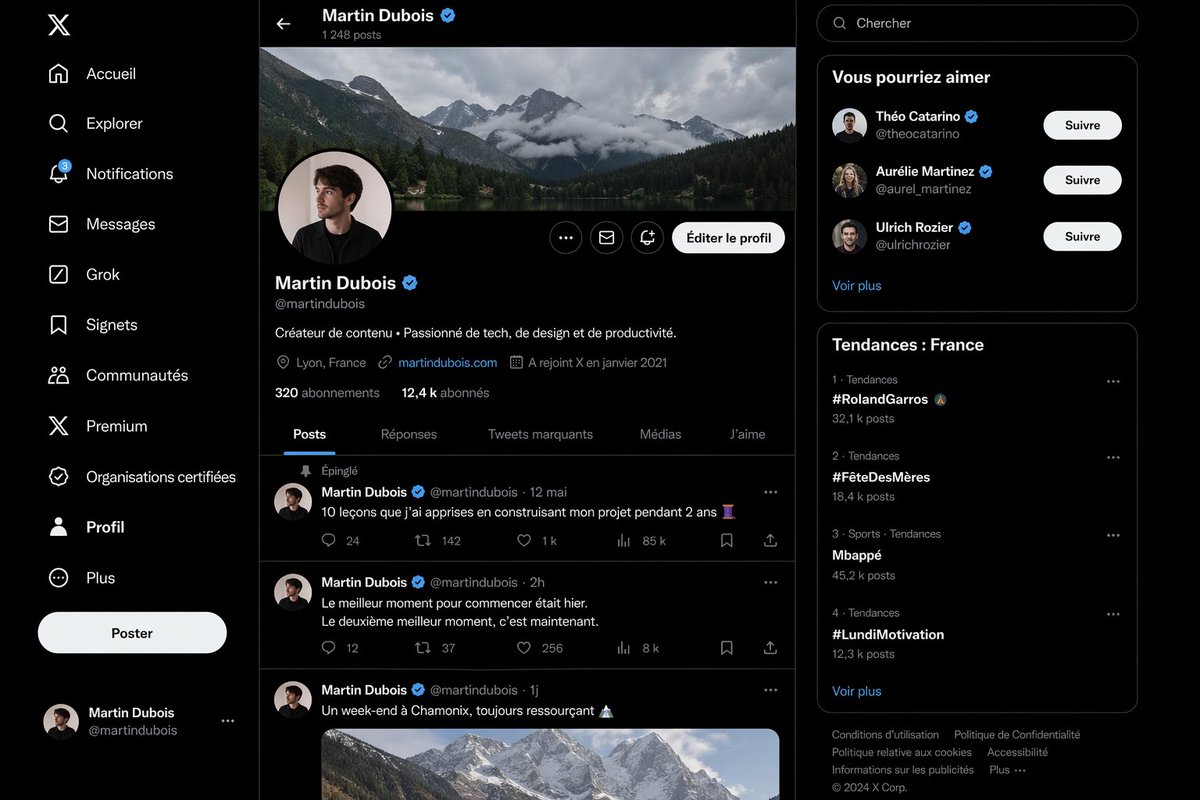
リアルなXプロフィールページモックアップ
フォトリアルなデスクトップ版Xスタイルのプロフィールインターフェース(フランス語)。AIが生成したソーシャルメディアのUIスクリーンショットや製品比較デモの展示に役立ちます。
これは製品および商業向けのGPT Image 2プロンプトケースです。以下のコピー可能なプロンプトを使用して同様のビジュアルを生成し、再利用する前にAwesome GPT Image 2 Prompts帰属表示と商用利用権を確認してください。
プロンプトセット全体が必要ですか? 製品および商業 関連する例をもっと見るにはトピックハブを開くか、 GPT Image 2 プロンプトカタログ 完全な例の索引、再利用可能な構造、および出典の明記については、こちらをご覧ください。
Free 1K preview
Generate one preview image instantly, no sign-up required.
4000/4000
プロンプト
コピー準備完了プロンプト
Create a highly realistic dark-mode social media interface mockup that closely resembles the desktop X/Twitter layout in French, shown as a full-browser screenshot with three vertical columns on a black background and subtle dark gray separators. The left sidebar contains exactly 11 navigation items stacked vertically with white icons and labels: “Accueil”, “Explorer”, “Notifications” with a small blue badge showing 3, “Messages”, “Grok”, “Signets”, “Communautés”, “Premium”, “Organisations certifiées”, “Profil”, and “Plus”. At the top of this sidebar place the white X logo, near the lower-middle add a large rounded white button labeled “Poster”, and at the bottom show a compact logged-in account block for Martin Dubois with handle @martindubois and a small circular avatar. The center column is the main profile page for {argument name="profile name" default="Martin Dubois"}, with a top bar showing a back arrow, the name “Martin Dubois” and a blue verification badge, and underneath the text “1 248 posts”. Below that, include a wide panoramic cover photo of dramatic cloudy alpine mountains above a forest lake. Overlapping the bottom-left of the banner, place a circular profile picture of a young man in dark clothing, Show every face clearly with natural, detailed facial features, with a pale background and a thin border. On the right side of the profile header place three small circular action buttons and one prominent rounded light button labeled “Éditer le profil”. Under the avatar show the display name Martin Dubois with a blue verification badge, the handle @martindubois, and a one-line bio in French: “Créateur de contenu • Passionné de tech, de design et de productivité.” Then add a metadata row with exactly 4 items: location “Lyon, France”, website “martindubois.com”, and “A rejoint X en janvier 2021”, followed by a follower row reading “320 abonnements” and “12,4 k abonnés”. Add a horizontal tab bar with exactly 5 tabs: “Posts”, “Réponses”, “Tweets marquants”, “Médias”, and “J’aime”, with “Posts” active and underlined in blue. Beneath the tabs, show a feed containing exactly 3 visible posts by Martin Dubois. Post 1 is pinned, indicated by “Épinglé”, dated “12 mai”, with the French text “10 leçons que j’ai apprises en construisant mon projet pendant 2 ans” followed by an emoji, and an engagement row with 5 values: 24 replies, 142 reposts, 1 k likes, 85 k views, and a bookmark/share area. Post 2 is dated “2h” with the French text “Le meilleur moment pour commencer était hier. Le deuxième meilleur moment, c’est maintenant.” and engagement values 12 replies, 37 reposts, 256 likes, and 8 k views. Post 3 is dated “1j” with the French text “Un week-end à Chamonix, toujours ressourçant” followed by a mountain emoji, and includes a large embedded image of snowy mountain peaks under soft daylight. Use circular avatars at the left of each post and thin separators between posts. The right sidebar starts with a rounded search field containing the placeholder “Chercher”. Below it, include a card titled “Vous pourriez aimer” with exactly 3 suggested profiles, each with avatar, display name, handle, blue verification badge, and a white rounded “Suivre” button: “Théo Catarino” @theocatarino, “Aurélie Martinez” @aurel_martinez, and “Ulrich Rozier” @ulrichrozier. Add a “Voir plus” link at the bottom of that card. Under it, create a trends card titled “Tendances : France” listing exactly 4 trends in ranked order with category and post counts: 1. “#RolandGarros” with “32,1 k posts”, 2. “#FêteDesMères” with “18,4 k posts”, 3. “Mbappé” with “45,2 k posts”, 4. “#LundiMotivation” with “12,3 k posts”. Add a “Voir plus” link below the trend list. At the very bottom place a compact footer with multiple small gray legal links and “© 2024 X Corp.”. The entire image should look almost indistinguishable from a real desktop screenshot: crisp typography, authentic spacing, realistic UI proportions, subtle rounded cards, white and gray text on near-black surfaces, blue accent color, polished anti-aliased icons, and a clean modern product-design aesthetic.プロンプト変数
プロンプトに表示される編集可能な引数プレースホルダーと、それらのデフォルト値。
変数
profile name
デフォルト
Martin Dubois
Best for
- - 製品および商業 visual exploration
- - Image generation and reference-image edits
- - Reusable briefs that keep source attribution visible
Change these parts
- - Subject, product, character, or scene
- - Aspect ratio, camera, lighting, and background
- - Brand, text, color, and output constraints
Recommended model and settings
- - Model: gpt-image-2
- - Input mode: テキストから画像
- - Aspect ratio: source
- - Commercial status: review original source
How to use this prompt
- 1. Copy the prompt and preserve its structure for the first test.
- 2. Replace the subject, context, and publishing channel.
- 3. Change one camera, lighting, or style variable per iteration.
- 4. Inspect the output, source, text, and rights before reuse.
Limitations, source, and reuse cautions
- - Generated output is an editable draft, not factual, legal, or rights evidence.
- - Review the linked source, people, brands, logos, text, and third-party media before commercial use.
Awesome GPT Image 2 Promptsからインポートされました。出典の明記が必要です。商用利用の可否はallowedです。有料利用の前に、出典元の権利をご確認ください。
このカテゴリーのその他の事例
カテゴリー、入力モードの互換性、品質、およびリスクの低さに基づいて優先順位付けされています。






再利用と出典に関する注記
ケースを事前に確認してから、このプロンプトを安全に使用してください。
- 1.プロンプトをコピーするか、生成ボタンを使ってDovooで直接開いてください。
- 2.ご自身の用途に合わせて、変数、アスペクト比、および参照画像を調整してください。
- 3.公開または有料利用の前に、情報源の権利、帰属表示の要件、およびブランドまたは肖像権に関するリスクを確認してください。