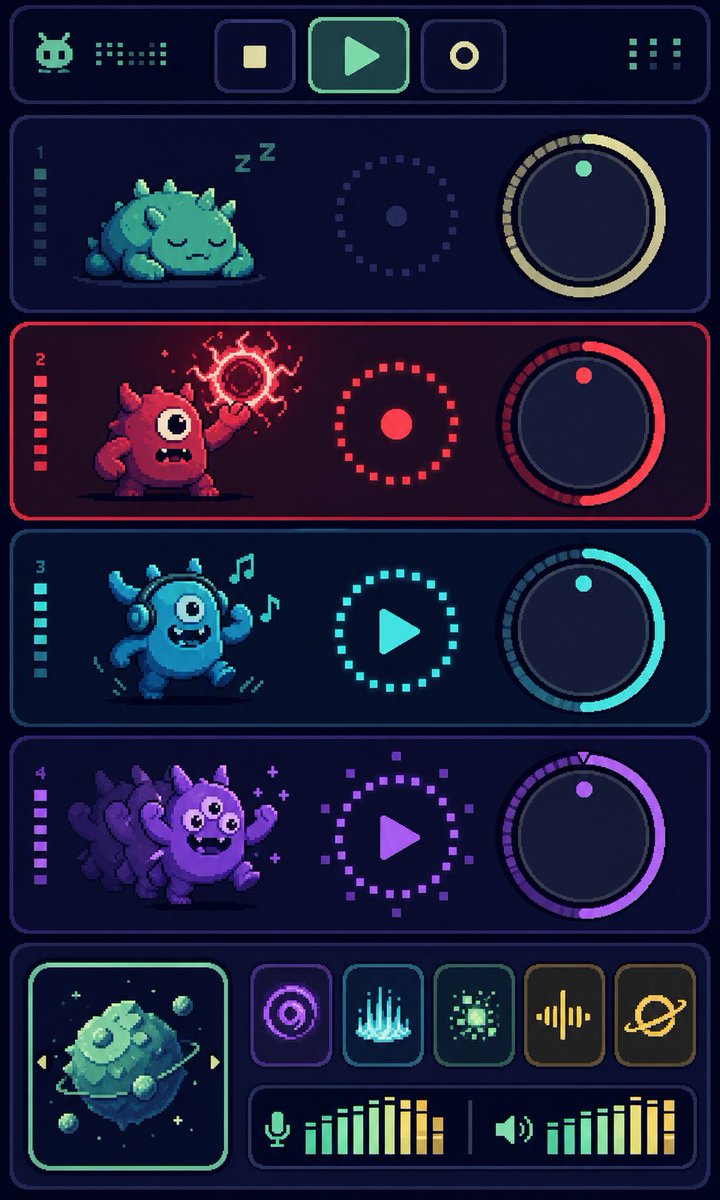
Pixel Monster Music Sequencer UI
Generates a vertical retro pixel-art synth dashboard with four monster tracks, knobs, transport controls, effects, and audio meters.
これはアニメ&ゲーム向けのGPT Image 2プロンプトケースです。以下のコピー可能なプロンプトを使用して同様のビジュアルを生成し、再利用する前にAwesome GPT Image 2 Prompts帰属表示と商用利用権を確認してください。
プロンプトセット全体が必要ですか? アニメ&ゲーム 関連する例をもっと見るにはトピックハブを開くか、 GPT Image 2 プロンプトカタログ 完全な例の索引、再利用可能な構造、および出典の明記については、こちらをご覧ください。
Free 1K preview
Generate one preview image instantly, no sign-up required.
3896/4000
プロンプト
コピー準備完了プロンプト
Goal: Create a vertical pixel-art sci-fi music sequencer interface showing four cute monster audio tracks, like a retro game synth dashboard.

Canvas: Tall portrait mobile screen, 720×1200 style, dark navy background with glowing rounded rectangular panels and crisp pixel-art edges. Use a limited neon palette with cyan, mint, red, purple, and yellow accents. Everything should look like high-resolution pixel art, with subtle scanline/dither texture and no photorealism.

Layout: At the very top, create one wide rounded header bar. Inside it place exactly 6 discrete control/readout elements: 1 small alien/robot face icon on the left, 1 dotted equalizer readout beside it, 3 square transport buttons in the center showing stop, play, and record icons, and 1 dotted menu/grid indicator on the right.

Main track area: Stack exactly 4 horizontal rounded track panels, each with a left track number and a vertical level meter, a monster character on the left, a circular dotted status control in the middle, and a large rotary knob on the right.

Track 1: Label number “1”. Mint/teal theme. The creature is a sleepy squat round monster with small horns/spikes, closed eyes, lying down, with “Z Z” sleep marks above it. The middle control is a dotted circular ring with a small center dot. The right knob has a pale yellow arc and one mint indicator dot near the top.

Track 2: Label number “2”. Red theme. The creature is a red one-eyed monster standing aggressively, mouth open with teeth, one arm raised and casting a crackling magical red orb above its hand. The middle control is a red dotted ring with a solid red center dot. The right knob has a red arc and one red indicator dot.

Track 3: Label number “3”. Cyan theme. The creature is a blue dancing one-eyed monster wearing headphones, smiling with a toothy mouth, arms raised, with exactly 2 floating music notes near its head. The middle control is a cyan dotted circle containing a play triangle. The right knob has a cyan arc and one cyan indicator dot.

Track 4: Label number “4”. Purple theme. The creature is a purple energetic monster with multiple ghosted afterimage duplicates behind it, big eyes, waving arms, small sparkle marks around it. The middle control is a purple dotted circle containing a play triangle. The right knob has a purple arc and one purple indicator dot plus a tiny triangular tick at the top.

Bottom mixer section: Create one wide rounded bottom panel. On the left, include exactly 1 square album-art tile with a glowing mint border, showing a floating mossy cube planet or asteroid with small orbiting rocks and tiny stars. To the right of the album art, arrange exactly 5 square effect buttons in one row: 1 purple concentric-circle/radar icon, 1 cyan vertical waveform/spectrum icon, 1 green pixel burst icon, 1 yellow audio waveform icon, and 1 yellow ringed planet icon. Beneath those buttons, add exactly 2 horizontal audio meters: the left meter has a microphone icon followed by green-to-yellow vertical bars, and the right meter has a speaker icon followed by green-to-yellow vertical bars, separated by a thin vertical divider.

Text content: Only include the visible track numbers “1”, “2”, “3”, and “4”; do not add readable labels or words besides the two “Z” sleep marks. Use abstract pixel icons rather than detailed typography.

Style constraints: Retro 16-bit pixel-art UI, dark futuristic synth console, glowing outlines, rounded panels, clean symmetry, high contrast, playful monster characters, no watermark, no realistic 3D rendering. Make the main accent color palette customizable: {argument name="primary neon color" default="mint cyan"}, {argument name="danger track color" default="hot red"}, {argument name="party track color" default="purple"}, {argument name="background color" default="deep navy"}, {argument name="interface theme" default="retro monster music sequencer"}.
プロンプト変数
プロンプトに表示される編集可能な引数プレースホルダーと、それらのデフォルト値。
変数
primary neon color
デフォルト
mint cyan
変数
danger track color
デフォルト
hot red
変数
party track color
デフォルト
purple
変数
background color
デフォルト
deep navy
変数
interface theme
デフォルト
retro monster music sequencer
Best for
- - アニメ&ゲーム visual exploration
- - Image generation and reference-image edits
- - Reusable briefs that keep source attribution visible
Change these parts
- - Subject, product, character, or scene
- - Aspect ratio, camera, lighting, and background
- - Brand, text, color, and output constraints
Recommended model and settings
- - Model: gpt-image-2
- - Input mode: テキストから画像
- - Aspect ratio: source
- - Commercial status: review original source
How to use this prompt
- 1. Copy the prompt and preserve its structure for the first test.
- 2. Replace the subject, context, and publishing channel.
- 3. Change one camera, lighting, or style variable per iteration.
- 4. Inspect the output, source, text, and rights before reuse.
Limitations, source, and reuse cautions
- - Generated output is an editable draft, not factual, legal, or rights evidence.
- - Review the linked source, people, brands, logos, text, and third-party media before commercial use.
Awesome GPT Image 2 Promptsからインポートされました。出典の明記が必要です。商用利用の可否はallowedです。有料利用の前に、出典元の権利をご確認ください。
このカテゴリーのその他の事例
カテゴリー、入力モードの互換性、品質、およびリスクの低さに基づいて優先順位付けされています。






再利用と出典に関する注記
ケースを事前に確認してから、このプロンプトを安全に使用してください。
- 1.プロンプトをコピーするか、生成ボタンを使ってDovooで直接開いてください。
- 2.ご自身の用途に合わせて、変数、アスペクト比、および参照画像を調整してください。
- 3.公開または有料利用の前に、情報源の権利、帰属表示の要件、およびブランドまたは肖像権に関するリスクを確認してください。