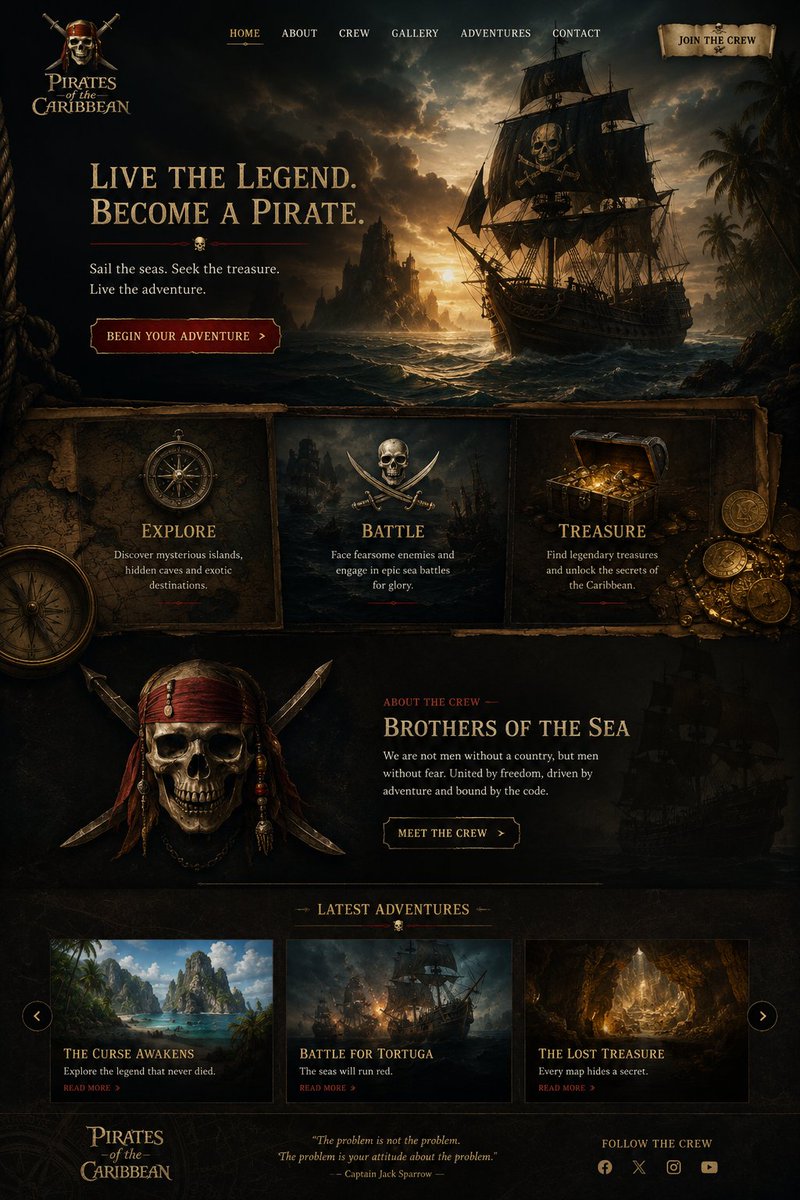
Cinematic Pirate Website Landing Page
A detailed prompt for generating a dark Pirates of the Caribbean-style adventure website mockup with hero art, feature cards, crew section, story cards, and footer.
これはグラフィック&ポスター向けのGPT Image 2プロンプトケースです。以下のコピー可能なプロンプトを使用して同様のビジュアルを生成し、再利用する前にAwesome GPT Image 2 Prompts帰属表示と商用利用権を確認してください。
プロンプトセット全体が必要ですか? グラフィック&ポスター 関連する例をもっと見るにはトピックハブを開くか、 GPT Image 2 プロンプトカタログ 完全な例の索引、再利用可能な構造、および出典の明記については、こちらをご覧ください。
Free 1K preview
Generate one preview image instantly, no sign-up required.
4000/4000
プロンプト
コピー準備完了プロンプト
Goal: Create a dark cinematic pirate-themed landing page for {argument name="website title" default="Pirates of the Caribbean"}, styled like a premium adventure movie website with antique parchment, carved wood, gold typography, and moody ocean lighting.

Canvas: Tall desktop webpage mockup, approximately 2:3 aspect ratio, full-bleed dark fantasy realism. Use a black, sepia, and tarnished-gold palette with deep teal storm clouds and warm sunset highlights. Texture everything with aged parchment, old maps, rope, weathered wood, and subtle grunge.

Header: At the top left place a stacked pirate logo reading “Pirates of the Caribbean,” with a small emblem above it. Across the top center place exactly 6 navigation links: “HOME,” “ABOUT,” “CREW,” “GALLERY,” “ADVENTURES,” and “CONTACT,” with HOME subtly highlighted in gold and underlined. At the top right place a parchment scroll button reading “JOIN THE CREW.”

Hero section: Make the top half a dramatic seascape at sunset: a large black pirate ship on the right with a skull-and-crossbones sail, rough waves, rocky island silhouettes in the distance, palm trees at far right, storm clouds, and golden light breaking through the sky. On the left, add a large serif headline: {argument name="hero headline" default="LIVE THE LEGEND.\nBECOME A PIRATE."} Under it add a thin red divider with a tiny skull icon centered. Below, add the subtext “Sail the seas. Seek the treasure.\nLive the adventure.” Add a dark red beveled call-to-action button reading {argument name="primary button text" default="BEGIN YOUR ADVENTURE"} with a small right arrow.

Feature cards: Beneath the hero, create exactly 3 adjacent framed panels on aged parchment/wood. Card 1 shows an antique compass and is titled “EXPLORE,” with text “Discover mysterious islands,\nhidden caves and exotic\ndestinations.” Card 2 shows crossed swords and a central skull/emblem, titled “BATTLE,” with text “Face fearsome enemies and\nengage in epic sea battles\nfor glory.” Card 3 shows an open treasure chest overflowing with gold coins and jewels, titled “TREASURE,” with text “Find legendary treasures\nand unlock the secrets of\nthe Caribbean.” Add scattered coins at the far right and a partial large compass at lower left for depth.

Crew section: Below the feature cards, create a dark section with a large pirate skull-and-crossed-swords crest on the left, decorated with red bandana strips, beads, and blades. On the right, add a small red label “ABOUT THE CREW,” then a gold title {argument name="crew headline" default="BROTHERS OF THE SEA"}. Add body copy: “We are not men without a country, but men\nwithout fear. United by freedom, driven by\nadventure and bound by the code.” Add an outlined button reading “MEET THE CREW” with a right arrow. Place a faint ghostly pirate ship silhouette in the background at right.

Latest adventures section: Add a centered heading “LATEST ADVENTURES” with small decorative horizontal lines and a tiny skull below it. Under the heading place exactly 3 adventure cards in a row, each with an image, title, description, and red “READ MORE >” link. Card 1: tropical island lagoon image, title “THE CURSE AWAKENS,” description “Explore the legend that never died.” Card 2: ship battle at sea image, title “BATTLE FOR TORTUGA,” description “The seas will run red.” Card 3: glowing cave treasure image, title “THE LOST TREASURE,” description “Every map hides a secret.” Add circular carousel arrow buttons on the far left and far right of this row.

Footer: Bottom left repeat the “Pirates of the Caribbean” logo. Center add an italic quote: “The problem is not the problem.\nThe problem is your attitude about the problem.” followed by “— Captain Jack Sparrow —”. Bottom right add “FOLLOW THE CREW” and exactly 4 small social icons: Facebook, X, Instagram, and YouTube.

Visual style: High-detail cinematic matte painting mixed with polished website UI design, realistic lighting, old pirate-map ornamentation, gold engraved serif typography, dark red accents, sharp rectangular content frames, subtle shadows, and a luxury adventure-game landing page feel. Keep all text legible, aligned, and spelled exactly as specified. No modern bright colors, no minimalist style, no extra sections, no watermark.
プロンプト変数
プロンプトに表示される編集可能な引数プレースホルダーと、それらのデフォルト値。
変数
website title
デフォルト
Pirates of the Caribbean
変数
hero headline
デフォルト
LIVE THE LEGEND.\nBECOME A PIRATE.
変数
primary button text
デフォルト
BEGIN YOUR ADVENTURE
変数
crew headline
デフォルト
BROTHERS OF THE SEA
Best for
- - グラフィック&ポスター visual exploration
- - Image generation and reference-image edits
- - Reusable briefs that keep source attribution visible
Change these parts
- - Subject, product, character, or scene
- - Aspect ratio, camera, lighting, and background
- - Brand, text, color, and output constraints
Recommended model and settings
- - Model: gpt-image-2
- - Input mode: テキストから画像
- - Aspect ratio: source
- - Commercial status: review original source
How to use this prompt
- 1. Copy the prompt and preserve its structure for the first test.
- 2. Replace the subject, context, and publishing channel.
- 3. Change one camera, lighting, or style variable per iteration.
- 4. Inspect the output, source, text, and rights before reuse.
Limitations, source, and reuse cautions
- - Generated output is an editable draft, not factual, legal, or rights evidence.
- - Review the linked source, people, brands, logos, text, and third-party media before commercial use.
Awesome GPT Image 2 Promptsからインポートされました。出典の明記が必要です。商用利用の可否はallowedです。有料利用の前に、出典元の権利をご確認ください。
このカテゴリーのその他の事例
カテゴリー、入力モードの互換性、品質、およびリスクの低さに基づいて優先順位付けされています。






再利用と出典に関する注記
ケースを事前に確認してから、このプロンプトを安全に使用してください。
- 1.プロンプトをコピーするか、生成ボタンを使ってDovooで直接開いてください。
- 2.ご自身の用途に合わせて、変数、アスペクト比、および参照画像を調整してください。
- 3.公開または有料利用の前に、情報源の権利、帰属表示の要件、およびブランドまたは肖像権に関するリスクを確認してください。