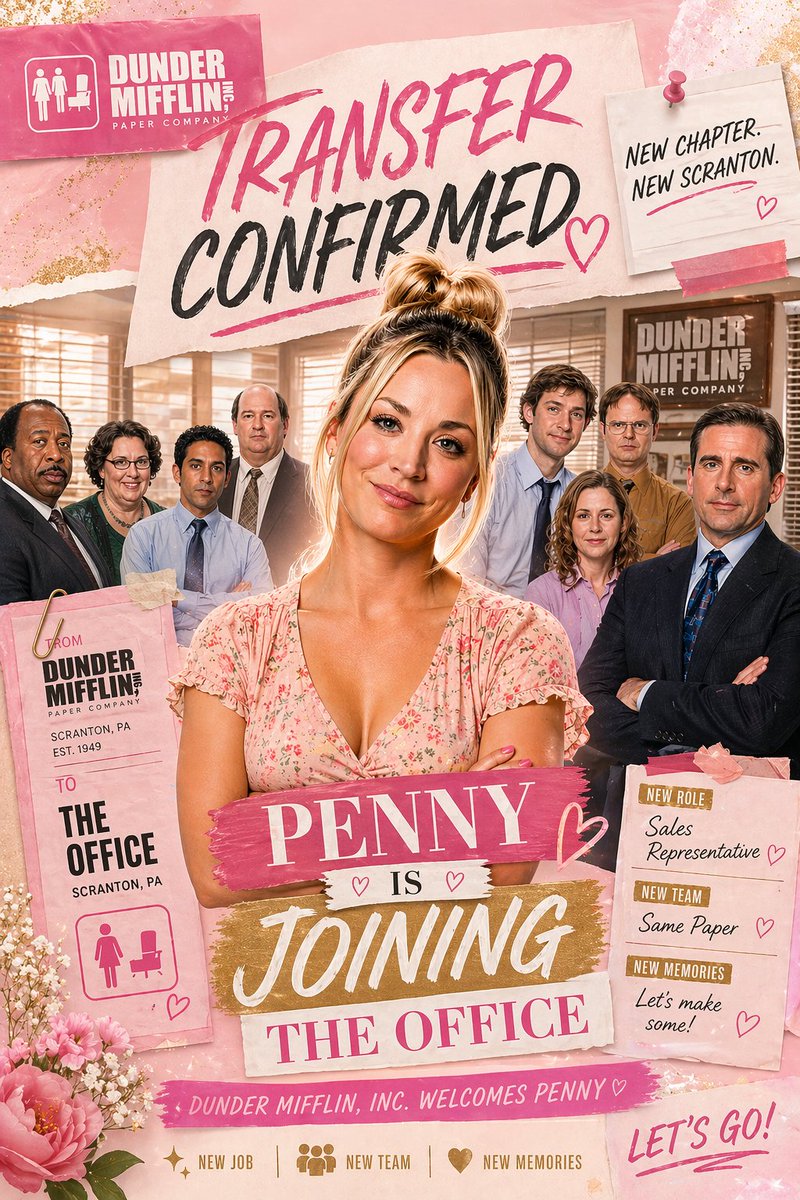
ピンクのオフィス異動のお知らせポスター
スクラップブック風のピンク色の職場告知ポスター。中心となる女性社員と彼女のオフィスチームが描かれており、パロディプロモーション、キャラクター編集、または異動のお祝いの告知に最適です。
これはグラフィック&ポスター向けのGPT Image 2プロンプトケースです。以下のコピー可能なプロンプトを使用して同様のビジュアルを生成し、再利用する前にAwesome GPT Image 2 Prompts帰属表示と商用利用権を確認してください。
プロンプトセット全体が必要ですか? グラフィック&ポスター 関連する例をもっと見るにはトピックハブを開くか、 GPT Image 2 プロンプトカタログ 完全な例の索引、再利用可能な構造、および出典の明記については、こちらをご覧ください。
Free 1K preview
Generate one preview image instantly, no sign-up required.
2775/4000
プロンプト
コピー準備完了プロンプト
A glossy, feminine scrapbook-style office announcement poster inspired by a sitcom workplace promo, in a vertical 2:3 composition. The scene shows 1 central woman standing in front of a group of 7 office coworkers inside a warm beige office with venetian blinds, desks, and a visible Dunder Mifflin-style wall sign in the background. The central woman has blonde hair in a messy high bun, a light pink floral V-neck dress, folded arms, and a confident, celebratory pose. Behind her, the 7 coworkers are arranged in a loose semicircle, wearing office attire in muted blues, browns, black, and lavender. Build the image as a mixed-media collage with torn paper, taped notes, brush-lettered headlines, glitter textures, flowers, and pink-and-gold accents. At the top left, place a pink rectangular company card with a white office icon and the text “DUNDER MIFFLIN, INC” and “PAPER COMPANY”. Across the upper center, place a large torn-paper headline reading “TRANSFER CONFIRMED” in expressive brush lettering, with “TRANSFER” in hot pink and “CONFIRMED” in black, plus pink underline strokes and a hand-drawn heart. At the top right, pin a small off-white note card with a pink pushpin and pink tape reading “NEW CHAPTER. NEW SCRANTON.” Near the lower center, layer a bold title made of 4 stacked text strips: “{argument name="character name" default="PENNY"}” on a pink paint-stroke banner, “IS” on a small white strip with 2 tiny hearts, “JOINING” on a gold brush-stroke banner, and “THE OFFICE” on a pale pink strip. On the lower left, hang a tall pink transfer tag clipped with a gold paperclip, reading “FROM DUNDER MIFFLIN, INC PAPER COMPANY / SCRANTON, PA / EST. 1949” and below that “TO THE OFFICE / SCRANTON, PA”, with a pink women-and-desk restroom-style icon at the bottom. On the lower right, place a pink note card with 3 labeled sections: “NEW ROLE” with “{argument name="job title" default="Sales Representative"}”, “NEW TEAM” with “{argument name="team text" default="Same Paper"}”, and “NEW MEMORIES” with “{argument name="memories text" default="Let’s make some!"}”, each accented with small pink hearts. Along the bottom center, add a pink ribbon strip reading “DUNDER MIFFLIN, INC. WELCOMES {argument name="character name" default="PENNY"}♡”. Beneath that, include 3 small icon-and-text items in one row: sparkle icon with “NEW JOB”, group icon with “NEW TEAM”, and heart icon with “NEW MEMORIES”. At the bottom right, add large handwritten pink script saying “LET’S GO!”. Decorate the corners with pink peonies, tiny white filler flowers, torn paper edges, soft glitter dust, and subtle gold foil flecks. Use a warm rosy palette with blush pink, cream, gold, and black, with polished poster compositing, soft glam lighting, and a cheerful celebratory mood.プロンプト変数
プロンプトに表示される編集可能な引数プレースホルダーと、それらのデフォルト値。
変数
character name
デフォルト
PENNY
変数
job title
デフォルト
Sales Representative
変数
team text
デフォルト
Same Paper
変数
memories text
デフォルト
Let’s make some!
Best for
- - グラフィック&ポスター visual exploration
- - Image generation and reference-image edits
- - Reusable briefs that keep source attribution visible
Change these parts
- - Subject, product, character, or scene
- - Aspect ratio, camera, lighting, and background
- - Brand, text, color, and output constraints
Recommended model and settings
- - Model: gpt-image-2
- - Input mode: テキストから画像
- - Aspect ratio: source
- - Commercial status: review original source
How to use this prompt
- 1. Copy the prompt and preserve its structure for the first test.
- 2. Replace the subject, context, and publishing channel.
- 3. Change one camera, lighting, or style variable per iteration.
- 4. Inspect the output, source, text, and rights before reuse.
Limitations, source, and reuse cautions
- - Generated output is an editable draft, not factual, legal, or rights evidence.
- - Review the linked source, people, brands, logos, text, and third-party media before commercial use.
Awesome GPT Image 2 Promptsからインポートされました。出典の明記が必要です。商用利用の可否はallowedです。有料利用の前に、出典元の権利をご確認ください。
このカテゴリーのその他の事例
カテゴリー、入力モードの互換性、品質、およびリスクの低さに基づいて優先順位付けされています。






再利用と出典に関する注記
ケースを事前に確認してから、このプロンプトを安全に使用してください。
- 1.プロンプトをコピーするか、生成ボタンを使ってDovooで直接開いてください。
- 2.ご自身の用途に合わせて、変数、アスペクト比、および参照画像を調整してください。
- 3.公開または有料利用の前に、情報源の権利、帰属表示の要件、およびブランドまたは肖像権に関するリスクを確認してください。