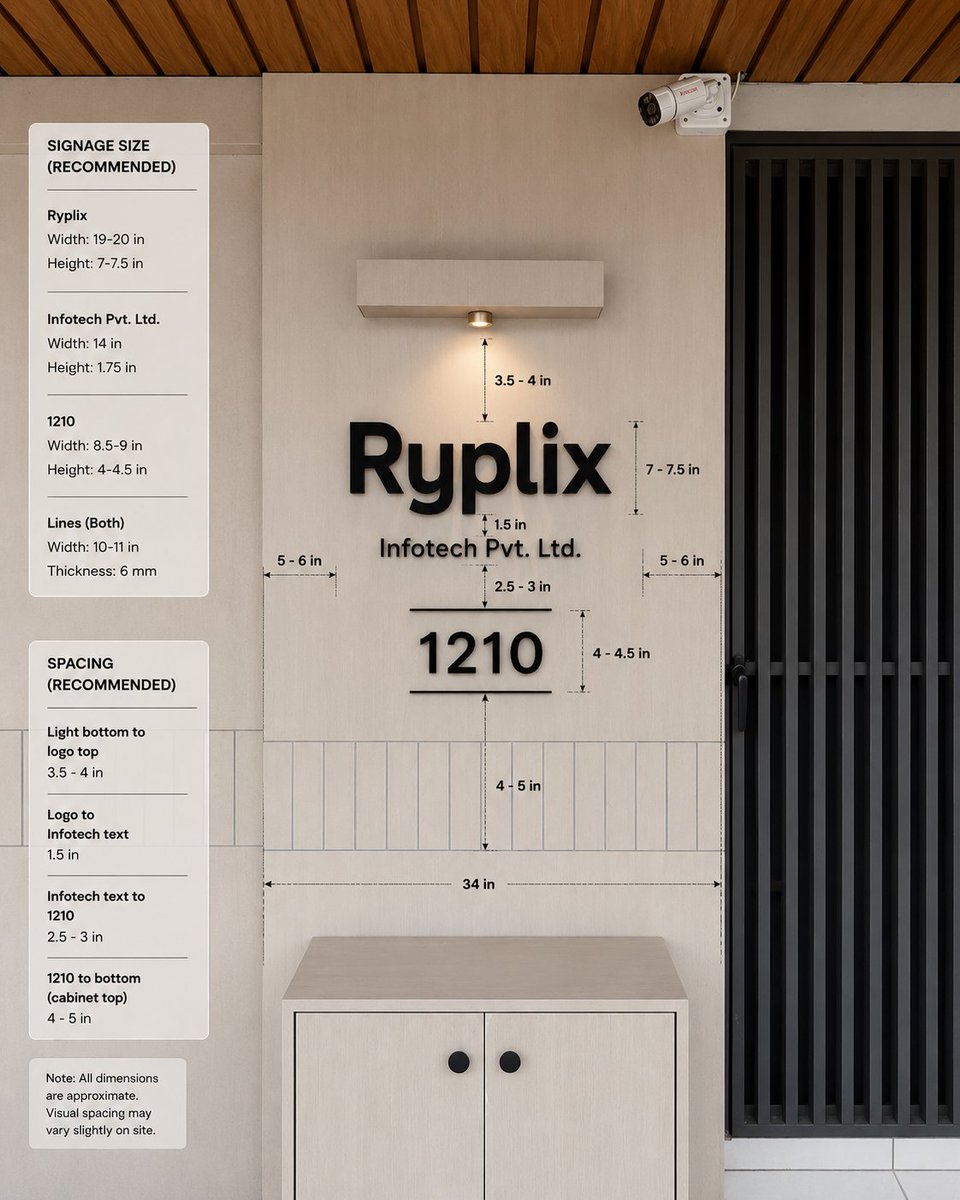
オフィス看板の寸法モックアップ
寸法ガイドと推奨サイズに関する注記を含む、クライアントの承認を得るための、フォトリアルなオフィス入口看板の仕様モックアップ。
これは製品および商業向けのGPT Image 2プロンプトケースです。以下のコピー可能なプロンプトを使用して同様のビジュアルを生成し、再利用する前にAwesome GPT Image 2 Prompts帰属表示と商用利用権を確認してください。
プロンプトセット全体が必要ですか? 製品および商業 関連する例をもっと見るにはトピックハブを開くか、 GPT Image 2 プロンプトカタログ 完全な例の索引、再利用可能な構造、および出典の明記については、こちらをご覧ください。
Free 1K preview
Generate one preview image instantly, no sign-up required.
3653/4000
プロンプト
コピー準備完了プロンプト
Goal: Create a realistic interior wall signage mockup with measurement annotations for a reception/office entrance, showing recommended dimensions and spacing for a company sign.

Canvas: Square 1:1 image, photorealistic architectural visualization, front-facing view with slight natural perspective. Use a warm modern palette: light beige wall panels, pale wood cabinet, black signage, black metal door grille, and wood slat ceiling.

Scene layout: Center the composition on a beige feature wall with a mounted sign. On the right, include a tall black vertical-slat door or gate occupying about one quarter of the image width. At the top right of the wall, add one small white CCTV security camera angled downward. At the top center, add one rectangular wall-mounted light fixture with a single warm downlight. At the bottom center, place one light-wood cabinet with two doors and exactly two round black knobs. Across the lower wall behind the sign, include a horizontal band of narrow vertical rectangular tiles. The ceiling at the very top should show warm brown wooden slats running diagonally.

Main sign content: Use raised matte-black 3D letters on the wall. The largest line reads {argument name="company logo text" default="Ryplix"}. Directly underneath, centered smaller text reads {argument name="company legal text" default="Infotech Pvt. Ltd."}. Below that, centered, display a large number {argument name="unit number" default="1210"}, with one thin horizontal line above it and one thin horizontal line below it. Keep all sign elements black with soft realistic shadows.

Measurement annotations: Add fine black dimension arrows, dashed guide lines, and small technical labels around the sign. Include exactly 10 visible measurement labels in the main wall area: “3.5 - 4 in” from the bottom of the light to the logo, “7 - 7.5 in” beside the logo height, “1.5 in” between the logo and legal text, “2.5 - 3 in” between legal text and the number, “4 - 4.5 in” beside the number height, “4 - 5 in” from the number to the cabinet-top tile area, “34 in” as a long horizontal width guide above the cabinet, plus two side gap labels “5 - 6 in” on the left and “5 - 6 in” on the right.

Left information panels: Add exactly three rounded white cards stacked vertically along the left side of the image. Card 1 title: “SIGNAGE SIZE (RECOMMENDED)”. It contains exactly three item groups separated by thin horizontal rules: “Ryplix” with “Width: 19-20 in” and “Height: 7-7.5 in”; “Infotech Pvt. Ltd.” with “Width: 14 in” and “Height: 1.75 in”; “1210” with “Width: 8.5-9 in” and “Height: 4-4.5 in”; then “Lines (Both)” with “Width: 10-11 in” and “Thickness: 6 mm”. Card 2 title: “SPACING (RECOMMENDED)”. It contains exactly four item groups separated by thin rules: “Light bottom to logo top” with “3.5 - 4 in”; “Logo to Infotech text” with “1.5 in”; “Infotech text to 1210” with “2.5 - 3 in”; “1210 to bottom (cabinet top)” with “4 - 5 in”. Card 3 is a small note card reading: “Note: All dimensions are approximate. Visual spacing may vary slightly on site.”

Visual style: Clean modern office design, natural lighting, realistic materials, subtle shadows, crisp legible typography, professional signage installation guide aesthetic. Use black sans-serif text for all labels and cards. The measurement lines should look like a design-spec overlay, not handwritten.

Constraints: Keep the image free of people and clutter. Do not add extra logos, extra cards, extra measurement labels, or additional decorative objects. Maintain accurate alignment: logo, legal text, unit number, light, and cabinet should all be centered on the same vertical axis.
プロンプト変数
プロンプトに表示される編集可能な引数プレースホルダーと、それらのデフォルト値。
変数
company logo text
デフォルト
Ryplix
変数
company legal text
デフォルト
Infotech Pvt. Ltd.
変数
unit number
デフォルト
1210
Best for
- - 製品および商業 visual exploration
- - Image generation and reference-image edits
- - Reusable briefs that keep source attribution visible
Change these parts
- - Subject, product, character, or scene
- - Aspect ratio, camera, lighting, and background
- - Brand, text, color, and output constraints
Recommended model and settings
- - Model: gpt-image-2
- - Input mode: テキストから画像
- - Aspect ratio: source
- - Commercial status: review original source
How to use this prompt
- 1. Copy the prompt and preserve its structure for the first test.
- 2. Replace the subject, context, and publishing channel.
- 3. Change one camera, lighting, or style variable per iteration.
- 4. Inspect the output, source, text, and rights before reuse.
Limitations, source, and reuse cautions
- - Generated output is an editable draft, not factual, legal, or rights evidence.
- - Review the linked source, people, brands, logos, text, and third-party media before commercial use.
Awesome GPT Image 2 Promptsからインポートされました。出典の明記が必要です。商用利用の可否はallowedです。有料利用の前に、出典元の権利をご確認ください。
このカテゴリーのその他の事例
カテゴリー、入力モードの互換性、品質、およびリスクの低さに基づいて優先順位付けされています。






再利用と出典に関する注記
ケースを事前に確認してから、このプロンプトを安全に使用してください。
- 1.プロンプトをコピーするか、生成ボタンを使ってDovooで直接開いてください。
- 2.ご自身の用途に合わせて、変数、アスペクト比、および参照画像を調整してください。
- 3.公開または有料利用の前に、情報源の権利、帰属表示の要件、およびブランドまたは肖像権に関するリスクを確認してください。