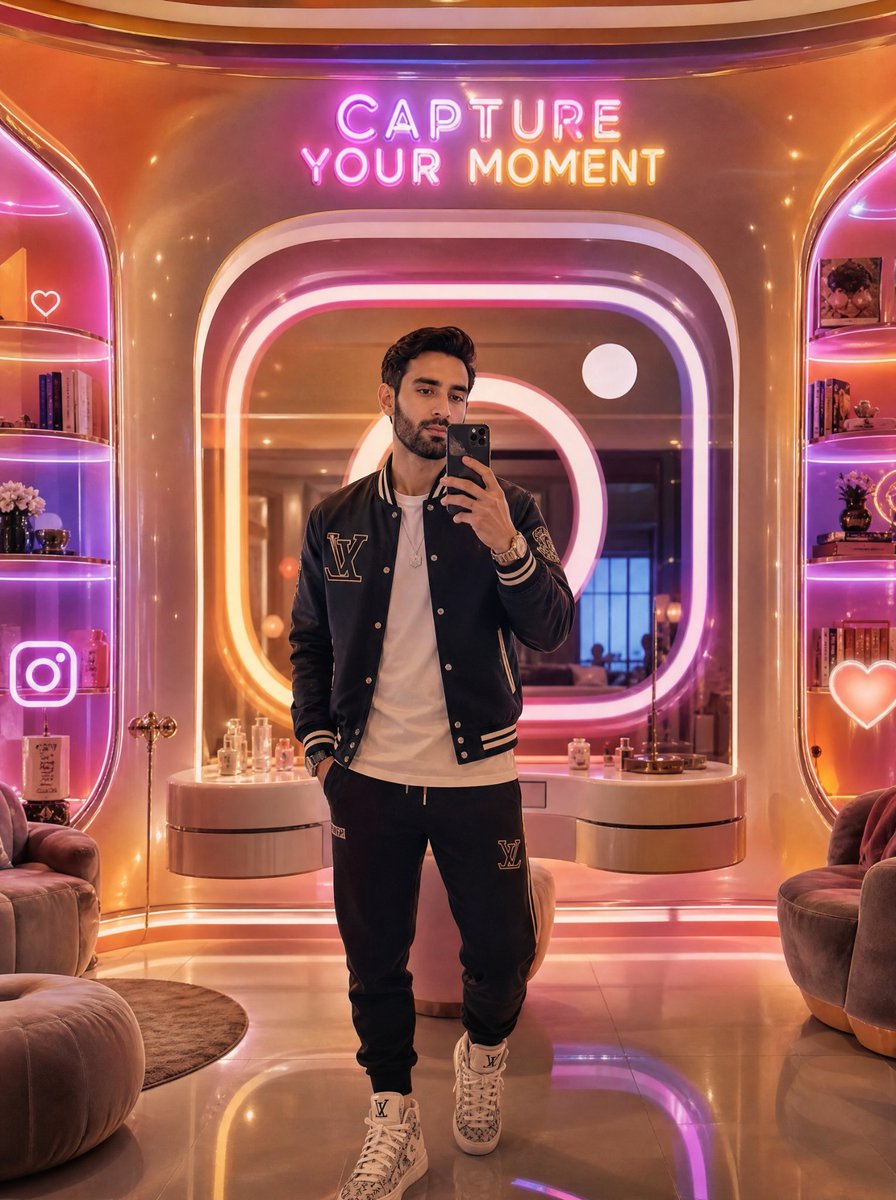
ネオンラグジュアリーミラーセルフィー
華やかなネオンが輝くインフルエンサーラウンジで、話題の全身鏡自撮り写真を撮るための、フォトリアルなプロンプト。
This is a gpt-image-2 prompt case for ポートレートキャラクター. Use the copy-ready prompt below to generate similar visuals, and review Awesome Seedance 2.0 Video Prompts attribution plus commercial-use rights before reuse.
Need the full prompt set? Use the ポートレートキャラクター topic hub for more related examples, or open the GPT Image 2 prompt library for the full example index, reusable structures, and source attribution.
Prompt
Copy-ready prompt
未来的な豪華なセルフィーラウンジで、スタイリッシュな若い男性の縦長の全身鏡セルフィーを作成します。被写体は中央に立っており、顔は黒いスマートフォンでほとんど隠れていますが、その上から短い巻き毛の黒髪が覗いています。彼はベージュのストライプの袖口と襟が付いた黒いベースボールジャケット、左胸に大きなLV風のプリントパッチ、その下に無地の白いTシャツ、同じLVパッチが付いた黒いジョギングショーツ、重ね付けしたブレスレットと時計、白いハイカットのデザイナースニーカーを身に着けています。環境は、丸みを帯びたレトロフューチャーな建築様式の、暖かく光沢のあるゴールドとローズピンクのインテリアです。彼の後ろには、ピンク、紫、オレンジ、白のネオンライトで飾られた、大きく照明された丸い正方形の鏡があります。鏡の上には、明るいネオンサインが「CAPTURE YOUR MOMENT」という文字を2行で表示しています。両側に1つずつ、ピンクがかった紫の縁を放つ2つの組み込みディスプレイ棚があります。棚には本、香水瓶、花、装飾品、額入りの写真が並んでいます。目立つネオンのソーシャルメディアアイコンを3つ追加します。左上の棚エリアに白いハートの輪郭、左下に大きなInstagramカメラアイコン、右下に光るハートアイコンです。ふかふかの丸いラウンジチェアを下の2つの角に配置し、本体の後ろには香水瓶と小さな装飾品を飾った曲線的な化粧台があります。床は光沢があり反射し、柔らかなボケ照明が施されています。このデザインは、映画のような超リアルなスタイル、ハイエンドのインフルエンサーの美学、温かみのある反射効果、浅い被写界深度、超洗練された素材、左右対称の構成、3:4の縦画面比率を採用しています。カスタム衣料ブランドは {argument name="fashion monogram" default="LV-style monogram"}、ネオンサインのテキストは {argument name="neon sign text" default="CAPTURE YOUR MOMENT"}、ジャケットの色は {argument name="jacket color" default="black"}、ラウンジの照明の色は {argument name="lighting palette" default="pink, purple, orange, and white neon"}、電話の色は {argument name="phone color" default="black"} です。Prompt variables
Editable argument placeholders found in the prompt, with their default values.
Variable
fashion monogram
Default
LV-style monogram
Variable
neon sign text
Default
CAPTURE YOUR MOMENT
Variable
jacket color
Default
black
Variable
lighting palette
Default
pink, purple, orange, and white neon
Variable
phone color
Default
black
More cases in this category
Prioritized by category, input mode compatibility, quality, and lower risk.


Reuse and source notes
Use this prompt safely after previewing the case.
- 1.Copy the prompt or open it directly in Dovoo with the generation button.
- 2.Adjust variables, aspect ratio, and reference images for your own use case.
- 3.Before publishing or paid usage, verify source rights, attribution requirements, and brand or likeness risks.