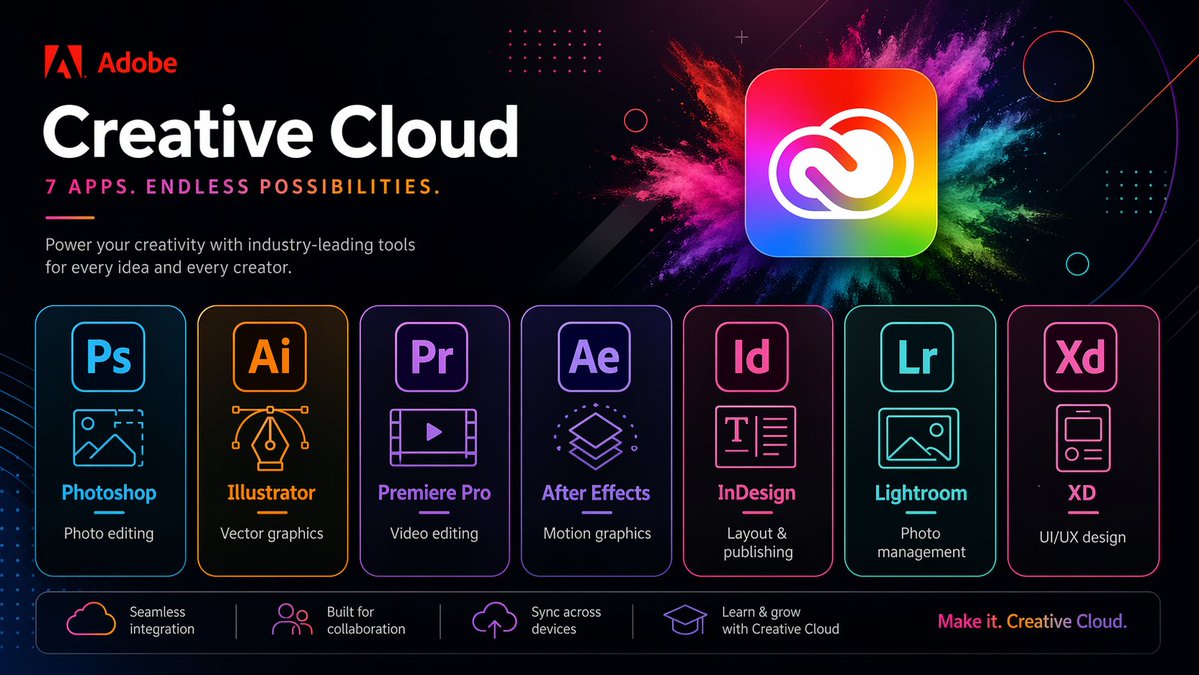
ネオンクリエイティブクラウドプロモーションポスター
洗練されたAdobe風のマーケティングポスター。7つのCreative Cloudアプリを未来的なネオンレイアウトで紹介しており、ブランド化されたテクノロジー広告やアプリスイートのプロモーションを再現するのに最適です。
これは製品および商業向けのGPT Image 2プロンプトケースです。以下のコピー可能なプロンプトを使用して同様のビジュアルを生成し、再利用する前にAwesome GPT Image 2 Prompts帰属表示と商用利用権を確認してください。
プロンプトセット全体が必要ですか? 製品および商業 関連する例をもっと見るにはトピックハブを開くか、 GPT Image 2 プロンプトカタログ 完全な例の索引、再利用可能な構造、および出典の明記については、こちらをご覧ください。
Free 1K preview
Generate one preview image instantly, no sign-up required.
Free text preview doesn’t preserve reference-image consistency.
4000/4000
プロンプト
コピー準備完了プロンプト
{
  "type": "neon promotional tech poster",
  "brand": {
    "name": "Adobe",
    "logoPosition": "top left"
  },
  "scene": {
    "style": "Fashionable futuristic tech ad, dark mode, glossy neon UI, high contrast, high-end marketing visuals",
    "background": "Deep black to deep navy blue gradient, with subtle diagonals, subtle glows, dot matrix grid embellishments, thin circular outlines, tiny spark particles and abstract geometric overlays",
    "accentEffect": "Large multi-colored powder explosion effect behind the main app icon, blending magenta, pink, purple, blue, cyan, green and yellow"
  },
  "text": {
    "headline": "Creative Cloud",
    "subheadline": "Premiere Pro",
    "body": "Empower every idea and creator with industry-leading tools.",
    "footerTagline": "Create endlessly. Creative Cloud."
  },
  "layout": {
    "sections": [
      {
        "title": "app cards",
        "position": "top left",
        "count": 3,
        "labels": [
          "Photoshop",
          "Creative Cloud",
          "Premiere Pro"
        ]
      },
      {
        "title": "feature strip",
        "position": "bottom bar",
        "count": 1,
        "labels": [
          "Seamless integration"
        ]
      },
      {
        "title": "Application card",
        "position": "Middle row",
        "count": 7,
        "labels": [
          "Photoshop",
          "Illustrator",
          "Premiere Pro",
          "After Effects",
          "InDesign",
          "Lightroom",
          "XD"
        ]
      },
      {
        "title": "Function bar",
        "position": "Bottom",
        "count": 4,
        "labels": [
          "Seamless integration",
          "Built for collaboration",
          "Cross-device sync",
          "Learn and grow with Creative Cloud"
        ]
      }
    ],
    "appCardArrangement": "Seven evenly distributed rounded rectangle cards, arranged horizontally in the lower center",
    "footerTaglinePosition": "Bottom right corner"
  },
  "objects": {
    "mainIcon": {
      "shape": "Rounded square app icon",
      "colors": "Rainbow gradient fill with a white Creative Cloud logo",
      "position": "Top right corner",
      "glow": "Soft outer glow"
    },
    "appCards": [
      {
        "code": "Ps",
        "name": "Photoshop",
        "borderColor": "Electric blue",
        "icon": "Image frame with mountains and dashed crop corners",
        "description": "Photo editing"
      },
      {
        "code": "Ai",
        "name": "Illustrator",
        "borderColor": "orange",
        "icon": "Vector pen tip with Bezier curve handles",
        "description": "Vector graphics"
      },
      {
        "code": "Pr",
        "name": "Premiere Pro",
        "borderColor": "Violet",
        "icon": "Video frame with a play button",
        "description": "Video editing"
      },
      {
        "code": "Ae",
        "name": "After Effects",
        "borderColor": "Purple",
        "icon": "Stacked motion graphics layers",
        "description": "Motion graphics"
      },
      {
        "code": "Id",
        "name": "InDesign",
        "borderColor": "Bright pink",
        "icon": "Text layout page",
        "description": "Typesetting and Publishing"
      },
      {
        "code": "Lr",
        "name": "Lightroom",
        "borderColor": "Cyan",
        "icon": "Photo Landscape Frames",
        "description": "Photo Management"
      },
      {
        "code": "Xd",
        "name": "XD",
        "borderColor": "Pink",
        "icon": "Mobile App Wireframe Cards",
        "description": "UI/UX Design"
      }
    ],
    "featureBar": [
      {
        "icon": "Cloud outline",
        "text": "Seamless integration"
      },
      {
        "icon": "People icon",
        "text": "Built for collaboration"
      },
      {
        "icon": "Upload to the cloud",
        "text": "Cross-device sync"
      },
      {
        "icon": "Graduation cap",
        "text": "Learn and grow with Creative Cloud"
      }
    ]
  },
  "rendering": {
    "camera": "Front view of a poster",
    "composition": "Concise and centered business layout",
    "lighting": "Neon edge lighting and soft glow",
    "finish": "Clear vector text blending effects, exquisite advertising aesthetics, ultra-sharp typography"
  }
}
Best for
- - 製品および商業 visual exploration
- - Image generation and reference-image edits
- - Reusable briefs that keep source attribution visible
Change these parts
- - Subject, product, character, or scene
- - Aspect ratio, camera, lighting, and background
- - Brand, text, color, and output constraints
Recommended model and settings
- - Model: gpt-image-2
- - Input mode: 画像から画像
- - Aspect ratio: source
- - Commercial status: review original source
How to use this prompt
- 1. Copy the prompt and preserve its structure for the first test.
- 2. Replace the subject, context, and publishing channel.
- 3. Change one camera, lighting, or style variable per iteration.
- 4. Inspect the output, source, text, and rights before reuse.
Limitations, source, and reuse cautions
- - Generated output is an editable draft, not factual, legal, or rights evidence.
- - Review the linked source, people, brands, logos, text, and third-party media before commercial use.
Awesome GPT Image 2 Promptsからインポートされました。出典の明記が必要です。商用利用の可否はallowedです。有料利用の前に、出典元の権利をご確認ください。
このカテゴリーのその他の事例
カテゴリー、入力モードの互換性、品質、およびリスクの低さに基づいて優先順位付けされています。






再利用と出典に関する注記
ケースを事前に確認してから、このプロンプトを安全に使用してください。
- 1.プロンプトをコピーするか、生成ボタンを使ってDovooで直接開いてください。
- 2.ご自身の用途に合わせて、変数、アスペクト比、および参照画像を調整してください。
- 3.公開または有料利用の前に、情報源の権利、帰属表示の要件、およびブランドまたは肖像権に関するリスクを確認してください。