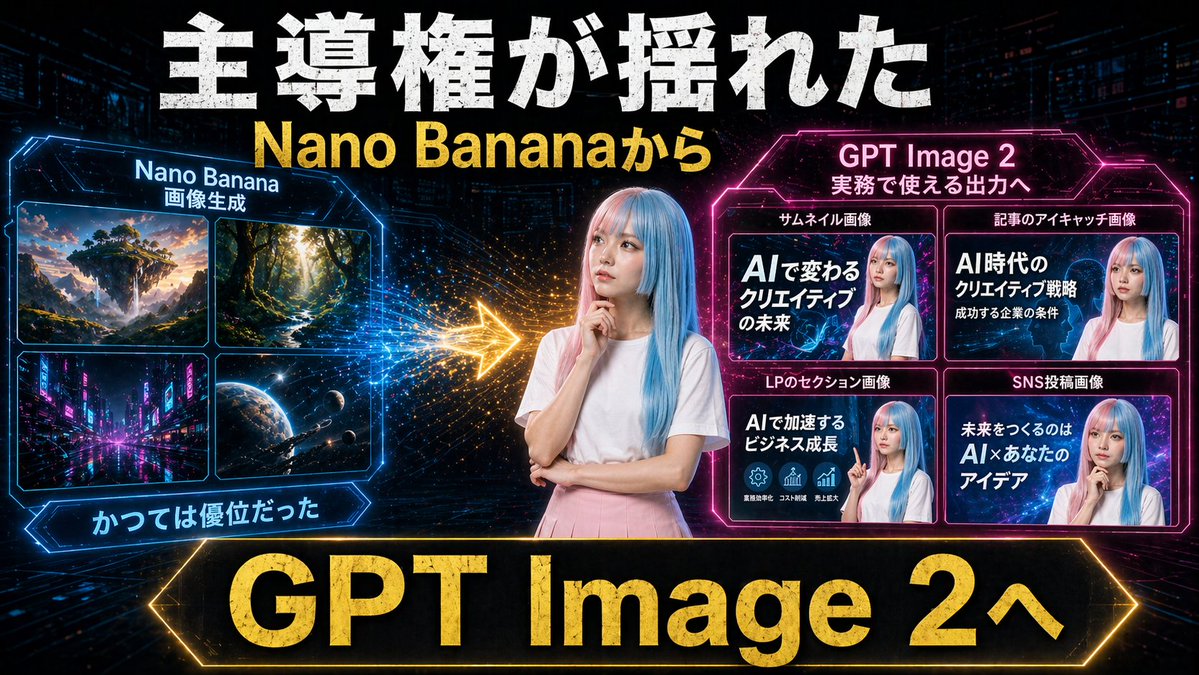
Neon AIのサムネイル比較
大胆なサイバーパンク風の比較サムネイル。Nano Banana画像生成からGPT Image 2への移行を、実用的なマーケティング出力例とともに示しており、YouTubeやソーシャルメディアのプロモーションに最適です。
これはグラフィック&ポスター向けのGPT Image 2プロンプトケースです。以下のコピー可能なプロンプトを使用して同様のビジュアルを生成し、再利用する前にAwesome GPT Image 2 Prompts帰属表示と商用利用権を確認してください。
プロンプトセット全体が必要ですか? グラフィック&ポスター 関連する例をもっと見るにはトピックハブを開くか、 GPT Image 2 プロンプトカタログ 完全な例の索引、再利用可能な構造、および出典の明記については、こちらをご覧ください。
Free 1K preview
Generate one preview image instantly, no sign-up required.
2351/4000
プロンプト
コピー準備完了プロンプト
Create a dramatic Japanese YouTube thumbnail in a futuristic neon cyberpunk style, 16:9 landscape. Use a dark tech-city background with faint skyscrapers, digital grid lines, glowing particles, and high-contrast blue, pink, and gold lighting. In the exact center, place a young woman from the waist up with long straight pastel blue hair, wearing a plain white short-sleeve T-shirt and a light pink skirt, posing thoughtfully with one hand near her chin and the other arm folded; Show every face clearly with natural, detailed facial features. Across the very top, add huge distressed bold white Japanese headline text reading 主導権が揺れた, and directly below it add large bold yellow text reading {argument name="subheadline text" default="Nano Bananaから"}. On the left side, create a glowing blue hexagonal-framed panel titled Nano Banana with a smaller subtitle 画像生成. Inside that panel, include exactly 4 image tiles in a 2x2 grid: 1) a fantasy floating island landscape at sunset, 2) a sunlit forest path with tall trees, 3) a neon futuristic city street at night, 4) an outer-space planet scene with stars and a spacecraft. Beneath the left panel, add a blue glowing ribbon label reading かつては優位だった. On the right side, create a glowing magenta hexagonal-framed panel titled {argument name="right panel title" default="GPT Image 2"} with a smaller subtitle 実務で使える出力へ. Inside it, include exactly 4 example thumbnail cards in a 2x2 grid, Show every face clearly with natural, detailed facial features. The 4 card labels above the tiles are: サムネイル画像, 記事のアイキャッチ画像, LPのセクション画像, SNS投稿画像. The large text inside the 4 cards should read respectively: 1) AIで変わるクリエイティブの未来, 2) AI時代のクリエイティブ戦略 成功する企業の条件, 3) AIで加速するビジネス成長, 4) 未来をつくるのは AI×あなたのアイデア. Between the left and right panels, place a bright glowing gold arrow pointing from left to right with spark-like particle trails, indicating transition or superiority shift. Along the bottom, add a very large black banner with a glowing gold border and massive bold gold text reading {argument name="bottom banner text" default="GPT Image 2へ"}. Overall composition should feel like a comparison graphic showing a shift from older image generation to more practical commercial output, with aggressive thumbnail typography, strong glow effects, metallic texture on major text, and polished social-media marketing visuals.プロンプト変数
プロンプトに表示される編集可能な引数プレースホルダーと、それらのデフォルト値。
変数
subheadline text
デフォルト
Nano Bananaから
変数
right panel title
デフォルト
GPT Image 2
変数
bottom banner text
デフォルト
GPT Image 2へ
Best for
- - グラフィック&ポスター visual exploration
- - Image generation and reference-image edits
- - Reusable briefs that keep source attribution visible
Change these parts
- - Subject, product, character, or scene
- - Aspect ratio, camera, lighting, and background
- - Brand, text, color, and output constraints
Recommended model and settings
- - Model: gpt-image-2
- - Input mode: テキストから画像
- - Aspect ratio: source
- - Commercial status: review original source
How to use this prompt
- 1. Copy the prompt and preserve its structure for the first test.
- 2. Replace the subject, context, and publishing channel.
- 3. Change one camera, lighting, or style variable per iteration.
- 4. Inspect the output, source, text, and rights before reuse.
Limitations, source, and reuse cautions
- - Generated output is an editable draft, not factual, legal, or rights evidence.
- - Review the linked source, people, brands, logos, text, and third-party media before commercial use.
Awesome GPT Image 2 Promptsからインポートされました。出典の明記が必要です。商用利用の可否はallowedです。有料利用の前に、出典元の権利をご確認ください。
このカテゴリーのその他の事例
カテゴリー、入力モードの互換性、品質、およびリスクの低さに基づいて優先順位付けされています。






再利用と出典に関する注記
ケースを事前に確認してから、このプロンプトを安全に使用してください。
- 1.プロンプトをコピーするか、生成ボタンを使ってDovooで直接開いてください。
- 2.ご自身の用途に合わせて、変数、アスペクト比、および参照画像を調整してください。
- 3.公開または有料利用の前に、情報源の権利、帰属表示の要件、およびブランドまたは肖像権に関するリスクを確認してください。