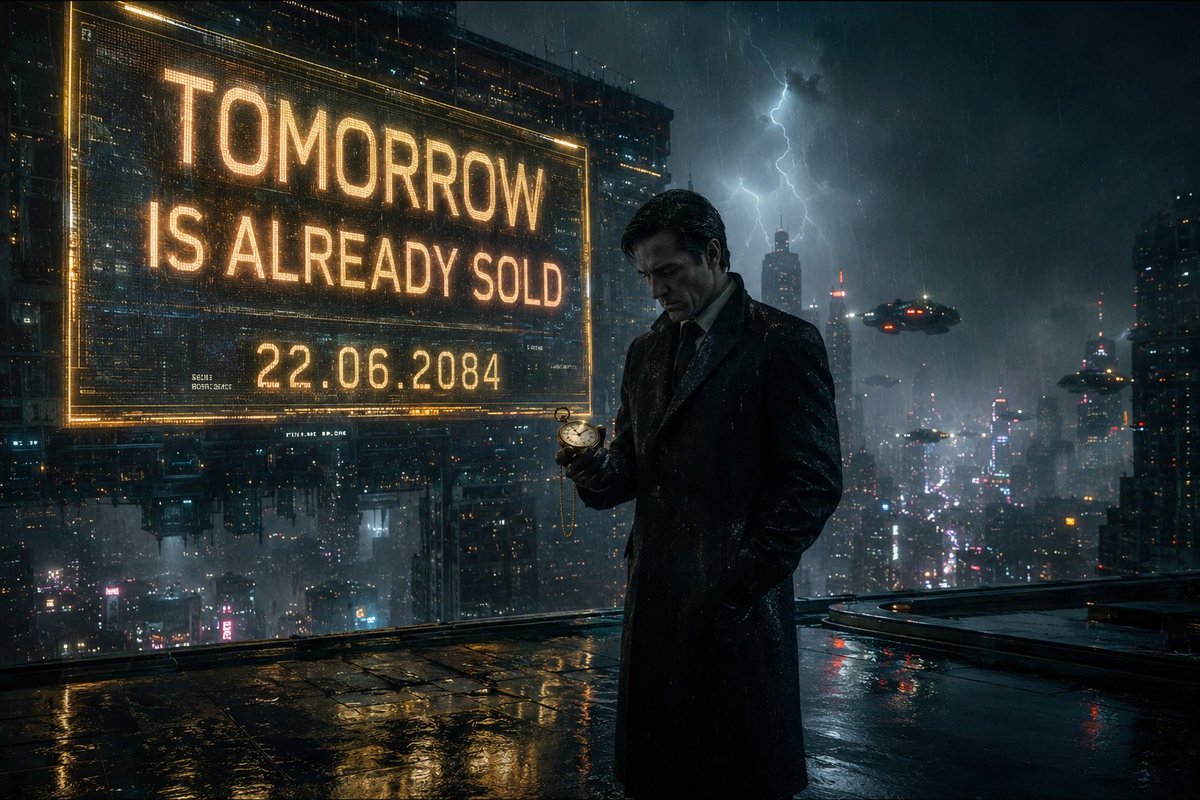
Neo-Noir Cyberpunk Businessman Portrait
A complex cinematic prompt for a mysterious businessman in a rainy futuristic city, featuring detailed environmental and cinematographic specifications.
これは肖像画とキャラクター向けのGPT Image 2プロンプトケースです。以下のコピー可能なプロンプトを使用して同様のビジュアルを生成し、再利用する前にAwesome GPT Image 2 Prompts帰属表示と商用利用権を確認してください。
プロンプトセット全体が必要ですか? 肖像画とキャラクター 関連する例をもっと見るにはトピックハブを開くか、 GPT Image 2 プロンプトカタログ 完全な例の索引、再利用可能な構造、および出典の明記については、こちらをご覧ください。
Free 1K preview
Generate one preview image instantly, no sign-up required.
2111/4000
プロンプト
コピー準備完了プロンプト
{
  "title": "The Man Who Sold Tomorrow",

  "image_description": "A cinematic neo-noir scene set in a {argument name="city style" default="futuristic city"} during heavy rain. A mysterious businessman stands alone beneath a glowing holographic billboard 500 stories above the city. Countless neon lights reflect across the wet rooftop surface. Flying vehicles drift silently through dense fog between skyscrapers. The man wears a perfectly tailored {argument name="clothing" default="black overcoat"} and leather gloves. In his hand is a small {argument name="prop" default="golden pocket watch"}. The watch displays tomorrow's date. His expression is calm but deeply troubled, as if he knows something nobody else does. Lightning briefly illuminates the city skyline behind him.",

  "subject": {
    "character": "Mysterious businessman",
    "appearance": "Elegant black overcoat, leather gloves, sharp facial features",
    "expression": "Melancholic, thoughtful, secretive",
    "pose": "Standing at the edge of a skyscraper rooftop"
  },

  "environment": {
    "location": "Cyberpunk megacity rooftop",
    "weather": "Heavy rain",
    "atmosphere": "Fog, neon reflections, distant flying vehicles"
  },

  "story_element": {
    "twist": "The pocket watch shows tomorrow's date because he already knows exactly how the world ends."
  },

  "cinematography": {
    "camera_angle": "Low angle",
    "shot_type": "Medium wide shot",
    "lens": "85mm anamorphic lens",
    "depth_of_field": "Shallow depth of field"
  },

  "lighting": {
    "primary": "Neon city lights",
    "secondary": "Lightning flashes",
    "effects": [
      "Volumetric fog",
      "Rain reflections",
      "Cinematic glow"
    ]
  },

  "color_palette": [
    "Blue",
    "Cyan",
    "Amber",
    "Black"
  ],

  "mood": [
    "Mysterious",
    "Thrilling",
    "Emotional",
    "Cinematic"
  ],

  "quality": {
    "style": "Denis Villeneuve inspired sci-fi cinema",
    "realism": "Ultra photorealistic",
    "resolution": "8K",
    "film_grain": true,
    "IMAX_quality": true,
    "award_winning_cinematography": true
  }
}
プロンプト変数
プロンプトに表示される編集可能な引数プレースホルダーと、それらのデフォルト値。
変数
city style
デフォルト
futuristic city
変数
clothing
デフォルト
black overcoat
変数
prop
デフォルト
golden pocket watch
Best for
- - 肖像画とキャラクター visual exploration
- - Image generation and reference-image edits
- - Reusable briefs that keep source attribution visible
Change these parts
- - Subject, product, character, or scene
- - Aspect ratio, camera, lighting, and background
- - Brand, text, color, and output constraints
Recommended model and settings
- - Model: gpt-image-2
- - Input mode: テキストから画像
- - Aspect ratio: source
- - Commercial status: review original source
How to use this prompt
- 1. Copy the prompt and preserve its structure for the first test.
- 2. Replace the subject, context, and publishing channel.
- 3. Change one camera, lighting, or style variable per iteration.
- 4. Inspect the output, source, text, and rights before reuse.
Limitations, source, and reuse cautions
- - Generated output is an editable draft, not factual, legal, or rights evidence.
- - Review the linked source, people, brands, logos, text, and third-party media before commercial use.
Awesome GPT Image 2 Promptsからインポートされました。出典の明記が必要です。商用利用の可否はallowedです。有料利用の前に、出典元の権利をご確認ください。
このカテゴリーのその他の事例
カテゴリー、入力モードの互換性、品質、およびリスクの低さに基づいて優先順位付けされています。






再利用と出典に関する注記
ケースを事前に確認してから、このプロンプトを安全に使用してください。
- 1.プロンプトをコピーするか、生成ボタンを使ってDovooで直接開いてください。
- 2.ご自身の用途に合わせて、変数、アスペクト比、および参照画像を調整してください。
- 3.公開または有料利用の前に、情報源の権利、帰属表示の要件、およびブランドまたは肖像権に関するリスクを確認してください。