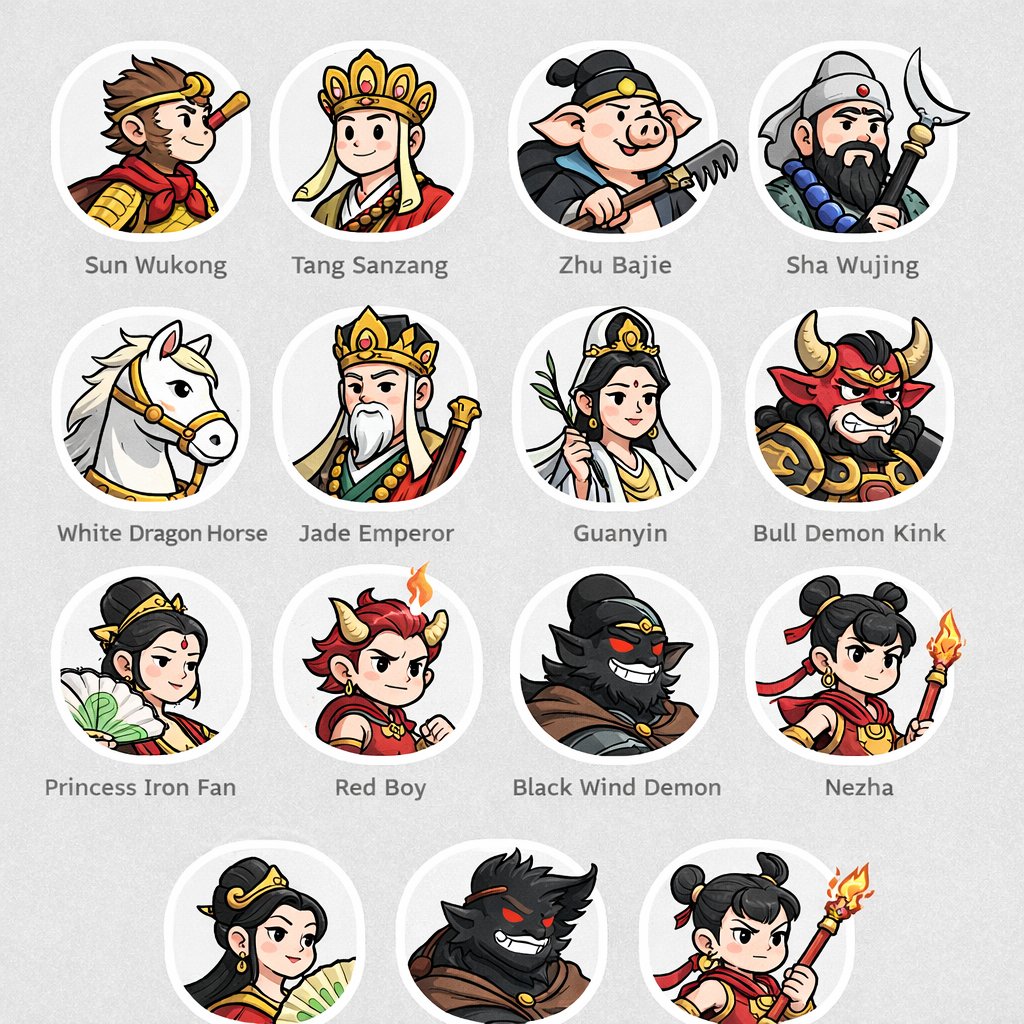
神話上のキャラクターのアバターグリッド
UIモックアップやキャストリストに最適な、漫画風の円形キャラクターアバターのグリッドとテキストラベルを生成します。
これは肖像画とキャラクター向けのGPT Image 2プロンプトケースです。以下のコピー可能なプロンプトを使用して同様のビジュアルを生成し、再利用する前にAwesome GPT Image 2 Prompts帰属表示と商用利用権を確認してください。
プロンプトセット全体が必要ですか? 肖像画とキャラクター 関連する例をもっと見るにはトピックハブを開くか、 GPT Image 2 プロンプトカタログ 完全な例の索引、再利用可能な構造、および出典の明記については、こちらをご覧ください。
Free 1K preview
Generate one preview image instantly, no sign-up required.
1822/4000
プロンプト
コピー準備完了プロンプト
{
  "type": "キャラクターアバターグリッド",
  "theme": "{argument name=\"theme\" default=\"西遊記の神話\"}",
  "style": "{argument name=\"art style\" default=\"クリーンな2Dカートゥーンベクターイラスト、太いアウトライン、フラットカラー\"}",
  "layout": {
    "background": "{argument name=\"background color\" default=\"薄い灰色\"} 微妙なテクスチャ",
    "format": "円形のポートレートのグリッドで、各円の下にテキストラベルが中央に配置",
    "rows": [
      {
        "count": 4,
        "items": [
          {
            "label": "孫悟空",
            "description": "金色の頭飾りと赤いスカーフをつけた猿の少年"
          },
          {
            "label": "唐三蔵",
            "description": "華やかな金の王冠をかぶった僧侶"
          },
          {
            "label": "猪八戒",
            "description": "熊手を持っている豚の男"
          },
          {
            "label": "沙悟浄",
            "description": "三日月杖を持っているひげの男"
          }
        ]
      },
      {
        "count": 4,
        "items": [
          {
            "label": "白馬",
            "description": "金の手綱をつけた白い馬"
          },
          {
            "label": "玉皇大帝",
            "description": "白いひげと金の王冠をつけた年老いた男"
          },
          {
            "label": "観音",
            "description": "柳の枝を持っている女神"
          },
          {
            "label": "牛魔王",
            "description": "鎧を着た激しい牛の悪魔"
          }
        ]
      },
      {
        "count": 4,
        "items": [
          {
            "label": "鉄扇公主",
            "description": "緑の扇子を持っている女性"
          },
          {
            "label": "紅孩児",
            "description": "赤い髪、角、小さな炎を持つ少年"
          },
          {
            "label": "黒風大王",
            "description": "赤い目をした暗い影の悪魔"
          },
          {
            "label": "哪吒",
            "description": "燃える槍を持っている二つの髪の房を持つ少年"
          }
        ]
      },
      {
        "count": 3,
        "description": "鉄扇公主、黒風大王、哪吒を繰り返す部分的な行で、底でわずかに切り取られている"
      }
    ]
  }
}
プロンプト変数
プロンプトに表示される編集可能な引数プレースホルダーと、それらのデフォルト値。
変数
theme
デフォルト
Journey to the West mythology
変数
art style
デフォルト
clean 2D cartoon vector illustration, thick outlines, flat colors
変数
background color
デフォルト
light gray
Best for
- - 肖像画とキャラクター visual exploration
- - Image generation and reference-image edits
- - Reusable briefs that keep source attribution visible
Change these parts
- - Subject, product, character, or scene
- - Aspect ratio, camera, lighting, and background
- - Brand, text, color, and output constraints
Recommended model and settings
- - Model: gpt-image-2
- - Input mode: テキストから画像
- - Aspect ratio: source
- - Commercial status: review original source
How to use this prompt
- 1. Copy the prompt and preserve its structure for the first test.
- 2. Replace the subject, context, and publishing channel.
- 3. Change one camera, lighting, or style variable per iteration.
- 4. Inspect the output, source, text, and rights before reuse.
Limitations, source, and reuse cautions
- - Generated output is an editable draft, not factual, legal, or rights evidence.
- - Review the linked source, people, brands, logos, text, and third-party media before commercial use.
Awesome GPT Image 2 Promptsからインポートされました。出典の明記が必要です。商用利用の可否はallowedです。有料利用の前に、出典元の権利をご確認ください。
このカテゴリーのその他の事例
カテゴリー、入力モードの互換性、品質、およびリスクの低さに基づいて優先順位付けされています。






再利用と出典に関する注記
ケースを事前に確認してから、このプロンプトを安全に使用してください。
- 1.プロンプトをコピーするか、生成ボタンを使ってDovooで直接開いてください。
- 2.ご自身の用途に合わせて、変数、アスペクト比、および参照画像を調整してください。
- 3.公開または有料利用の前に、情報源の権利、帰属表示の要件、およびブランドまたは肖像権に関するリスクを確認してください。