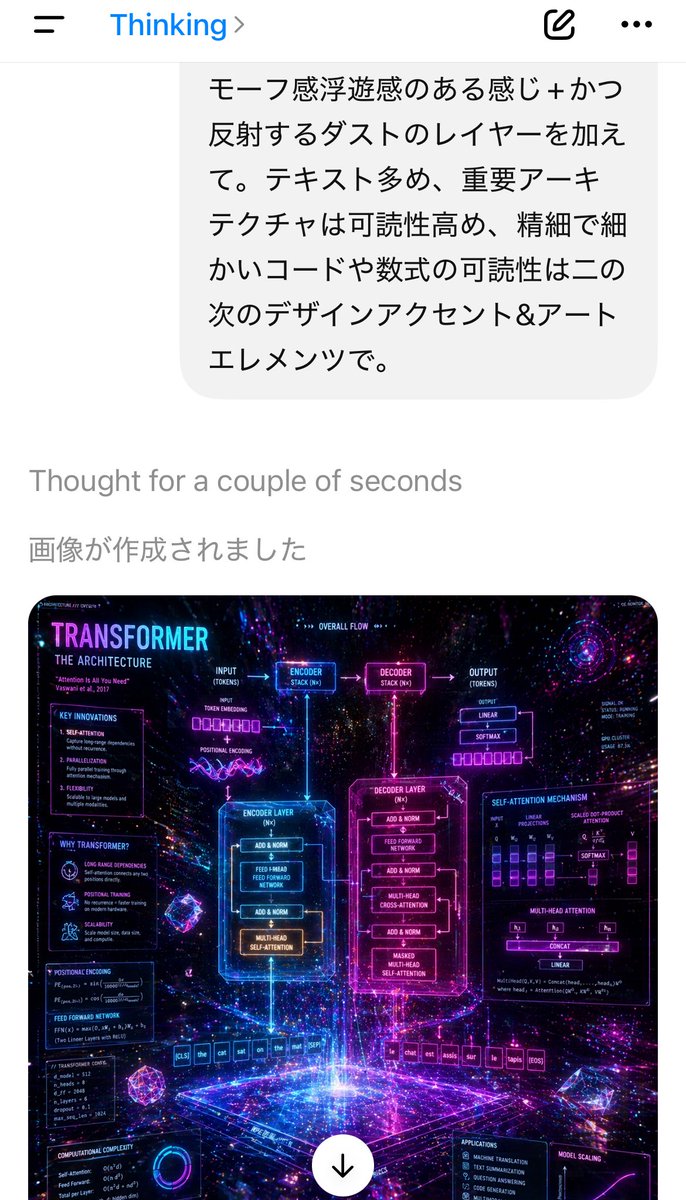
トランスフォーマーのポスター付きモバイルAIチャットのスクリーンショット
日本語のAIとの会話を表示するリアルなスマートフォンチャットアプリのスクリーンショットと、ネオンカラーのSF風トランスフォーマー建築のインフォグラフィックを生成画像として作成します。
これは製品および商業向けのGPT Image 2プロンプトケースです。以下のコピー可能なプロンプトを使用して同様のビジュアルを生成し、再利用する前にAwesome GPT Image 2 Prompts帰属表示と商用利用権を確認してください。
プロンプトセット全体が必要ですか? 製品および商業 関連する例をもっと見るにはトピックハブを開くか、 GPT Image 2 プロンプトカタログ 完全な例の索引、再利用可能な構造、および出典の明記については、こちらをご覧ください。
Free 1K preview
Generate one preview image instantly, no sign-up required.
Free text preview doesn’t preserve reference-image consistency.
2185/4000
プロンプト
コピー準備完了プロンプト
A smartphone app screenshot in portrait orientation showing an AI chat interface in Japanese, with a clean white background and iOS-style top bar. At the very top, display a left hamburger menu icon, blue text reading “Thinking” with a right chevron, an edit compose icon, and a three-dot menu. Below it, show a large rounded light-gray chat bubble containing 6 lines of Japanese text, exactly: 「モーフ感浮遊感のある感じ+かつ反射するダストのレイヤーを加えて。テキスト多め、重要ーアーキテクチャは可読性高め、精細で細かいコードや数式の可読性は二の次のデザインアクセント&アートエレメンツで。」 Under the bubble, place small light-gray system text reading “Thought for a couple of seconds”, then a larger gray Japanese line reading “画像が作成されました”. In the lower half, show 1 generated image thumbnail with rounded corners: a dense futuristic infographic poster about the Transformer neural network architecture, rendered as glowing neon sci-fi holographic UI art. The poster should have a cosmic deep-space background with stars, purple, magenta, blue, and cyan light trails, reflective particles, volumetric glow, and floating geometric crystals. Large title at top left of the poster: “TRANSFORMER”, with subtitle “THE ARCHITECTURE”. Include 2 large central glowing boxes labeled “ENCODER LAYER” and “DECODER LAYER”, linked by arrows and smaller blocks for “ENCODER STACK (N×)” and “DECODER STACK (N×)”. Add many surrounding labeled panels and formulas, including sections for “KEY INNOVATIONS”, “WHY TRANSFORMERS?”, “POSITIONAL ENCODING”, “FEED FORWARD NETWORK”, “COMPUTATIONAL COMPLEXITY”, “OVERALL FLOW”, “SELF-ATTENTION MECHANISM”, “MULTI-HEAD ATTENTION”, “APPLICATIONS”, and “MODEL SCALING”. Show token rows at the bottom, including an English input sequence like “[CLS] the cat sat on the mat [SEP]” and an output sequence in French-like tokens ending with “[EOS]”. Add tiny charts, equations, attention diagrams, and wiring lines throughout, but keep the overall impression artistic and luminous rather than strictly readable. At the bottom center of the poster thumbnail, overlay a white circular download button with a black downward arrow. The overall screenshot should feel like a real mobile ChatGPT-style interface displaying an AI-generated image result, crisp and modern.
Best for
- - 製品および商業 visual exploration
- - Image generation and reference-image edits
- - Reusable briefs that keep source attribution visible
Change these parts
- - Subject, product, character, or scene
- - Aspect ratio, camera, lighting, and background
- - Brand, text, color, and output constraints
Recommended model and settings
- - Model: gpt-image-2
- - Input mode: 画像から画像
- - Aspect ratio: source
- - Commercial status: review original source
How to use this prompt
- 1. Copy the prompt and preserve its structure for the first test.
- 2. Replace the subject, context, and publishing channel.
- 3. Change one camera, lighting, or style variable per iteration.
- 4. Inspect the output, source, text, and rights before reuse.
Limitations, source, and reuse cautions
- - Generated output is an editable draft, not factual, legal, or rights evidence.
- - Review the linked source, people, brands, logos, text, and third-party media before commercial use.
Awesome GPT Image 2 Promptsからインポートされました。出典の明記が必要です。商用利用の可否はallowedです。有料利用の前に、出典元の権利をご確認ください。
このカテゴリーのその他の事例
カテゴリー、入力モードの互換性、品質、およびリスクの低さに基づいて優先順位付けされています。






再利用と出典に関する注記
ケースを事前に確認してから、このプロンプトを安全に使用してください。
- 1.プロンプトをコピーするか、生成ボタンを使ってDovooで直接開いてください。
- 2.ご自身の用途に合わせて、変数、アスペクト比、および参照画像を調整してください。
- 3.公開または有料利用の前に、情報源の権利、帰属表示の要件、およびブランドまたは肖像権に関するリスクを確認してください。