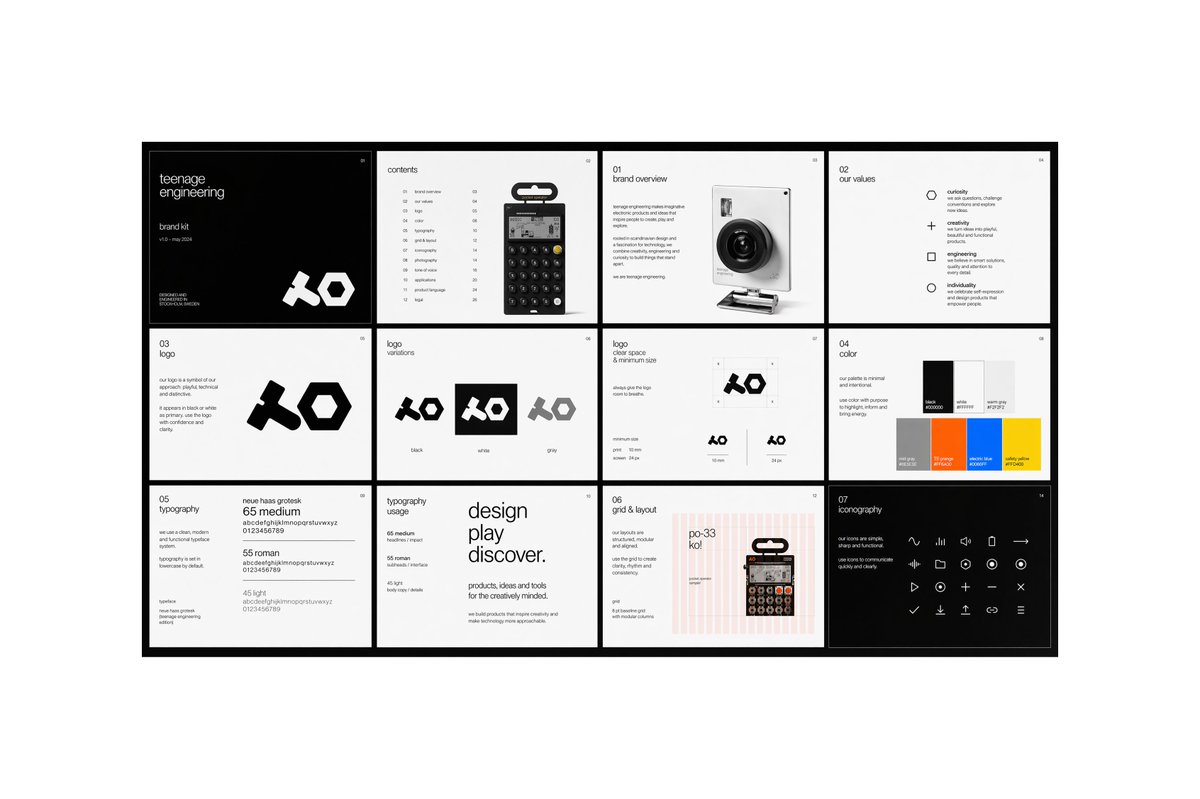
ミニマルなブランドガイドラインボード
現代的なテクノロジーブランドのロゴ、価値観、タイポグラフィ、カラー、レイアウトシステム、アイコンなどを効果的に紹介するための、洗練されたマルチパネル式ブランドアイデンティティプレゼンテーションボード。
これはグラフィック&ポスター向けのGPT Image 2プロンプトケースです。以下のコピー可能なプロンプトを使用して同様のビジュアルを生成し、再利用する前にAwesome GPT Image 2 Prompts帰属表示と商用利用権を確認してください。
プロンプトセット全体が必要ですか? グラフィック&ポスター 関連する例をもっと見るにはトピックハブを開くか、 GPT Image 2 プロンプトカタログ 完全な例の索引、再利用可能な構造、および出典の明記については、こちらをご覧ください。
Free 1K preview
Generate one preview image instantly, no sign-up required.
4000/4000
プロンプト
コピー準備完了プロンプト
{
  "type": "modern brand guideline presentation board",
  "style": "minimal Swiss editorial design, monochrome with selective accent colors, clean grid system, lots of white space, thin sans-serif typography, crisp product-render aesthetic",
  "brand": {
    "name": "{argument name=\"brand name\" default=\"teenage engineering\"}",
    "subtitle": "brand kit",
    "issue": "v18 - may 2024",
    "logo_style": "bold geometric abstract wordmark with chunky angular forms"
  },
  "canvas": {
    "aspect_ratio": "16:9",
    "background": "light gray outer background with a centered presentation board framed by a thick black border"
  },
  "layout": {
    "structure": "4 columns by 3 rows",
    "total_panels": 12,
    "sections": [
      {
        "title": "cover",
        "position": "row 1, column 1",
        "count": 1,
        "theme": "black background cover page with small white text and oversized white logo at bottom right"
      },
      {
        "title": "contents",
        "position": "row 1, column 2",
        "count": 1,
        "theme": "table of contents page with a centered handheld calculator product image and a vertical list of sections with page numbers"
      },
      {
        "title": "01 brand overview",
        "position": "row 1, column 3",
        "count": 1,
        "theme": "introductory text block on the left and a realistic compact camera render on the right"
      },
      {
        "title": "02 our values",
        "position": "row 1, column 4",
        "count": 1,
        "theme": "four-value list with simple outline icons",
        "labels": [
          "curiosity",
          "creativity",
          "engineering",
          "individuality"
        ]
      },
      {
        "title": "03 Logo",
        "position": "row 2, column 1",
        "count": 1,
        "theme": "logo explanation text on the left and one large black logo on white background"
      },
      {
        "title": "logo variations",
        "position": "row 2, column 2",
        "count": 1,
        "theme": "three logo tiles shown side by side",
        "labels": [
          "black",
          "white",
          "grey"
        ]
      },
      {
        "title": "logo clear space & minimum size",
        "position": "row 2, column 3",
        "count": 1,
        "theme": "diagram page showing protected area around logo and two minimum-size examples"
      },
      {
        "title": "04 color",
        "position": "row 2, column 4",
        "count": 1,
        "theme": "color palette page with 6 rectangular swatches arranged in two rows of three",
        "labels": [
          "black",
          "white",
          "light gray",
          "mid grey",
          "orange",
          "blue",
          "yellow"
        ]
      },
      {
        "title": "05 typography",
        "position": "row 3, column 1",
        "count": 1,
        "theme": "font specimen page showing three weights with sample alphabet and numerals",
        "labels": [
          "65 medium",
          "55 roman",
          "45 light"
        ]
      },
      {
        "title": "typography usage",
        "position": "row 3, column 2",
        "count": 1,
        "theme": "large editorial type composition with stacked words and smaller supporting body copy"
      },
      {
        "title": "06 grid & layout",
        "position": "row 3, column 3",
        "count": 1,
        "theme": "page showing a pink vertical-column grid overlay, alignment notes, and a product image placed on the right"
      },
      {
        "title": "07 iconography",
        "position": "row 3, column 4",
        "count": 1,
        "theme": "black background page with a matrix of 24 minimalist line icons in white",
        "labels": [
          "wave",
          "pause",
          "speaker",
          "stop",
          "arrow right",
          "rewind",
          "volume down",
          "circle",
          "plus",
          "record",
          "play",
          "download",
          "close",
          "check",
          "minus",
          "upload",
          "link",
          "menu",
          "and 6 more simple media/system icons"
        ]
      }
    ]
  },
  "visual_details": {
    "products": [
      {
        "type": "calculator/synth-style handheld device",
        "appearance": "small black rectangular device with circular buttons and a hanging retail tab"
      },
      {
        "type": "compact camera",
        "appearance": "white body with a large black lens, photographed at a slight angle"
      }
    ],
    "typography": "neutral grotesk sans serif, very small captions, neat alignment, magazine-like hierarchy",
    "color_palette": "primarily black and white, with accents of light gray, orange, blue, yellow, and faint pink grid lines",
    "rendering": "high-resolution presentation mockup, perfectly straight-on view, sharp edges, professional branding case-study aesthetic"
  },
  "text_treatment": "use mostly small editorial placeholder text and concise branding copy, preserving the minimalist corporate design language",
  "quality": "clean, premium, contemporary, design-award presentation board"
}
プロンプト変数
プロンプトに表示される編集可能な引数プレースホルダーと、それらのデフォルト値。
変数
brand name
デフォルト
teenage engineering
Best for
- - グラフィック&ポスター visual exploration
- - Image generation and reference-image edits
- - Reusable briefs that keep source attribution visible
Change these parts
- - Subject, product, character, or scene
- - Aspect ratio, camera, lighting, and background
- - Brand, text, color, and output constraints
Recommended model and settings
- - Model: gpt-image-2
- - Input mode: テキストから画像
- - Aspect ratio: source
- - Commercial status: review original source
How to use this prompt
- 1. Copy the prompt and preserve its structure for the first test.
- 2. Replace the subject, context, and publishing channel.
- 3. Change one camera, lighting, or style variable per iteration.
- 4. Inspect the output, source, text, and rights before reuse.
Limitations, source, and reuse cautions
- - Generated output is an editable draft, not factual, legal, or rights evidence.
- - Review the linked source, people, brands, logos, text, and third-party media before commercial use.
Awesome GPT Image 2 Promptsからインポートされました。出典の明記が必要です。商用利用の可否はallowedです。有料利用の前に、出典元の権利をご確認ください。
このカテゴリーのその他の事例
カテゴリー、入力モードの互換性、品質、およびリスクの低さに基づいて優先順位付けされています。






再利用と出典に関する注記
ケースを事前に確認してから、このプロンプトを安全に使用してください。
- 1.プロンプトをコピーするか、生成ボタンを使ってDovooで直接開いてください。
- 2.ご自身の用途に合わせて、変数、アスペクト比、および参照画像を調整してください。
- 3.公開または有料利用の前に、情報源の権利、帰属表示の要件、およびブランドまたは肖像権に関するリスクを確認してください。