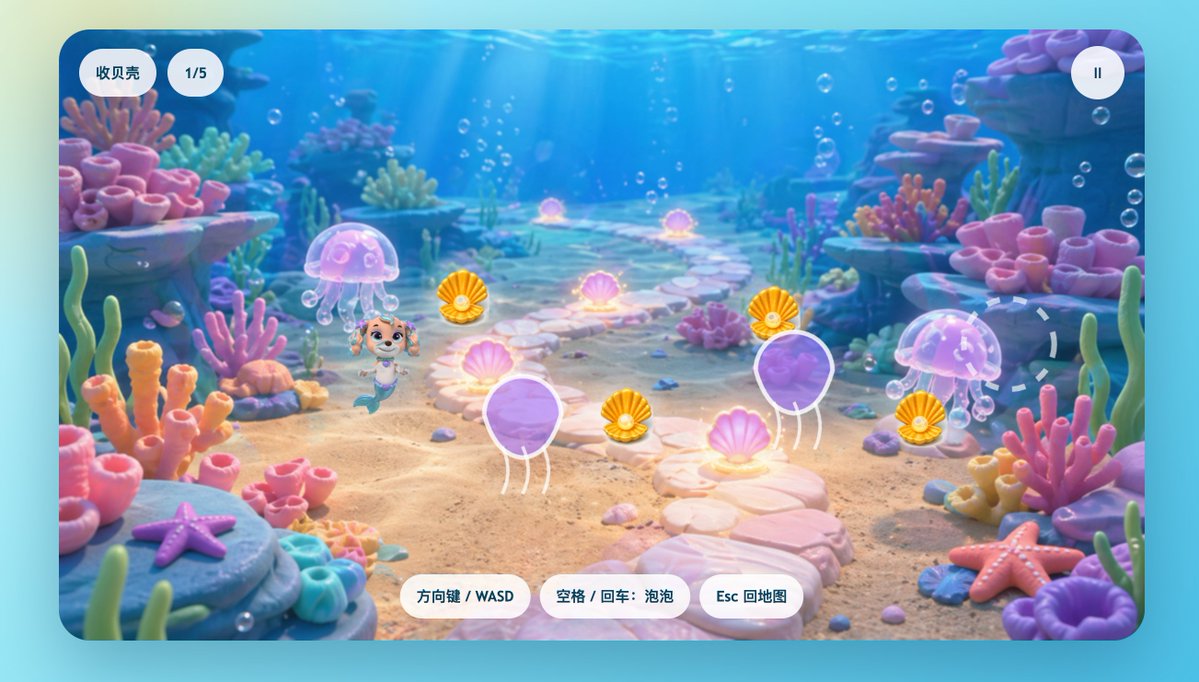
かわいい人魚の子犬の水中ゲーム画面
このプロンプトは、人魚の子犬を主人公としたカラフルな子供向け水中ゲームのスクリーンショットを生成します。収集可能な貝殻、サンゴ礁の風景、そしてシンプルな中国語のUIを備えたカジュアルゲームのモックアップに最適です。
これはアニメ&ゲーム向けのGPT Image 2プロンプトケースです。以下のコピー可能なプロンプトを使用して同様のビジュアルを生成し、再利用する前にAwesome GPT Image 2 Prompts帰属表示と商用利用権を確認してください。
プロンプトセット全体が必要ですか? アニメ&ゲーム 関連する例をもっと見るにはトピックハブを開くか、 GPT Image 2 プロンプトカタログ 完全な例の索引、再利用可能な構造、および出典の明記については、こちらをご覧ください。
Free 1K preview
Generate one preview image instantly, no sign-up required.
2248/4000
プロンプト
コピー準備完了プロンプト
A bright, fantastical 2D underwater game scene, rendered in a refined children's animation style, presented as a full-screen level screenshot within a rounded rectangular game viewport. The background features vibrant coral reefs, with a light-colored pebble path winding from the foreground across the sandy seabed towards the center of the image, creating a sense of spatial depth. Sunlight streams down from the clear blue water above, and numerous small bubbles float throughout the scene. The path is flanked by soft, toy-like coral formations and marine plants in shades of pink, peach, lavender, turquoise, and mint, along with rocky outcroppings on either side. Two starfish are placed in the foreground: a purple starfish on a rock in the lower left corner, and a pink-orange starfish in the lower right corner. Add two semi-transparent pink jellyfish, positioned to the left and center-right of the image, emitting a soft glow. Scatter 6 glowing pink clam shells along the path and surrounding areas, each radiating a gentle magical aura. Place 4 collectible shells with pearl centers and golden-orange hues near the central game area. Add two large, purple balloon-like jellyfish obstacles with white outlines and short tentacles, positioned in the lower-left center and mid-right. In the left-center foreground, place a charming mermaid puppy character inspired by preschool animation rescue dogs: a small, smiling dog face, large, expressive eyes, light brown and cream-colored fur, a pink headband, and a teal mermaid tail, posed playfully as if moving forward. On the right side, add a faint, dashed circular target marker above the environment. Overlay simple Chinese mobile game UI elements: two white rounded capsule buttons in the upper left corner labeled “Collect Shells” and “1/5”; a white circular pause button with “II” in the upper right corner. Place 3 white rounded command buttons at the bottom center, with the text in bluish-gray: “Arrow Keys / WASD,” “Space / Enter: Bubble,” and “Esc to Map.” The overall image is glossy, with soft lighting, suitable for children, with high and balanced color saturation, creating a dreamy coral reef atmosphere, a simple composition, and in line with the art style of casual games.
Best for
- - アニメ&ゲーム visual exploration
- - Image generation and reference-image edits
- - Reusable briefs that keep source attribution visible
Change these parts
- - Subject, product, character, or scene
- - Aspect ratio, camera, lighting, and background
- - Brand, text, color, and output constraints
Recommended model and settings
- - Model: gpt-image-2
- - Input mode: テキストから画像
- - Aspect ratio: source
- - Commercial status: review original source
How to use this prompt
- 1. Copy the prompt and preserve its structure for the first test.
- 2. Replace the subject, context, and publishing channel.
- 3. Change one camera, lighting, or style variable per iteration.
- 4. Inspect the output, source, text, and rights before reuse.
Limitations, source, and reuse cautions
- - Generated output is an editable draft, not factual, legal, or rights evidence.
- - Review the linked source, people, brands, logos, text, and third-party media before commercial use.
Awesome GPT Image 2 Promptsからインポートされました。出典の明記が必要です。商用利用の可否はallowedです。有料利用の前に、出典元の権利をご確認ください。
このカテゴリーのその他の事例
カテゴリー、入力モードの互換性、品質、およびリスクの低さに基づいて優先順位付けされています。






再利用と出典に関する注記
ケースを事前に確認してから、このプロンプトを安全に使用してください。
- 1.プロンプトをコピーするか、生成ボタンを使ってDovooで直接開いてください。
- 2.ご自身の用途に合わせて、変数、アスペクト比、および参照画像を調整してください。
- 3.公開または有料利用の前に、情報源の権利、帰属表示の要件、およびブランドまたは肖像権に関するリスクを確認してください。