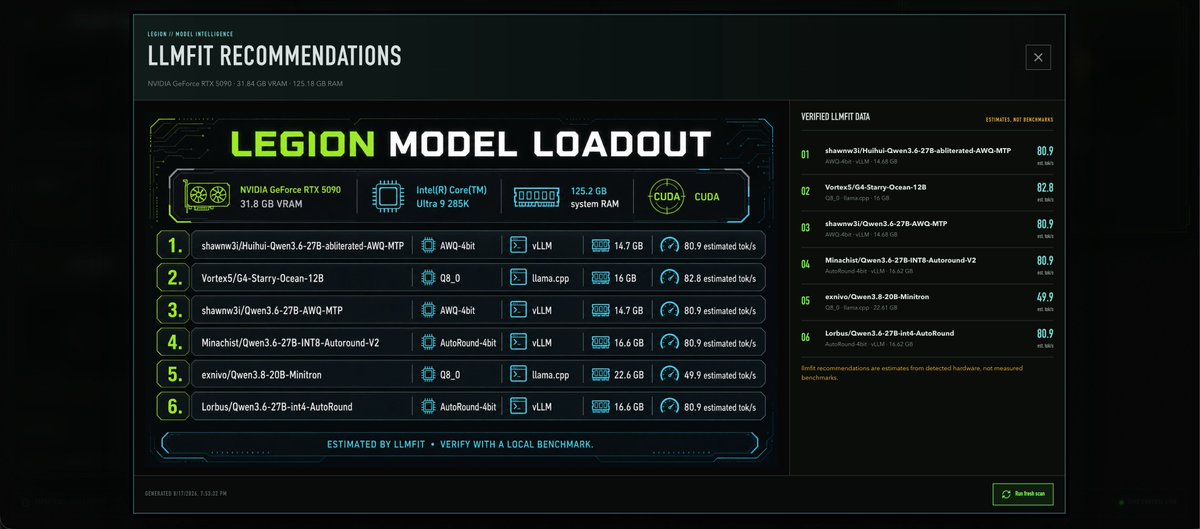
Cyberpunk LLMFit Model Dashboard
Generates a dark sci-fi dashboard infographic showing local hardware and six recommended LLM model loadouts for a machine-learning control panel.
これはグラフィック&ポスター向けのGPT Image 2プロンプトケースです。以下のコピー可能なプロンプトを使用して同様のビジュアルを生成し、再利用する前にAwesome GPT Image 2 Prompts帰属表示と商用利用権を確認してください。
プロンプトセット全体が必要ですか? グラフィック&ポスター 関連する例をもっと見るにはトピックハブを開くか、 GPT Image 2 プロンプトカタログ 完全な例の索引、再利用可能な構造、および出典の明記については、こちらをご覧ください。
Free 1K preview
Generate one preview image instantly, no sign-up required.
4000/4000
プロンプト
コピー準備完了プロンプト
Goal: Create a dark futuristic dashboard infographic for local AI model recommendations titled {argument name="headline text" default="LLMFIT RECOMMENDATIONS"}, with a large central panel reading {argument name="main title" default="LEGION MODEL LOADOUT"}. The design should look like a cyberpunk hardware-analysis UI generated on demand for a local machine, not a marketing poster.

Canvas: Wide 21:9 landscape image, approximately 1200x560, black and deep teal background with subtle glow, thin cyan grid lines, faint circuit traces, and a bordered application-window frame. Add a small close-box icon in the top right of the window. Use sharp sci-fi typography, condensed uppercase headings, neon lime accents, cyan outlines, and small amber annotation text.

Top header: At upper left, small label "LEGION / MODEL INTELLIGENCE" above the headline. Under the headline, show hardware summary text: {argument name="hardware summary" default="NVIDIA GeForce RTX 5090 · 31.84 GB VRAM · 125.18 GB RAM"}.

Main layout: Split the dashboard into two main columns. The left column takes about 70% width and contains the primary loadout card. The right column takes about 30% width and contains a compact verified-data list.

Left primary card: Create a large neon-framed panel with the big title "LEGION MODEL LOADOUT" in lime green and white. Beneath it, show exactly 4 hardware capability badges in a single row: 1) NVIDIA GeForce RTX 5090, 31.8 GB VRAM with a GPU fan icon; 2) Intel(R) Core(TM) Ultra 9 285K with a CPU chip icon; 3) 125.2 GB system RAM with a memory module icon; 4) CUDA with a circular CUDA icon. Use lime for the GPU badge and cyan for the others.

Loadout table: Below the badges, show exactly 6 ranked recommendation rows with large lime row numbers in rounded boxes and thin cyan separators. Each row should include model name, quantization, runtime, memory, and estimated speed. The 6 rows are: 1) "shawnw3j/Huihui-Qwen3.6-27B-abliterated-AWQ-MTP", quantization "AWQ-4bit", runtime "vLLM", memory "14.7 GB", speed "80.9 estimated tok/s"; 2) "Vortex5/G4-Starry-Ocean-12B", quantization "Q8_0", runtime "llama.cpp", memory "16 GB", speed "82.8 estimated tok/s"; 3) "shawnw3j/Qwen3.6-27B-AWQ-MTP", quantization "AWQ-4bit", runtime "vLLM", memory "14.7 GB", speed "80.9 estimated tok/s"; 4) "Minachist/Qwen3.6-27B-INT8-Autoround-V2", quantization "AutoRound-4bit", runtime "vLLM", memory "16.6 GB", speed "80.9 estimated tok/s"; 5) "exnivo/Qwen3.8-20B-Minitron", quantization "Q8_0", runtime "llama.cpp", memory "22.6 GB", speed "49.9 estimated tok/s"; 6) "Lorbus/Qwen3.6-27B-int4-AutoRound", quantization "AutoRound-4bit", runtime "vLLM", memory "16.6 GB", speed "80.9 estimated tok/s". Add tiny icons for chip, terminal/runtime, memory, and speedometer in the metric columns.

Footer strip in the main card: Centered text in cyan: "ESTIMATED BY LLMFIT · VERIFY WITH A LOCAL BENCHMARK." Add angular brackets and thin decorative circuit segments around it.

Right sidebar: Header "VERIFIED LLMFIT DATA" on the left and small amber text "ESTIMATES, NOT BENCHMARKS" on the right. Show exactly 6 compact verified-data rows matching the 6 recommendations, numbered 01 through 06 in lime. Each row should show a shortened model name, a small second line with quant/runtime/memory, and a large right-aligned score: 80.9, 82.8, 80.9, 80.9, 49.9, 80.9. At the bottom, add a small amber note: "llmfit recommendations are estimates from detected hardware, not measured benchmarks."

Bottom window bar: Add tiny timestamp text at bottom left, "GENERATED 8/17/2026, 7:35:32 PM". Add a small rectangular neon green button at bottom right labeled {argument name="button label" default="Refresh scan"} with a refresh icon.

Visual constraints: Keep all text in English, crisp and legible, with no extra rows beyond the specified 6 recommendations and no extra hardware badges beyond the specified 4. Use a dark transparent-glass UI style, subtle bloom, no people, no logos other than the textual hardware/model labels, and no watermark.
プロンプト変数
プロンプトに表示される編集可能な引数プレースホルダーと、それらのデフォルト値。
変数
headline text
デフォルト
LLMFIT RECOMMENDATIONS
変数
main title
デフォルト
LEGION MODEL LOADOUT
変数
hardware summary
デフォルト
NVIDIA GeForce RTX 5090 · 31.84 GB VRAM · 125.18 GB RAM
変数
button label
デフォルト
Refresh scan
Best for
- - グラフィック&ポスター visual exploration
- - Image generation and reference-image edits
- - Reusable briefs that keep source attribution visible
Change these parts
- - Subject, product, character, or scene
- - Aspect ratio, camera, lighting, and background
- - Brand, text, color, and output constraints
Recommended model and settings
- - Model: gpt-image-2
- - Input mode: テキストから画像
- - Aspect ratio: source
- - Commercial status: review original source
How to use this prompt
- 1. Copy the prompt and preserve its structure for the first test.
- 2. Replace the subject, context, and publishing channel.
- 3. Change one camera, lighting, or style variable per iteration.
- 4. Inspect the output, source, text, and rights before reuse.
Limitations, source, and reuse cautions
- - Generated output is an editable draft, not factual, legal, or rights evidence.
- - Review the linked source, people, brands, logos, text, and third-party media before commercial use.
Awesome GPT Image 2 Promptsからインポートされました。出典の明記が必要です。商用利用の可否はallowedです。有料利用の前に、出典元の権利をご確認ください。
このカテゴリーのその他の事例
カテゴリー、入力モードの互換性、品質、およびリスクの低さに基づいて優先順位付けされています。





再利用と出典に関する注記
ケースを事前に確認してから、このプロンプトを安全に使用してください。
- 1.プロンプトをコピーするか、生成ボタンを使ってDovooで直接開いてください。
- 2.ご自身の用途に合わせて、変数、アスペクト比、および参照画像を調整してください。
- 3.公開または有料利用の前に、情報源の権利、帰属表示の要件、およびブランドまたは肖像権に関するリスクを確認してください。