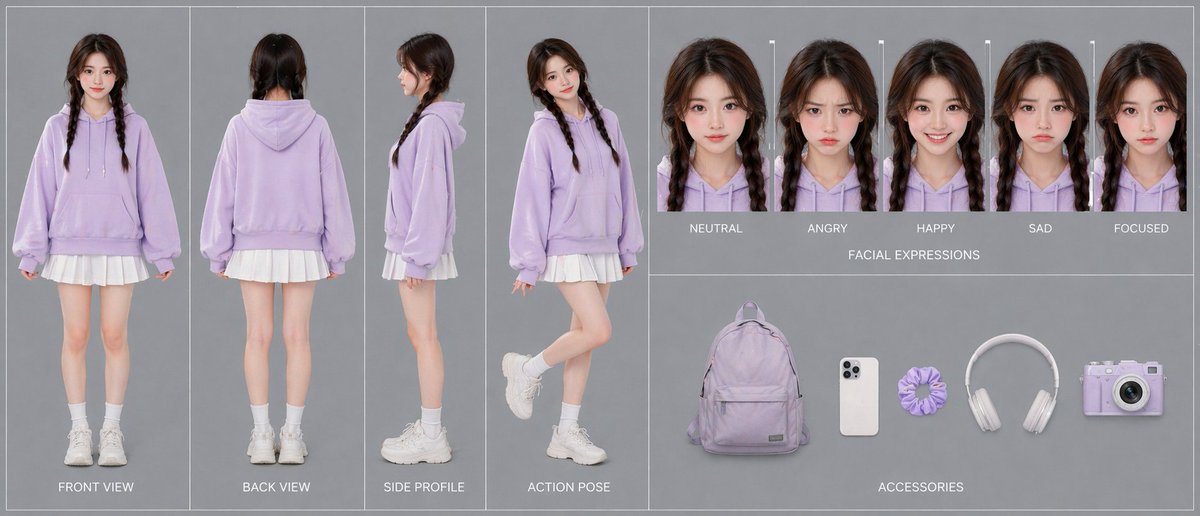
ラベンダー色のパーカーを着たキャラクターの参考資料
AIビデオ、アニメーション、またはキャラクターデザインのワークフローで使用するための、全身図、5種類の表情、および5種類のアクセサリーを示す、洗練された複数パネルのキャラクター一貫性シート。
これは肖像画とキャラクター向けのGPT Image 2プロンプトケースです。以下のコピー可能なプロンプトを使用して同様のビジュアルを生成し、再利用する前にAwesome GPT Image 2 Prompts帰属表示と商用利用権を確認してください。
プロンプトセット全体が必要ですか? 肖像画とキャラクター 関連する例をもっと見るにはトピックハブを開くか、 GPT Image 2 プロンプトカタログ 完全な例の索引、再利用可能な構造、および出典の明記については、こちらをご覧ください。
Free 1K preview
Generate one preview image instantly, no sign-up required.
2462/4000
プロンプト
コピー準備完了プロンプト
{"type":"character reference sheet","style":"clean studio fashion turnaround board, photorealistic, soft commercial lighting, minimalist gray background, high-resolution consistency sheet for AI video character design","character":{"gender_presentation":"young woman","age_appearance":"late teens to early 20s","identity":"same person shown consistently across all panels","hair":{"color":"dark brown","style":"center-parted twin braids falling over the front of the shoulders","texture":"slightly wavy with soft volume at the crown"},"outfit":{"top":"oversized pastel lavender hoodie with drawstrings and front kangaroo pocket","bottom":"short white pleated skirt visible below the hoodie hem","socks":"white mid-calf socks","shoes":"chunky white sneakers"}},"layout":{"background":"uniform light gray studio backdrop with thin white divider lines separating panels","sections":[{"title":"body views","position":"left half","count":4,"labels":["FRONT VIEW","BACK VIEW","SIDE PROFILE","ACTION POSE"],"details":"full-body character shown in 4 separate vertical panels; front view standing straight with arms relaxed, back view standing straight, side profile facing left, action pose in three-quarter view with one leg bent upward behind her and a playful casual stance"},{"title":"FACIAL EXPRESSIONS","position":"upper right","count":5,"labels":["NEUTRAL","ANGRY","HAPPY","SAD","FOCUSED"],"details":"5 tightly cropped head-and-shoulders portraits of the same character in the same lavender hoodie, evenly spaced in a row, each with the same hairstyle and lighting, subtle expression changes only"},{"title":"ACCESSORIES","position":"lower right","count":5,"labels":["backpack","smartphone","scrunchie","headphones","camera"],"details":"5 isolated items laid out horizontally with soft shadows: a pastel lavender backpack, a white smartphone with triple rear cameras, a lavender scrunchie, white over-ear headphones, and a pastel lavender compact camera"}],"composition":"wide horizontal board, left section dedicated to full-body turnaround, upper-right strip for expression lineup, lower-right strip for accessories","text_style":"small uppercase white sans-serif labels centered beneath or near each item"},"color_palette":{"dominant":["pastel lavender","white","cool gray"],"accent":["soft skin tones","dark brown hair"]},"quality":"polished catalog-style presentation, accurate proportions, consistent facial features and clothing details across all panels"}Best for
- - 肖像画とキャラクター visual exploration
- - Image generation and reference-image edits
- - Reusable briefs that keep source attribution visible
Change these parts
- - Subject, product, character, or scene
- - Aspect ratio, camera, lighting, and background
- - Brand, text, color, and output constraints
Recommended model and settings
- - Model: gpt-image-2
- - Input mode: テキストから画像
- - Aspect ratio: source
- - Commercial status: review original source
How to use this prompt
- 1. Copy the prompt and preserve its structure for the first test.
- 2. Replace the subject, context, and publishing channel.
- 3. Change one camera, lighting, or style variable per iteration.
- 4. Inspect the output, source, text, and rights before reuse.
Limitations, source, and reuse cautions
- - Generated output is an editable draft, not factual, legal, or rights evidence.
- - Review the linked source, people, brands, logos, text, and third-party media before commercial use.
Awesome GPT Image 2 Promptsからインポートされました。出典の明記が必要です。商用利用の可否はallowedです。有料利用の前に、出典元の権利をご確認ください。
このカテゴリーのその他の事例
カテゴリー、入力モードの互換性、品質、およびリスクの低さに基づいて優先順位付けされています。






再利用と出典に関する注記
ケースを事前に確認してから、このプロンプトを安全に使用してください。
- 1.プロンプトをコピーするか、生成ボタンを使ってDovooで直接開いてください。
- 2.ご自身の用途に合わせて、変数、アスペクト比、および参照画像を調整してください。
- 3.公開または有料利用の前に、情報源の権利、帰属表示の要件、およびブランドまたは肖像権に関するリスクを確認してください。