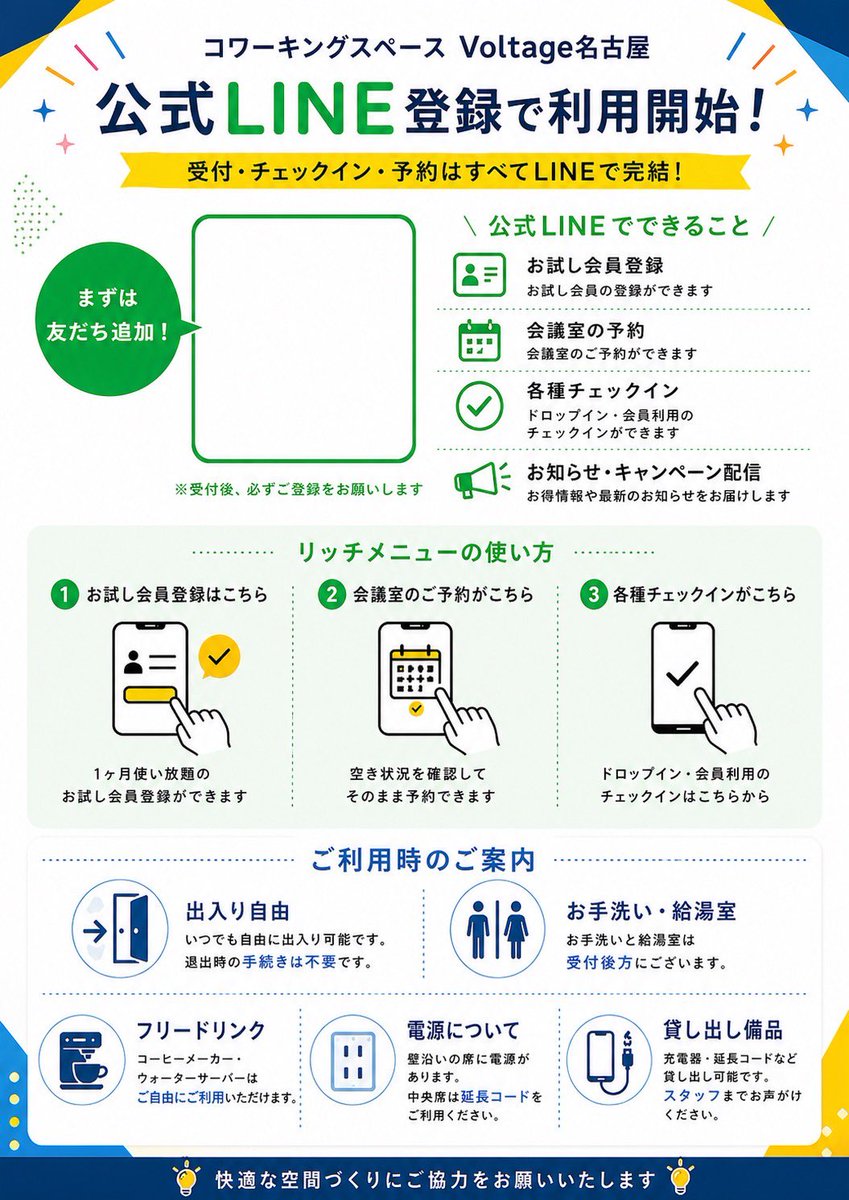
日本語版LINE登録ポスター
LINEを使った登録、予約、チェックイン、施設案内などを説明する、コワーキングスペース向けのすっきりとした日本語のプロモーションポスター。店舗の看板や受付エリアの印刷物に最適です。
これはグラフィック&ポスター向けのGPT Image 2プロンプトケースです。以下のコピー可能なプロンプトを使用して同様のビジュアルを生成し、再利用する前にAwesome GPT Image 2 Prompts帰属表示と商用利用権を確認してください。
プロンプトセット全体が必要ですか? グラフィック&ポスター 関連する例をもっと見るにはトピックハブを開くか、 GPT Image 2 プロンプトカタログ 完全な例の索引、再利用可能な構造、および出典の明記については、こちらをご覧ください。
Free 1K preview
Generate one preview image instantly, no sign-up required.
4000/4000
プロンプト
コピー準備完了プロンプト
{
  "type": "Japanese promotional poster flyer",
  "purpose": "LINE registration guide for a coworking space",
  "style": "clean corporate flat design, modern Japanese advertising layout, vector icons, white background with bold blue and green accents, high readability, print-ready poster composition",
  "brand": {
    "name": "Voltage Nagoya",
    "category": "coworking space",
    "header": "コワーキングスペース {argument name=\"venue name\" default=\"Voltage Nagoya\"}"
  },
  "layout": {
    "orientation": "portrait",
    "sections": [
      {
        "title": "公式LINE登録で利用開始!",
        "position": "top header",
        "count": 2,
        "labels": [
          "公式LINE登録で利用開始!",
          "受付・チェックイン・予約はすべてLINEで完結!"
        ]
      },
      {
        "title": "main signup area",
        "position": "upper middle",
        "count": 3,
        "labels": [
          "まずは友だち追加!",
          "QR code placeholder",
          "※受付後、必ずご登録をお願いします"
        ]
      },
      {
        "title": "公式LINEでできること",
        "position": "upper right",
        "count": 4,
        "labels": [
          "お試し会員登録",
          "会議室の予約",
          "各種チェックイン",
          "お知らせ・キャンペーン配信"
        ]
      },
      {
        "title": "リッチメニューの使い方",
        "position": "middle",
        "count": 3,
        "labels": [
          "1 お試し会員登録はこちら",
          "2 会議室のご予約がこちら",
          "3 各種チェックインがこちら"
        ]
      },
      {
        "title": "ご利用時のご案内",
        "position": "lower middle",
        "count": 5,
        "labels": [
          "出入り自由",
          "お手洗い・給湯室",
          "フリードリンク",
          "電源について",
          "貸し出し備品"
        ]
      },
      {
        "title": "footer message",
        "position": "bottom",
        "count": 1,
        "labels": [
          "快適な空間づくりにご協力をお願いいたします"
        ]
      }
    ]
  },
  "content_blocks": {
    "line_features": [
      {
        "icon": "ID card profile icon in green outline",
        "heading": "お試し会員登録",
        "text": "お試し会員の登録ができます"
      },
      {
        "icon": "calendar icon in green outline",
        "heading": "会議室の予約",
        "text": "会議室のご予約ができます"
      },
      {
        "icon": "check circle icon in green outline",
        "heading": "各種チェックイン",
        "text": "ドロップイン・会員利用のチェックインができます"
      },
      {
        "icon": "megaphone icon in green outline",
        "heading": "お知らせ・キャンペーン配信",
        "text": "お得情報や最新のお知らせをお届けします"
      }
    ],
    "rich_menu_steps": [
      {
        "step": 1,
        "heading": "お試し会員登録はこちら",
        "visual": "smartphone screen showing profile form, yellow button, hand tapping, yellow LINE-style check bubble",
        "text": "1ヶ月使い放題の お試し会員登録ができます"
      },
      {
        "step": 2,
        "heading": "会議室のご予約がこちら",
        "visual": "smartphone screen with calendar, hand tapping date",
        "text": "空き状況を確認して そのまま予約できます"
      },
      {
        "step": 3,
        "heading": "各種チェックインがこちら",
        "visual": "smartphone screen with large check mark, hand tapping",
        "text": "ドロップイン・会員利用の チェックインはこちらから"
      }
    ],
    "facility_info": [
      {
        "heading": "出入り自由",
        "icon": "open door with arrow",
        "text": "いつでも自由に出入り可能です。 退出時の手続きは不要です。"
      },
      {
        "heading": "お手洗い・給湯室",
        "icon": "restroom male and female symbols",
        "text": "お手洗いと給湯室は 受付後方にございます。"
      },
      {
        "heading": "フリードリンク",
        "icon": "coffee machine cup",
        "text": "コーヒーメーカー、ウォーターサーバーは ご自由にご利用いただけます。"
      },
      {
        "heading": "電源について",
        "icon": "electrical outlet",
        "text": "壁沿いの席に電源があります。 中央席は延長コードを ご利用ください。"
      },
      {
        "heading": "貸し出し備品",
        "icon": "charging cable or power bank device",
        "text": "充電器・延長コードなど 貸し出し可能です。 スタッフまでお声がけください。"
      }
    ]
  },
  "visual_details": {
    "top_decorations": "small colorful confetti strokes and sparkles near top corners",
    "frame": "subtle geometric blue and yellow corner shapes around the poster edges",
    "main_colors": [
      "deep blue",
      "bright LINE green",
      "yellow",
      "white",
      "light gray"
    ],
    "typography": "bold Japanese sans-serif headline, large green emphasis on LINE, smaller black explanatory text, section headers in green and blue",
    "icons": "simple outlined vector icons with consistent stroke weight",
    "qr_area": "large empty rounded rectangle placeholder bordered in green for {argument name=\"QR code area\" default=\"official LINE QR code\"}",
    "speech_circle": "solid green circular callout on left with white text 'まずは友だち追加!'"
  },
  "customizable_fields": {
    "headline": "{argument name=\"main headline\" default=\"公式LINE登録で利用開始!\"}",
    "subheadline": "{argument name=\"subheadline text\" default=\"受付・チェックイン・予約はすべてLINEで完結!\"}",
    "brand_green": "{argument name=\"accent green\" default=\"LINE green\"}",
    "footer_note": "{argument name=\"footer message\" default=\"快適な空間づくりにご協力をお願いいたします\"}"
  }
}
プロンプト変数
プロンプトに表示される編集可能な引数プレースホルダーと、それらのデフォルト値。
変数
venue name
デフォルト
Voltage Nagoya
変数
QR code area
デフォルト
official LINE QR code
変数
main headline
デフォルト
公式LINE登録で利用開始!
変数
subheadline text
デフォルト
受付・チェックイン・予約はすべてLINEで完結!
変数
accent green
デフォルト
LINE green
変数
footer message
デフォルト
快適な空間づくりにご協力をお願いいたします
Best for
- - グラフィック&ポスター visual exploration
- - Image generation and reference-image edits
- - Reusable briefs that keep source attribution visible
Change these parts
- - Subject, product, character, or scene
- - Aspect ratio, camera, lighting, and background
- - Brand, text, color, and output constraints
Recommended model and settings
- - Model: gpt-image-2
- - Input mode: テキストから画像
- - Aspect ratio: source
- - Commercial status: review original source
How to use this prompt
- 1. Copy the prompt and preserve its structure for the first test.
- 2. Replace the subject, context, and publishing channel.
- 3. Change one camera, lighting, or style variable per iteration.
- 4. Inspect the output, source, text, and rights before reuse.
Limitations, source, and reuse cautions
- - Generated output is an editable draft, not factual, legal, or rights evidence.
- - Review the linked source, people, brands, logos, text, and third-party media before commercial use.
Awesome GPT Image 2 Promptsからインポートされました。出典の明記が必要です。商用利用の可否はallowedです。有料利用の前に、出典元の権利をご確認ください。
このカテゴリーのその他の事例
カテゴリー、入力モードの互換性、品質、およびリスクの低さに基づいて優先順位付けされています。






再利用と出典に関する注記
ケースを事前に確認してから、このプロンプトを安全に使用してください。
- 1.プロンプトをコピーするか、生成ボタンを使ってDovooで直接開いてください。
- 2.ご自身の用途に合わせて、変数、アスペクト比、および参照画像を調整してください。
- 3.公開または有料利用の前に、情報源の権利、帰属表示の要件、およびブランドまたは肖像権に関するリスクを確認してください。