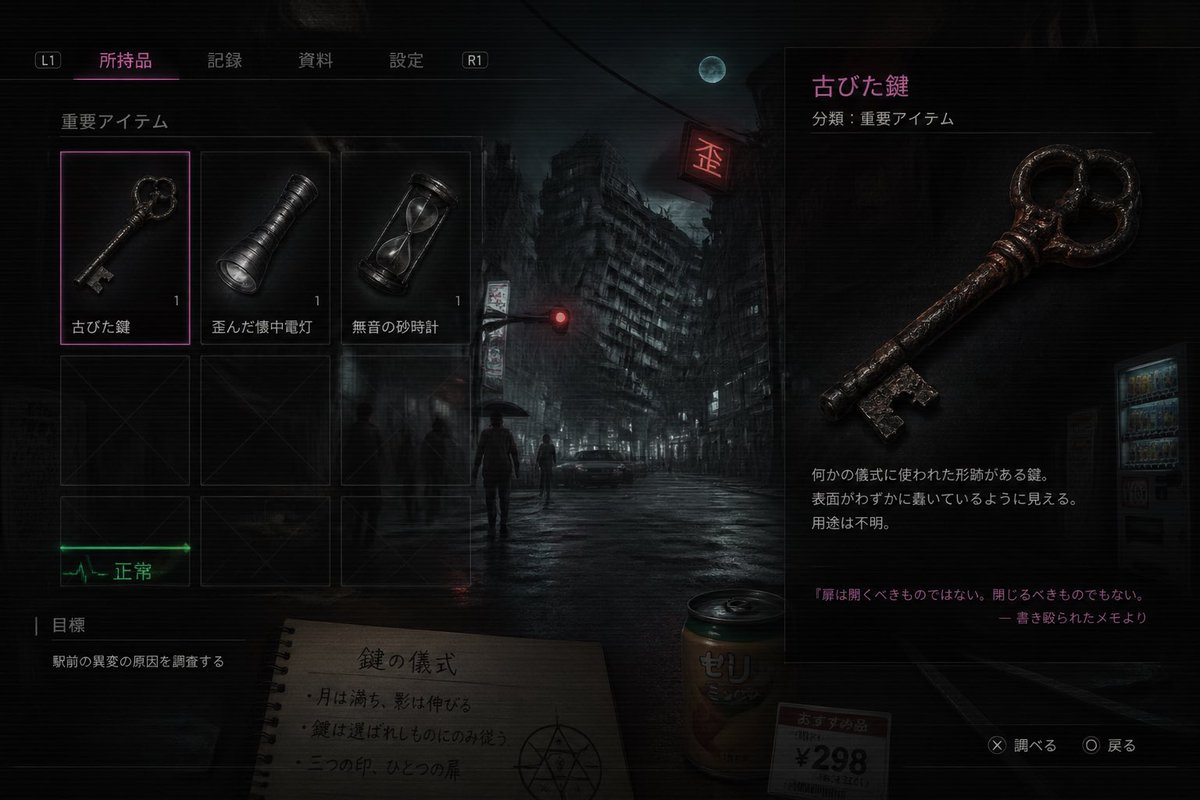
日本のホラーゲームのインベントリ画面
このプロンプトは、リアルな日本のサバイバルホラーゲームのインベントリUIのスクリーンショットを生成します。これは、偽のゲーム画面、雰囲気のあるコンセプトアート、またはオカルトをテーマにしたインターフェースのモックアップに役立ちます。
これはアニメ&ゲーム向けのGPT Image 2プロンプトケースです。以下のコピー可能なプロンプトを使用して同様のビジュアルを生成し、再利用する前にAwesome GPT Image 2 Prompts帰属表示と商用利用権を確認してください。
プロンプトセット全体が必要ですか? アニメ&ゲーム 関連する例をもっと見るにはトピックハブを開くか、 GPT Image 2 プロンプトカタログ 完全な例の索引、再利用可能な構造、および出典の明記については、こちらをご覧ください。
Free 1K preview
Generate one preview image instantly, no sign-up required.
2466/4000
プロンプト
コピー準備完了プロンプト
A dark, cinematic survival-horror game inventory screen in Japanese, styled like a realistic modern console UI over a moody nighttime city background. The scene shows a rain-soaked urban intersection with 1 leaning high-rise building in the center background, 1 full moon in a cloudy sky, 1 glowing red traffic light, 1 red neon sign, 1 parked car, 1 vending machine on the far right, and 4 distant human silhouettes including 1 person holding an umbrella. The entire image has a gritty, low-key, bluish-black palette with subtle scanlines, soft bloom, wet reflections, and a tense occult atmosphere. The interface has a top navigation bar with 4 Japanese tabs labeled "所持品", "記録", "資料", "設定", plus 2 shoulder button hints labeled "L1" and "R1". On the left is an inventory grid under the label "重要アイテム" containing 6 visible slots arranged as 3 columns by 2 rows; the top row contains exactly 3 items, each with a small quantity number "1": an old key labeled "古びた鍵", a dented flashlight labeled "歪んだ懐中電灯", and an hourglass labeled "無音の砂時計". The selected slot is the old key, highlighted with a thin neon-magenta border. The bottom row shows 3 empty dark placeholder slots with faint X marks. Beneath the grid is 1 green ECG-like status indicator labeled "正常". In the lower left is an objectives panel labeled "目標" with 1 objective line: "駅前の異変の原因を調査する". In the center-bottom foreground, partially under the UI, place 1 spiral notebook opened to a page with the handwritten Japanese title "鍵の儀式" and 3 short ritual note lines, plus a hand-drawn occult circle symbol. Next to it place 1 beverage can labeled "ゼリ" and 1 small price tag card reading "おすすめ品 ¥298". On the right side, create a large item detail panel for the selected object, with the item name in magenta "古びた鍵" and a category line "分類:重要アイテム". Show a large detailed render of the rusty antique key, iron-like, worn, reddish-brown corrosion, ornate round bow with clover-like openings, and a jagged bit. Below it include 3 short Japanese description lines about it being a ritual-shaped key of unknown purpose, and at the bottom add a quoted note in magenta: "扉は開くべきものではない。閉じるべきものでもない。" followed by "― 書き殴られたメモより". In the lower right corner add 2 control prompts: "✕ 調べる" and "◯ 戻る". Make the composition feel like a polished AAA horror game screenshot, realistic UI, eerie lore-heavy item design, high contrast, subtle neon magenta accents, and a mysterious meaningless-but-plausible occult game logic.
Best for
- - アニメ&ゲーム visual exploration
- - Image generation and reference-image edits
- - Reusable briefs that keep source attribution visible
Change these parts
- - Subject, product, character, or scene
- - Aspect ratio, camera, lighting, and background
- - Brand, text, color, and output constraints
Recommended model and settings
- - Model: gpt-image-2
- - Input mode: テキストから画像
- - Aspect ratio: source
- - Commercial status: review original source
How to use this prompt
- 1. Copy the prompt and preserve its structure for the first test.
- 2. Replace the subject, context, and publishing channel.
- 3. Change one camera, lighting, or style variable per iteration.
- 4. Inspect the output, source, text, and rights before reuse.
Limitations, source, and reuse cautions
- - Generated output is an editable draft, not factual, legal, or rights evidence.
- - Review the linked source, people, brands, logos, text, and third-party media before commercial use.
Awesome GPT Image 2 Promptsからインポートされました。出典の明記が必要です。商用利用の可否はallowedです。有料利用の前に、出典元の権利をご確認ください。
このカテゴリーのその他の事例
カテゴリー、入力モードの互換性、品質、およびリスクの低さに基づいて優先順位付けされています。






再利用と出典に関する注記
ケースを事前に確認してから、このプロンプトを安全に使用してください。
- 1.プロンプトをコピーするか、生成ボタンを使ってDovooで直接開いてください。
- 2.ご自身の用途に合わせて、変数、アスペクト比、および参照画像を調整してください。
- 3.公開または有料利用の前に、情報源の権利、帰属表示の要件、およびブランドまたは肖像権に関するリスクを確認してください。