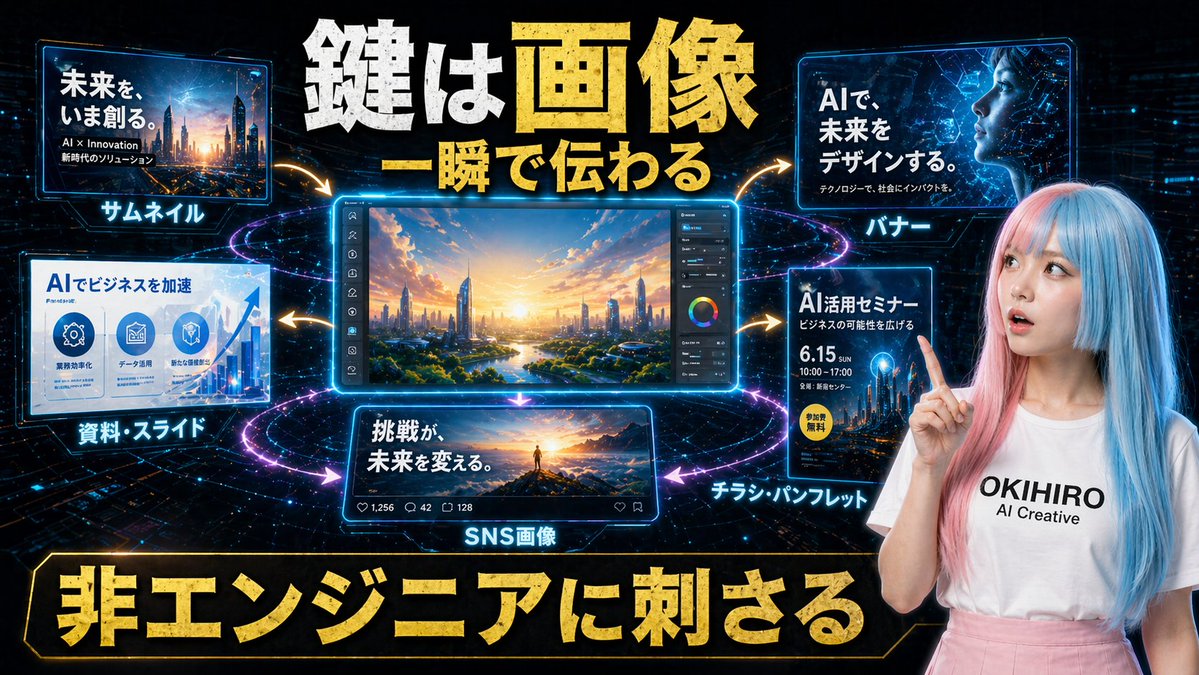
日本のAIクリエイティブプロモーションスライド
サムネイル、バナー、スライド、ソーシャルメディア投稿、チラシなど、ビジネスプロモーションにおけるAI生成画像の活用事例を紹介する、未来的な日本のマーケティンググラフィック。
これはグラフィック&ポスター向けのGPT Image 2プロンプトケースです。以下のコピー可能なプロンプトを使用して同様のビジュアルを生成し、再利用する前にAwesome GPT Image 2 Prompts帰属表示と商用利用権を確認してください。
プロンプトセット全体が必要ですか? グラフィック&ポスター 関連する例をもっと見るにはトピックハブを開くか、 GPT Image 2 プロンプトカタログ 完全な例の索引、再利用可能な構造、および出典の明記については、こちらをご覧ください。
Free 1K preview
Generate one preview image instantly, no sign-up required.
Free text preview doesn’t preserve reference-image consistency.
3080/4000
プロンプト
コピー準備完了プロンプト
Create a futuristic Japanese promotional hero graphic for an AI creative service, designed like a high-impact social media ad or presentation slide. Use a dark black-and-deep-blue cyber background with glowing circuit patterns, star-like particles, and neon light trails forming circular rings around a central editing screen. The composition is a single wide landscape layout with 6 distinct visual panels plus 1 human presenter on the right. At the top center, place a huge bold Japanese headline in distressed metallic gold and white text reading "鍵は画像" on the first line and "一瞬で伝わる" below it, with dramatic 3D depth, rough texture, and strong glow. In the center, place the largest panel: a luminous blue-framed desktop editing interface showing a vivid futuristic cityscape at sunrise, viewed from above with a river, greenery, sleek skyscrapers, warm orange sunlight, and a right-side vertical toolbar including sliders and a color wheel. Surround this centerpiece with 5 smaller glowing panels connected by curved gold arrows pointing outward from the center. Top left panel: a thumbnail example with a futuristic city image and Japanese text reading "未来を、いま創る。", smaller subtext "AI × Innovation" and "時代のソリューション", and a bright cyan label below the panel reading "サムネイル". Top right panel: a banner example with an abstract blue digital globe or network image and Japanese text reading "AIで、未来をデザインする。" with smaller subtext "テクノロジーで、社会にインパクトを。", and a cyan label below reading "バナー". Bottom left panel: a slide/document example with a business infographic style, title text "AIでビジネスを加速", three circular icon areas, an upward graph on the right, and a cyan label below reading "資料・スライド". Bottom center panel: an SNS post example showing a person standing on a mountain peak at sunrise with bold Japanese text "挑戦が、未来を変える。", small social media engagement icons and counts along the bottom bar, and a cyan label below reading "SNS画像". Bottom right panel: a flyer example with a dark blue event poster layout, title text "AI活用セミナー", smaller line "ビジネスの可能性を広げる", large date "6.15", time "10:00–17:00", a yellow circular badge reading "参加費無料", and a cyan label below reading "チラシ・パンフレット". On the right side of the overall composition, place a young woman presenter from waist up, facing forward, lightly smiling, raising her right index finger near her face as if making a key point. She has long straight split-dyed hair, pastel pink on one side and pastel blue on the other, fair skin, and wears a white T-shirt with black text reading "{argument name="brand text" default="OKIHIRO AI Creative"}" and a high-waisted soft pink skirt. Her face is intentionally simplified or obscured in a clean ad-like way. At the very bottom, add an enormous gold Japanese slogan inside a black-and-gold framed banner reading "非エンジニアに刺さる". Use intense contrast, neon cyan edge lighting, gold accent typography, glossy UI frames, energetic motion arrows, and a polished tech-marketing aesthetic that feels optimized for convincing non-technical business users about AI-powered image generation.プロンプト変数
プロンプトに表示される編集可能な引数プレースホルダーと、それらのデフォルト値。
変数
brand text
デフォルト
OKIHIRO AI Creative
Best for
- - グラフィック&ポスター visual exploration
- - Image generation and reference-image edits
- - Reusable briefs that keep source attribution visible
Change these parts
- - Subject, product, character, or scene
- - Aspect ratio, camera, lighting, and background
- - Brand, text, color, and output constraints
Recommended model and settings
- - Model: gpt-image-2
- - Input mode: 画像から画像
- - Aspect ratio: source
- - Commercial status: review original source
How to use this prompt
- 1. Copy the prompt and preserve its structure for the first test.
- 2. Replace the subject, context, and publishing channel.
- 3. Change one camera, lighting, or style variable per iteration.
- 4. Inspect the output, source, text, and rights before reuse.
Limitations, source, and reuse cautions
- - Generated output is an editable draft, not factual, legal, or rights evidence.
- - Review the linked source, people, brands, logos, text, and third-party media before commercial use.
Awesome GPT Image 2 Promptsからインポートされました。出典の明記が必要です。商用利用の可否はallowedです。有料利用の前に、出典元の権利をご確認ください。
このカテゴリーのその他の事例
カテゴリー、入力モードの互換性、品質、およびリスクの低さに基づいて優先順位付けされています。






再利用と出典に関する注記
ケースを事前に確認してから、このプロンプトを安全に使用してください。
- 1.プロンプトをコピーするか、生成ボタンを使ってDovooで直接開いてください。
- 2.ご自身の用途に合わせて、変数、アスペクト比、および参照画像を調整してください。
- 3.公開または有料利用の前に、情報源の権利、帰属表示の要件、およびブランドまたは肖像権に関するリスクを確認してください。