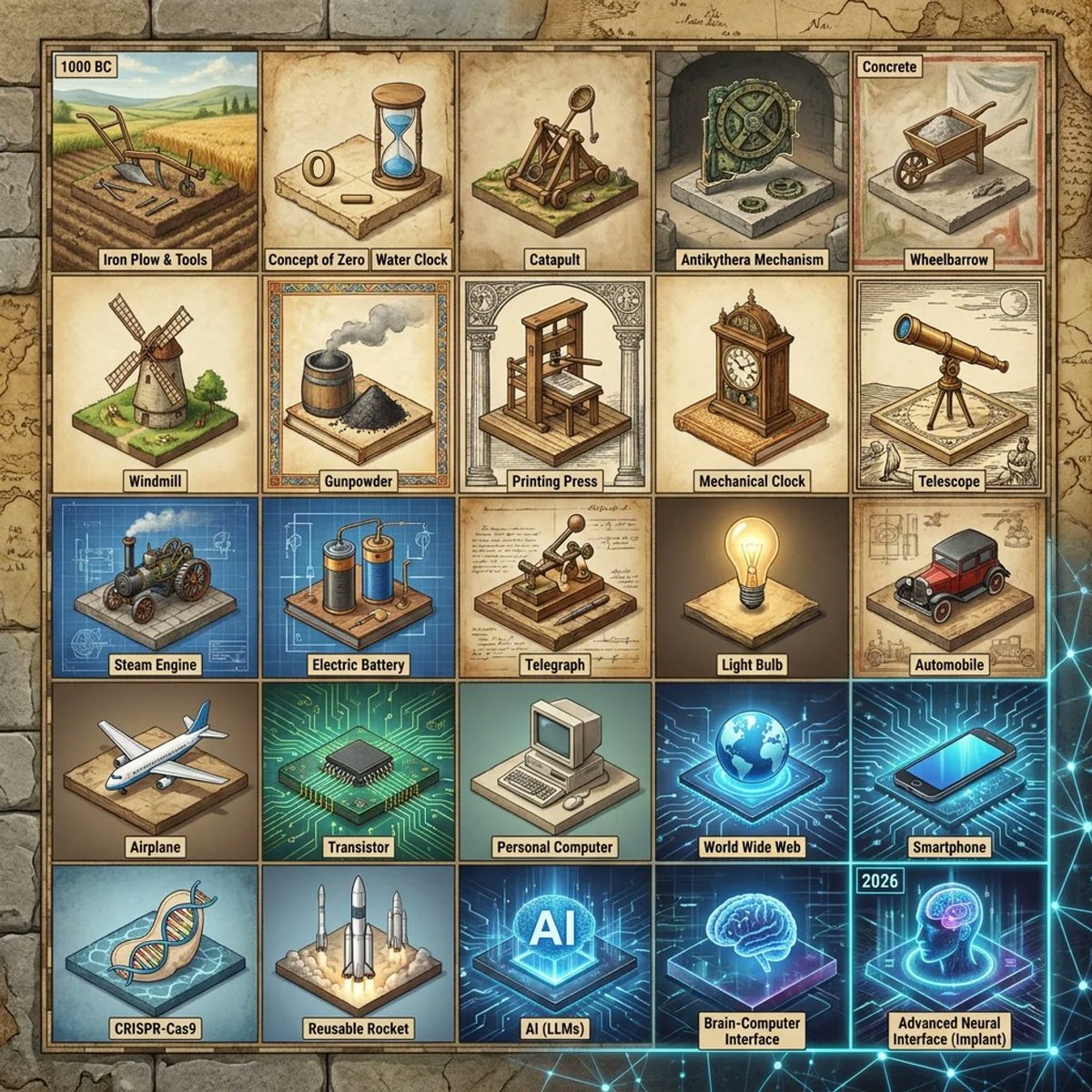
歴史的発明年表グリッド
このプロンプトを実行すると、羊皮紙風の教育用ポスターが生成されます。このポスターには、歴史上の発明品をラベル付けしたジオラマがグリッド状に配置されており、年表形式のインフォグラフィックや、世界を変えた技術の比較に最適です。
これはグラフィック&ポスター向けのGPT Image 2プロンプトケースです。以下のコピー可能なプロンプトを使用して同様のビジュアルを生成し、再利用する前にAwesome GPT Image 2 Prompts帰属表示と商用利用権を確認してください。
プロンプトセット全体が必要ですか? グラフィック&ポスター 関連する例をもっと見るにはトピックハブを開くか、 GPT Image 2 プロンプトカタログ 完全な例の索引、再利用可能な構造、および出典の明記については、こちらをご覧ください。
Free 1K preview
Generate one preview image instantly, no sign-up required.
3795/4000
プロンプト
コピー準備完了プロンプト
Create a square infographic-style illustration showing a {argument name="grid size" default="15×15"} invention timeline grid rendered as a collection of miniature isometric dioramas on aged parchment tiles. The image should look like a curated historical poster that spans from {argument name="starting year" default="1000 BC"} to {argument name="ending year" default="2026"}, with one invention per tile and no repeats. Show the visible portion as a 5 by 5 section of the larger grid, for a total of 25 labeled tiles, arranged in neat rows and columns with thin dark borders. Every tile contains a unique world-changing invention depicted as a small handcrafted diorama with era-appropriate materials, colors, and background details. Use a warm antiquarian palette for ancient and medieval inventions, sepia technical-document tones for early modern inventions, and cooler neon-blue futuristic lighting for modern digital and biotech inventions. Surround the grid with an old-map border and subtle historical cartography textures, blending into faint modern network graphics near the bottom right.

Label each visible tile with a small beige caption tag in bold black text. Include exactly these 25 visible inventions in reading order from top left to bottom right: 1) {argument name="first tile label" default="1000 BC"} tile showing an iron plow and simple hand tools in a farm field, captioned "Iron Plow & Tools"; 2) "Concept of Zero" shown as a parchment-like tile with a carved zero symbol and a blue hourglass; 3) "Water Clock" shown as a wooden water-timing device; 4) "Catapult" shown as a wooden siege engine; 5) "Antikythera Mechanism" shown as an intricate bronze gear device in a stone niche; 6) "Concrete" shown as a wheelbarrow filled with wet cement or mortar; 7) "Wheelbarrow" shown as a simple wooden one-wheel cart; 8) "Windmill" shown as a traditional mill on grassy ground; 9) "Gunpowder" shown as a barrel and a mound of black powder with smoke; 10) "Printing Press" shown as a wooden press framed by classical columns; 11) "Mechanical Clock" shown as an ornate standing clock; 12) "Telescope" shown as an early brass telescope on a tripod with sketch-like scientific notes; 13) "Steam Engine" shown on a blue blueprint-style tile with an early locomotive engine; 14) "Electric Battery" shown on a blueprint-like tile with two cylindrical battery cells and wiring; 15) "Telegraph" shown as a Morse telegraph key on technical paper; 16) "Light Bulb" shown glowing warmly on a neutral pedestal; 17) "Automobile" shown as an early red motorcar on a workshop-plan background; 18) "Airplane" shown as a commercial jet aircraft in miniature; 19) "Transistor" shown as a black microchip on a luminous circuit-board tile; 20) "Personal Computer" shown as a beige desktop computer with CRT monitor and keyboard; 21) "World Wide Web" shown as a glowing blue globe over digital circuitry; 22) "Smartphone" shown as a sleek modern phone on a neon-tech background; 23) "CRISPR-Cas9" shown as a DNA double helix in a biotech-blue display tile; 24) "Reusable Rocket" shown as several upright rockets launching with exhaust clouds; 25) "AI (LLMs)" shown as glowing large letters AI in a holographic tech cube; 26) "Brain-Computer Interface" shown as a glowing brain hologram on a blue platform; 27) "Advanced Neural Interface (Implant)" shown as a transparent human head profile with a glowing brain implant, with a small top label reading "2026".

Keep the composition highly organized, poster-like, and visually dense, with each tile readable at a glance. Use slight isometric perspective, crisp linework, painterly shading, and polished editorial illustration quality. The overall feeling should combine museum poster, educational timeline, and imaginative historical-tech diorama art.
プロンプト変数
プロンプトに表示される編集可能な引数プレースホルダーと、それらのデフォルト値。
変数
grid size
デフォルト
15×15
変数
starting year
デフォルト
1000 BC
変数
ending year
デフォルト
2026
変数
first tile label
デフォルト
1000 BC
Best for
- - グラフィック&ポスター visual exploration
- - Image generation and reference-image edits
- - Reusable briefs that keep source attribution visible
Change these parts
- - Subject, product, character, or scene
- - Aspect ratio, camera, lighting, and background
- - Brand, text, color, and output constraints
Recommended model and settings
- - Model: gpt-image-2
- - Input mode: テキストから画像
- - Aspect ratio: source
- - Commercial status: review original source
How to use this prompt
- 1. Copy the prompt and preserve its structure for the first test.
- 2. Replace the subject, context, and publishing channel.
- 3. Change one camera, lighting, or style variable per iteration.
- 4. Inspect the output, source, text, and rights before reuse.
Limitations, source, and reuse cautions
- - Generated output is an editable draft, not factual, legal, or rights evidence.
- - Review the linked source, people, brands, logos, text, and third-party media before commercial use.
Awesome GPT Image 2 Promptsからインポートされました。出典の明記が必要です。商用利用の可否はallowedです。有料利用の前に、出典元の権利をご確認ください。
このカテゴリーのその他の事例
カテゴリー、入力モードの互換性、品質、およびリスクの低さに基づいて優先順位付けされています。






再利用と出典に関する注記
ケースを事前に確認してから、このプロンプトを安全に使用してください。
- 1.プロンプトをコピーするか、生成ボタンを使ってDovooで直接開いてください。
- 2.ご自身の用途に合わせて、変数、アスペクト比、および参照画像を調整してください。
- 3.公開または有料利用の前に、情報源の権利、帰属表示の要件、およびブランドまたは肖像権に関するリスクを確認してください。