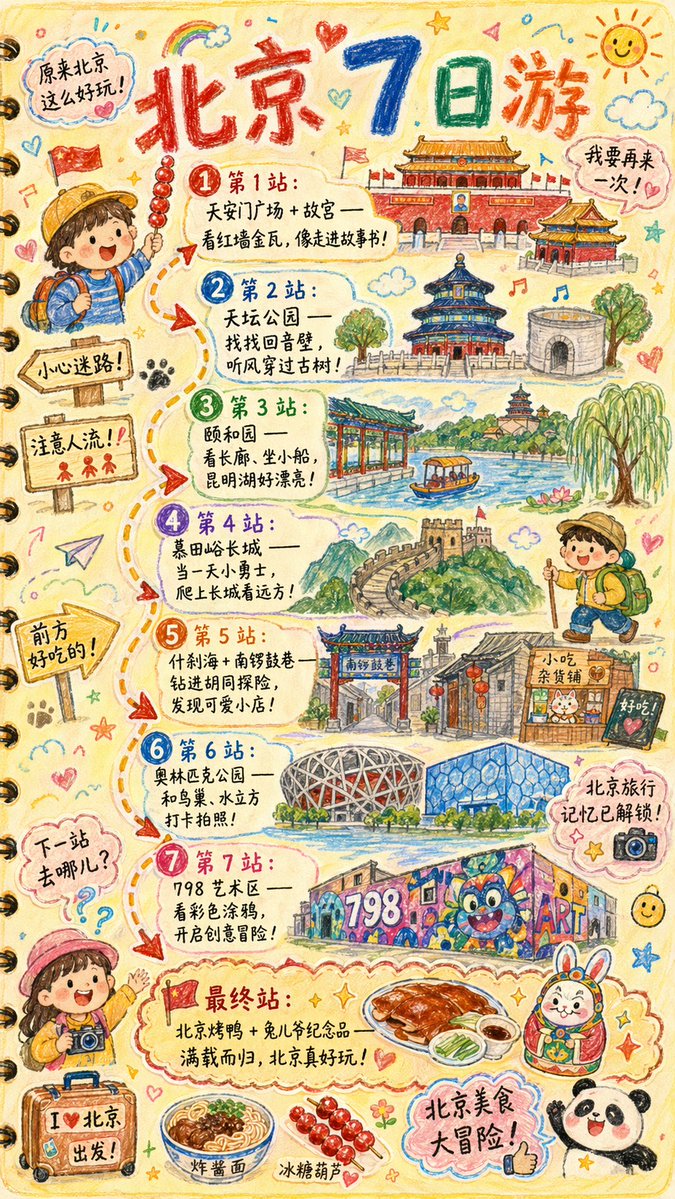
手描きの旅行記イラスト
都市名、ランドマーク、ルートなどをカスタマイズできる、子供っぽい手描きの旅行記イラストを作成するための詳細な指示書。
これはグラフィック&ポスター向けのGPT Image 2プロンプトケースです。以下のコピー可能なプロンプトを使用して同様のビジュアルを生成し、再利用する前にAwesome GPT Image 2 Prompts帰属表示と商用利用権を確認してください。
プロンプトセット全体が必要ですか? グラフィック&ポスター 関連する例をもっと見るにはトピックハブを開くか、 GPT Image 2 プロンプトカタログ 完全な例の索引、再利用可能な構造、および出典の明記については、こちらをご覧ください。
Free 1K preview
Generate one preview image instantly, no sign-up required.
2430/4000
プロンプト
コピー準備完了プロンプト
Please draw a brightly colored, vertical (9:16) hand-drawn style "{argument name="city name" default="Beijing"} Travel Journal Illustration." The style should look as if it were created with crayons by a curious child. Use a soft and warm light-colored background (such as light yellow), paired with bright tones like red, blue, and green, to create a cozy, child-like, and travel-inspired atmosphere.

I. Main Image: Journal-style Travel Route

Draw a "winding travel route" in the center of the illustration, connecting multiple locations with arrows and dashed lines. Recommended attractions will be automatically generated based on a {argument name="number of days" default="1"}-day itinerary:

Example format (automatically replaced with {argument name="city name" default="Beijing"} related content):

- "Stop 1: {Attraction 1 recommendation + short fun description}"
- "Stop 2: {Attraction 2 recommendation + short fun description}"
- "Stop 3: {Attraction 3 recommendation + short fun description}"
- ...
- "Final Stop: {Local signature food/souvenir + warm closing statement}"

> The number of travel stops is automatically generated based on the number of days. If no days are input, a 1-day/highlights route will be generated by default.

II. Fun Surrounding Elements (Automatically replaced based on the city)

Add plenty of child-like elements around the route, such as:

- Cute travel characters: "A child holding local snacks," "An adventurous kid wearing a backpack," etc.
- Child-like Q-version hand-drawings of local landmarks: such as "{landmark 1}," "{landmark 2}," "{landmark 3}."
- Fun signboards: "Watch out for getting lost!", "Mind the crowds!", "Good food ahead!" (Adjusted according to city context).
- Sticker-style slogans: "{argument name="city name" default="Beijing"} Travel Memories Unlocked!", "{argument name="city name" default="Beijing"} Food Adventure!", "Where to next?"
- Cute small icons of local delicacies: such as "{food 1}," "{food 2}," "{food 3}."
- Exclamations (maintaining a child-like tone): "{argument name="city name" default="Beijing"} is so much fun!", "I want to go again!"

III. Overall Style Requirements

- Hand-drawn crayon style / children's travel log style
- Bright colors, full but warm composition
- Emphasis on the joy and exploration of travel
- All text uses cute handwritten fonts
- Make the entire image look like a travel journal page full of child-like wonder.
プロンプト変数
プロンプトに表示される編集可能な引数プレースホルダーと、それらのデフォルト値。
変数
city name
デフォルト
Beijing
変数
number of days
デフォルト
1
Best for
- - グラフィック&ポスター visual exploration
- - Image generation and reference-image edits
- - Reusable briefs that keep source attribution visible
Change these parts
- - Subject, product, character, or scene
- - Aspect ratio, camera, lighting, and background
- - Brand, text, color, and output constraints
Recommended model and settings
- - Model: gpt-image-2
- - Input mode: テキストから画像
- - Aspect ratio: source
- - Commercial status: review original source
How to use this prompt
- 1. Copy the prompt and preserve its structure for the first test.
- 2. Replace the subject, context, and publishing channel.
- 3. Change one camera, lighting, or style variable per iteration.
- 4. Inspect the output, source, text, and rights before reuse.
Limitations, source, and reuse cautions
- - Generated output is an editable draft, not factual, legal, or rights evidence.
- - Review the linked source, people, brands, logos, text, and third-party media before commercial use.
Awesome GPT Image 2 Promptsからインポートされました。出典の明記が必要です。商用利用の可否はallowedです。有料利用の前に、出典元の権利をご確認ください。
このカテゴリーのその他の事例
カテゴリー、入力モードの互換性、品質、およびリスクの低さに基づいて優先順位付けされています。






再利用と出典に関する注記
ケースを事前に確認してから、このプロンプトを安全に使用してください。
- 1.プロンプトをコピーするか、生成ボタンを使ってDovooで直接開いてください。
- 2.ご自身の用途に合わせて、変数、アスペクト比、および参照画像を調整してください。
- 3.公開または有料利用の前に、情報源の権利、帰属表示の要件、およびブランドまたは肖像権に関するリスクを確認してください。