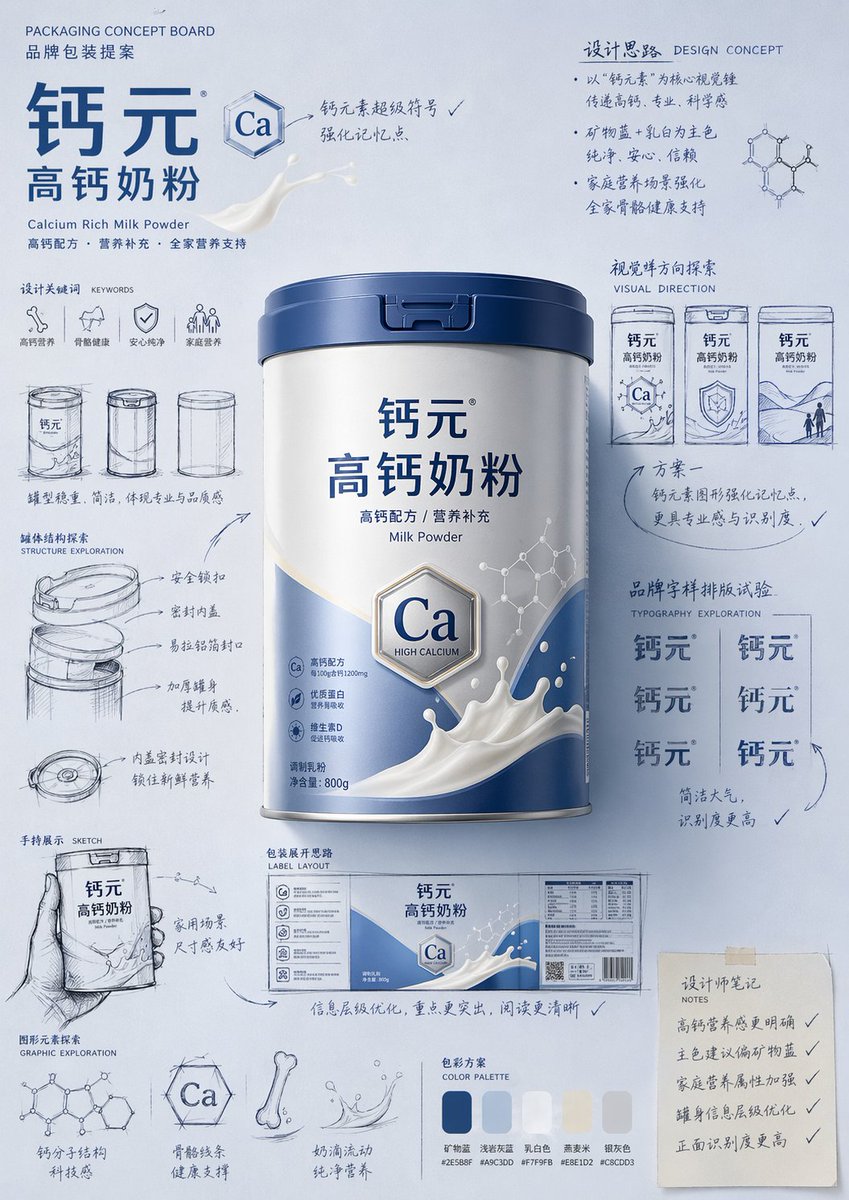
パッケージデザイン提案ボードのプロンプト
プロフェッショナルな手描きスタイルの製品パッケージデザイン案やコンセプトムードボードを作成するための、非常に詳細な指示書。
これは製品および商業向けのGPT Image 2プロンプトケースです。以下のコピー可能なプロンプトを使用して同様のビジュアルを生成し、再利用する前にAwesome GPT Image 2 Prompts帰属表示と商用利用権を確認してください。
プロンプトセット全体が必要ですか? 製品および商業 関連する例をもっと見るにはトピックハブを開くか、 GPT Image 2 プロンプトカタログ 完全な例の索引、再利用可能な構造、および出典の明記については、こちらをご覧ください。
Free 1K preview
Generate one preview image instantly, no sign-up required.
Free text preview doesn’t preserve reference-image consistency.
4000/4000
プロンプト
コピー準備完了プロンプト
Please generate a "hand-drawn packaging proposal board style" product introduction poster for {argument name="product name" default="milk powder"}.

If I provide a product image, please use it as the main reference, retaining the core visual characteristics, packaging form, colors, materials, brand identity, and overall temperament of the product. Prioritize the main color tone and color relationships from the product image for the design.
If I do not provide a product image, please automatically generate a product appearance and packaging design that fits the positioning of {argument name="product name" default="milk powder"}, and automatically match natural and reasonable main, auxiliary, and background colors based on the product attributes, category characteristics, and temperament.

Overall poster style requirements:
This is not a standard e-commerce detail page or a simple studio-shot poster, but a creative proposal board that integrates "product finished image + packaging design sketches + brand concept development process." The overall presentation is a high-aesthetic, high-completion brand design display image, as if a designer is presenting a packaging concept proposal.

Visual requirements:
- Vertical composition
- Use a unified background with a brand feel; the background color should be naturally determined by the product itself and not fixed to any one color.
- Color schemes should coordinate with product attributes: if there is a reference image, prioritize inheriting its main and brand colors; if not, automatically generate a reasonable color scheme based on the product name.
- Place the most complete and eye-catching product main visual in the center, with realistic textures, 3D lighting, and commercial finish effects.
- Surround the product with multiple auxiliary visual elements: packaging sketches from different angles, structural sketches, local form explorations, hand-held display drafts, packaging unfolding ideas, and brand lettering layout experiments.
- Add natural and casual black or dark hand-drawn line art, arrows, circles, symbols, and handwritten Chinese annotations to give the image a strong sense of "design process" and "creative proposal."
- The finished product image should be relatively refined and realistic, while the sketch parts should be relatively casual and dynamic, creating a contrast between the "finished product + design sketches."
- The layout should look relaxed and free, but overall it must have order, rhythm, and a visual center, reflecting a high-end graphic design feel.
- Small graphics, symbols, or interesting elements related to the product can be added appropriately to enhance brand memory points.
- The final effect should have a sense of branding, creativity, process, and visual impact.

Color principles:
- Do not fix a yellow background.
- Automatically select the main color tone based on product type, material, use, consumer experience, and brand temperament.
- The background color, product color, text color, and sketch line art color should coordinate with each other.
- High-saturation monochromatic backgrounds or soft, unified color schemes can be used, as long as the overall image has a brand feel and visual impact.
- Colors should naturally serve the product rather than overshadow it.

Style keywords:
Packaging design proposal board, brand concept development, hand-drawn sketches, design process feel, moodboard, creative review draft, product finished rendering, visual experimentation, commercial design poster.

Special notes:
- If there is a reference product image, prioritize following it and do not deviate from the product itself.
- If there is no reference image, automatically generate reasonable product appearance, packaging, and color schemes based on the product name, maintaining overall style consistency.
- The focus of the image is "product introduction + creative design process display."
- Do not make it look like a common e-commerce detail page, a promotional poster, or overly neat and stiff; do not lack sketches and handwritten annotations; avoid a cheap feel or an immature cartoon style.
プロンプト変数
プロンプトに表示される編集可能な引数プレースホルダーと、それらのデフォルト値。
変数
product name
デフォルト
milk powder
Best for
- - 製品および商業 visual exploration
- - Image generation and reference-image edits
- - Reusable briefs that keep source attribution visible
Change these parts
- - Subject, product, character, or scene
- - Aspect ratio, camera, lighting, and background
- - Brand, text, color, and output constraints
Recommended model and settings
- - Model: gpt-image-2
- - Input mode: 画像から画像
- - Aspect ratio: source
- - Commercial status: review original source
How to use this prompt
- 1. Copy the prompt and preserve its structure for the first test.
- 2. Replace the subject, context, and publishing channel.
- 3. Change one camera, lighting, or style variable per iteration.
- 4. Inspect the output, source, text, and rights before reuse.
Limitations, source, and reuse cautions
- - Generated output is an editable draft, not factual, legal, or rights evidence.
- - Review the linked source, people, brands, logos, text, and third-party media before commercial use.
Awesome GPT Image 2 Promptsからインポートされました。出典の明記が必要です。商用利用の可否はallowedです。有料利用の前に、出典元の権利をご確認ください。
このカテゴリーのその他の事例
カテゴリー、入力モードの互換性、品質、およびリスクの低さに基づいて優先順位付けされています。






再利用と出典に関する注記
ケースを事前に確認してから、このプロンプトを安全に使用してください。
- 1.プロンプトをコピーするか、生成ボタンを使ってDovooで直接開いてください。
- 2.ご自身の用途に合わせて、変数、アスペクト比、および参照画像を調整してください。
- 3.公開または有料利用の前に、情報源の権利、帰属表示の要件、およびブランドまたは肖像権に関するリスクを確認してください。