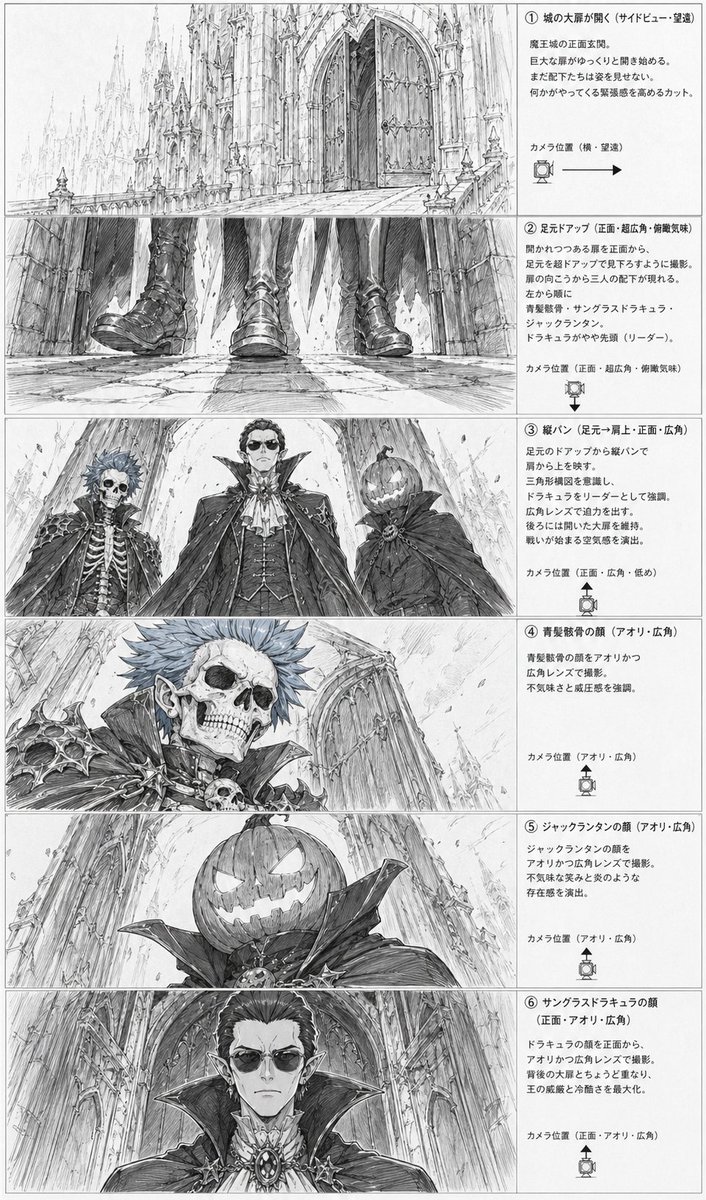
ゴシック悪役のストーリーボードシート
これにより、城の入り口にいるゴシック調の悪役たちの6つの映画的なショットを示す、モノクロのアニメ風ストーリーボードページが生成されます。これは、制作前のレイアウトやシーンプランニングに役立ちます。
これはアニメ&ゲーム向けのGPT Image 2プロンプトケースです。以下のコピー可能なプロンプトを使用して同様のビジュアルを生成し、再利用する前にAwesome GPT Image 2 Prompts帰属表示と商用利用権を確認してください。
プロンプトセット全体が必要ですか? アニメ&ゲーム 関連する例をもっと見るにはトピックハブを開くか、 GPT Image 2 プロンプトカタログ 完全な例の索引、再利用可能な構造、および出典の明記については、こちらをご覧ください。
Free 1K preview
Generate one preview image instantly, no sign-up required.
4000/4000
プロンプト
コピー準備完了プロンプト
{
  "type": "anime storyboard layout sheet",
  "style": "monochrome pencil sketch, detailed line art, grayscale concept art, dramatic gothic fantasy atmosphere, manga storyboard presentation",
  "subject": {
    "setting": "the front entrance of a massive gothic demon castle with towering cathedral-like spires, pointed arches, carved stone, huge double doors, long stone approach, and a cavernous sense of scale",
    "theme": "ominous villain introduction before a battle",
    "characters": [
      {
        "id": "character 1",
        "description": "undead noble with a skeletal face, spiky short hair, pointed ears, ornate dark armor with bone and skull motifs, high collar, aristocratic vampire-like styling"
      },
      {
        "id": "character 2",
        "description": "tall central vampire lord in an elaborate formal outfit with layered cape, high standing collar, cravat, vest, jewelry and medallion, regal and intimidating presence"
      },
      {
        "id": "character 3",
        "description": "jack-o'-lantern headed figure wearing a dark cloak with a huge collar, carved glowing-smile pumpkin face, eerie and theatrical"
      }
    ],
    "faces partially censored with soft gray rectangular blurs on 3 close-up panels": "true"
  },
  "layout": {
    "orientation": "vertical page",
    "columns": "2",
    "left column": "6 storyboard image panels stacked vertically",
    "right column": "6 explanatory text boxes stacked vertically",
    "sections": [
      {
        "title": "① 城の大扉が開く(サイドビュー・望遠)",
        "position": "top row",
        "count": 1,
        "labels": [
          "opening castle gate wide shot"
        ],
        "image": "a long telephoto side view of the gigantic castle entrance, with the monumental front doors beginning to open and the architecture dwarfing everything around it"
      },
      {
        "title": "② 足元アップ(正面・超広角・俯瞰気味)",
        "position": "second row",
        "count": 1,
        "labels": [
          "feet close-up"
        ],
        "image": "an ultra-wide low frontal close-up of 3 pairs of boots and the hems of capes as the villains approach over cracked stone pavement, emphasizing footsteps and menace"
      },
      {
        "title": "③ 縦パン(足元→肩上・正面・広角)",
        "position": "third row",
        "count": 3,
        "labels": [
          "skeleton noble",
          "vampire lord",
          "jack-o'-lantern figure"
        ],
        "image": "a dramatic low-angle three-character lineup framed from below, showing the 3 antagonists towering above the viewer against the cathedral facade"
      },
      {
        "title": "④ 青髪骸骨の顔(アオリ・広角)",
        "position": "fourth row",
        "count": 1,
        "labels": [
          "skeletal face close-up"
        ],
        "image": "close-up low-angle portrait of the skeletal blue-haired noble, with sharp shoulder armor, skull ornament, and the castle wall receding behind"
      },
      {
        "title": "⑤ ジャックランタンの顔(アオリ・広角)",
        "position": "fifth row",
        "count": 1,
        "labels": [
          "pumpkin head close-up"
        ],
        "image": "close-up low-angle portrait of the jack-o'-lantern headed figure, showing the carved sinister grin and oversized collar against the towering architecture"
      },
      {
        "title": "⑥ サングラスドラキュラの顔(正面・アオリ・広角)",
        "position": "bottom row",
        "count": 1,
        "labels": [
          "vampire lord face close-up"
        ],
        "image": "frontal low-angle close-up of the central vampire lord with elegant hair, pointed ears, ornate brooch, and enormous collar filling the frame"
      }
    ],
    "ui components": {
      "count": 6,
      "items": [
        "6 numbered section headers",
        "6 camera position notes",
        "6 camera direction icons with arrows or angle markers",
        "6 bordered explanatory text areas",
        "6 storyboard image frames",
        "1 full page border"
      ]
    }
  },
  "composition": "clean production sheet layout with thin panel borders, dense Japanese annotations on the right, each illustration on the left corresponding to one text explanation, highly readable storyboard design",
  "text": "all annotation text is in Japanese, printed in neat storyboard document formatting",
  "quality": "highly detailed architectural draftsmanship, expressive perspective exaggeration, cinematic villain reveal, professional anime pre-production board"
}
Best for
- - アニメ&ゲーム visual exploration
- - Image generation and reference-image edits
- - Reusable briefs that keep source attribution visible
Change these parts
- - Subject, product, character, or scene
- - Aspect ratio, camera, lighting, and background
- - Brand, text, color, and output constraints
Recommended model and settings
- - Model: gpt-image-2
- - Input mode: テキストから画像
- - Aspect ratio: source
- - Commercial status: review original source
How to use this prompt
- 1. Copy the prompt and preserve its structure for the first test.
- 2. Replace the subject, context, and publishing channel.
- 3. Change one camera, lighting, or style variable per iteration.
- 4. Inspect the output, source, text, and rights before reuse.
Limitations, source, and reuse cautions
- - Generated output is an editable draft, not factual, legal, or rights evidence.
- - Review the linked source, people, brands, logos, text, and third-party media before commercial use.
Awesome GPT Image 2 Promptsからインポートされました。出典の明記が必要です。商用利用の可否はallowedです。有料利用の前に、出典元の権利をご確認ください。
このカテゴリーのその他の事例
カテゴリー、入力モードの互換性、品質、およびリスクの低さに基づいて優先順位付けされています。






再利用と出典に関する注記
ケースを事前に確認してから、このプロンプトを安全に使用してください。
- 1.プロンプトをコピーするか、生成ボタンを使ってDovooで直接開いてください。
- 2.ご自身の用途に合わせて、変数、アスペクト比、および参照画像を調整してください。
- 3.公開または有料利用の前に、情報源の権利、帰属表示の要件、およびブランドまたは肖像権に関するリスクを確認してください。