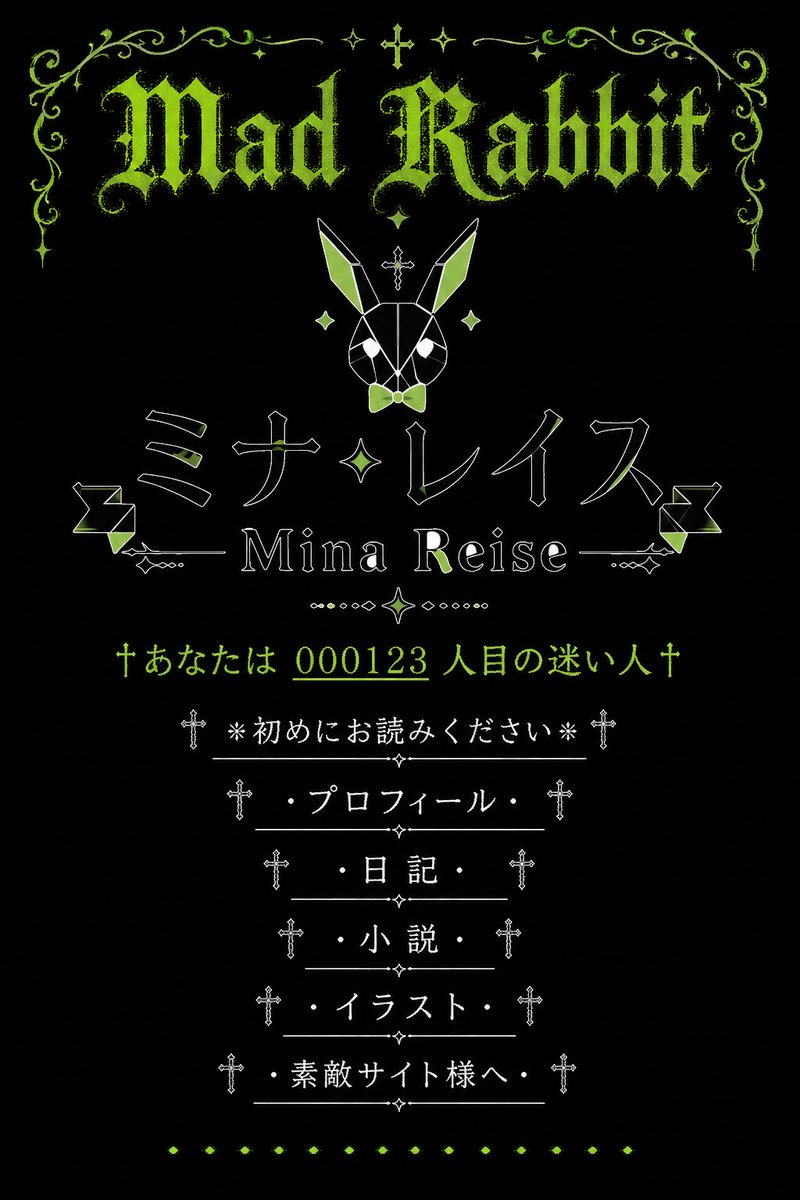
Gothic Japanese Mobile Homepage
Generates a nostalgic black-and-lime gothic Japanese mobile homepage design with rabbit motifs, ornamental typography, and classic personal-site navigation.
これはグラフィック&ポスター向けのGPT Image 2プロンプトケースです。以下のコピー可能なプロンプトを使用して同様のビジュアルを生成し、再利用する前にAwesome GPT Image 2 Prompts帰属表示と商用利用権を確認してください。
プロンプトセット全体が必要ですか? グラフィック&ポスター 関連する例をもっと見るにはトピックハブを開くか、 GPT Image 2 プロンプトカタログ 完全な例の索引、再利用可能な構造、および出典の明記については、こちらをご覧ください。
Free 1K preview
Generate one preview image instantly, no sign-up required.
2983/4000
プロンプト
コピー準備完了プロンプト
Goal: Create a vertical screenshot-style graphic of a nostalgic early-2000s Japanese mobile personal homepage with a gothic lolita / dark fantasy aesthetic, centered on the fictional site owner {argument name="site owner name" default="Mina Reise"} and the site title {argument name="main gothic title" default="Mad Rabbit"}.

Canvas: Portrait 2:3 aspect ratio, black background, designed like an old mobile homepage landing page. Use a limited palette of acid lime green, white, and black. Everything is vertically centered with generous black space and symmetrical ornamentation.

Visual style: Ancient Japanese cellphone homepage, faux gothic web shrine, pixel-era elegance, distressed lime-green blackletter typography, thin white line art, small crosses, sparkles, filigree, diamonds, dotted separators, and decorative horizontal rules. The mood is occult, cute, rabbit-themed, and nostalgic.

Layout: At the top, place an ornate lime-green filigree border spanning the width, with symmetrical curling vines, small sparkle stars, and a tiny cross at the center. Beneath it, display the large distressed blackletter headline “{argument name="main gothic title" default="Mad Rabbit"}” in lime green. Below the title, center a geometric white line-art rabbit head icon with long ears, lime-green ear fills, a small lime bow tie, diamond accents, and a small cross above it.

Main name area: Under the rabbit, place a large Japanese katakana name in thin outlined white lettering with lime highlights: “{argument name="Japanese display name" default="ミナ・レイス"}”. Directly below, show the romanized name “{argument name="site owner name" default="Mina Reise"}” in a serif font, flanked by thin horizontal decorative lines and small geometric ornaments. Add one central diamond/sparkle motif between the Japanese name and the romanized name.

Visitor line: Below the name area, add a lime-green old-homepage counter message with crosses on both ends: “†あなたは {argument name="visitor counter" default="000123"} 人目の迷い人†”. Underline or emphasize the number as if it is a classic homepage hit counter.

Navigation menu: Create exactly 6 vertically stacked menu links, centered, each in white Japanese text with a leading and trailing cross ornament and a thin horizontal divider line. The 6 visible menu items must be: 1) “※初めにお読みください※”, 2) “・プロフィール・”, 3) “・日記・”, 4) “・小説・”, 5) “・イラスト・”, 6) “・素敵サイト様へ・”. Place tiny diamond ornaments between divider lines.

Decorative elements count: Include exactly 1 large top headline, 1 geometric rabbit icon, 1 large Japanese display name, 1 romanized name line, 1 visitor counter line, 6 navigation menu links, 2 side geometric ribbon-like ornaments near the name area, and 1 bottom row of small lime diamond dots.

Constraints: Keep the composition symmetrical and centered, no modern UI chrome, no photographic elements, no extra menu items, no watermark, no realistic phone frame. Make the text legible while preserving an aged bitmap/webpage feel.
プロンプト変数
プロンプトに表示される編集可能な引数プレースホルダーと、それらのデフォルト値。
変数
site owner name
デフォルト
Mina Reise
変数
main gothic title
デフォルト
Mad Rabbit
変数
Japanese display name
デフォルト
ミナ・レイス
変数
visitor counter
デフォルト
000123
Best for
- - グラフィック&ポスター visual exploration
- - Image generation and reference-image edits
- - Reusable briefs that keep source attribution visible
Change these parts
- - Subject, product, character, or scene
- - Aspect ratio, camera, lighting, and background
- - Brand, text, color, and output constraints
Recommended model and settings
- - Model: gpt-image-2
- - Input mode: テキストから画像
- - Aspect ratio: source
- - Commercial status: review original source
How to use this prompt
- 1. Copy the prompt and preserve its structure for the first test.
- 2. Replace the subject, context, and publishing channel.
- 3. Change one camera, lighting, or style variable per iteration.
- 4. Inspect the output, source, text, and rights before reuse.
Limitations, source, and reuse cautions
- - Generated output is an editable draft, not factual, legal, or rights evidence.
- - Review the linked source, people, brands, logos, text, and third-party media before commercial use.
Awesome GPT Image 2 Promptsからインポートされました。出典の明記が必要です。商用利用の可否はallowedです。有料利用の前に、出典元の権利をご確認ください。
このカテゴリーのその他の事例
カテゴリー、入力モードの互換性、品質、およびリスクの低さに基づいて優先順位付けされています。




再利用と出典に関する注記
ケースを事前に確認してから、このプロンプトを安全に使用してください。
- 1.プロンプトをコピーするか、生成ボタンを使ってDovooで直接開いてください。
- 2.ご自身の用途に合わせて、変数、アスペクト比、および参照画像を調整してください。
- 3.公開または有料利用の前に、情報源の権利、帰属表示の要件、およびブランドまたは肖像権に関するリスクを確認してください。