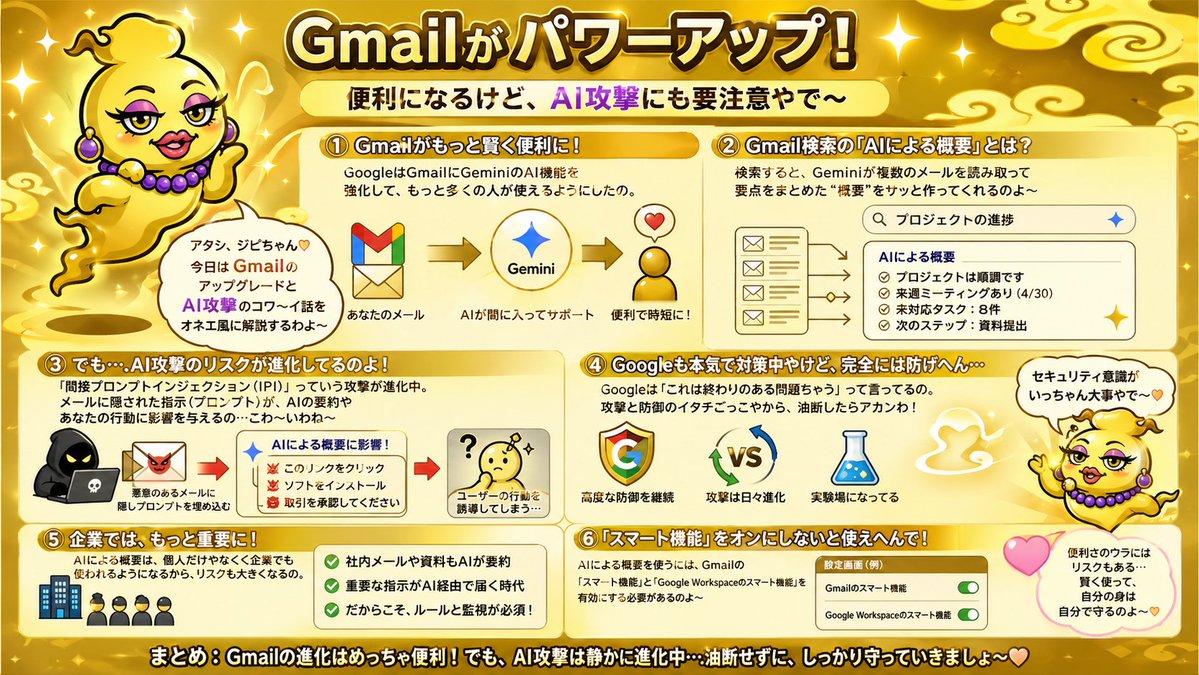
ゴールドGmail AIリスクインフォグラフィック
GmailのAIアップグレード、Geminiの概要、および関連するセキュリティリスクを説明する、目を引く日本のインフォグラフィックポスター。ソーシャルメディアへの投稿、スライドのビジュアル、ブログの要約などに役立ちます。
これはグラフィック&ポスター向けのGPT Image 2プロンプトケースです。以下のコピー可能なプロンプトを使用して同様のビジュアルを生成し、再利用する前にAwesome GPT Image 2 Prompts帰属表示と商用利用権を確認してください。
プロンプトセット全体が必要ですか? グラフィック&ポスター 関連する例をもっと見るにはトピックハブを開くか、 GPT Image 2 プロンプトカタログ 完全な例の索引、再利用可能な構造、および出典の明記については、こちらをご覧ください。
Free 1K preview
Generate one preview image instantly, no sign-up required.
4000/4000
プロンプト
コピー準備完了プロンプト
{
  "type": "Japanese infographic poster",
  "topic": "Gmail feature upgrades and AI security risks",
  "style": "bright playful educational explainer, glossy gold theme, high-contrast Japanese TV variety-show graphic design, thick outlined text, rounded boxes, sparkles, soft gradients, cute warning visuals",
  "aspect_ratio": "16:9",
  "language": "Japanese",
  "background": {
    "base_color": "metallic gold",
    "details": [
      "glowing sparkles scattered across the whole image",
      "stylized pale gold cloud swirls in the corners and top area",
      "soft radial highlights",
      "warm shiny gradient backdrop"
    ]
  },
  "headline": {
    "text": "{argument name=\"headline text\" default=\"Gmailがパワーアップ!\"}",
    "position": "top center",
    "style": "very large bold Japanese display text, white to pale yellow fill, thick dark brown outline, bright glow"
  },
  "subheadline": {
    "text": "便利になるけど、AI攻撃にも要注意やで〜",
    "position": "below headline center",
    "style": "Bold Japanese text on a pale yellow rounded banner, with “AI Attack” in vibrant purple"
  },
  "mascot": {
    "count": 2,
    "description": "a cute floating genie character in a shiny gold lamp-spirit body with no legs, round yellow face, tiny curl of hair, purple earrings and purple bead necklace, expressive hands, outlined in black, speaking in an onee-style Kansai vibe",
    "placements": [
      {
        "position": "upper left",
        "pose": "floating beside the title, one hand raised, with a speech bubble"
      },
      {
        "position": "right side lower-middle",
        "pose": "floating near sections 4 and 6, one arm raised, with a speech bubble and pink heart nearby"
      }
    ],
    "speech_bubbles": [
      "アタシ、ジビちゃん♡ 今日は GmailのアップデートとAI攻撃のコワ〜イ話をオネエ風に解説するわよ〜",
      "セキュリティ意識がいっちゃん大事やで〜"
    ]
  },
  "layout": {
    "sections": [
      {
        "title": "① Gmailがもっと賢く便利に!",
        "position": "upper left",
        "count": 1,
        "contents": [
          "short explanation about Google strengthening Gemini AI features in Gmail so more people can use it",
          "3-step visual flow: Gmail logo -> Gemini star logo -> happy convenience icon with heart",
          "small labels: あなたのメール / AIが間に入ってサポート / 便利で時短に!"
        ]
      },
      {
        "title": "② Gmail検索の『AIによる概要』とは?",
        "position": "upper right",
        "count": 1,
        "contents": [
          "description that Gemini reads multiple emails from search results and quickly creates a summary",
          "search bar mockup with the query プロジェクトの進捗",
          "left side stack of 4 email icons/cards",
          "right side summary panel titled AIによる概要",
          "4 bullet items in the summary: プロジェクトは順調です / 来週ミーティングあり(4/30) / 未対応タスク:8件 / 次のステップ:資料提出"
        ]
      },
      {
        "title": "③ でも…AI攻撃のリスクが進化してるのよ!",
        "position": "middle left",
        "count": 1,
        "contents": [
          "warning text about prompt injection attacks hidden in emails and documents influencing AI summaries and affecting user behavior",
          "left visual of a hooded hacker with a laptop and a malicious email icon",
          "center summary box titled AIによる概要に影響!",
          "3 warning bullets with red demon icons: このリンクをクリック / ソフトをインストール / 取引を承認してください",
          "right visual of a confused yellow face with a question mark",
          "caption: ユーザーの行動を誘導してしまう…"
        ]
      },
      {
        "title": "④ Googleも本気で対策中やけど、完全には防げへん…",
        "position": "middle right",
        "count": 1,
        "contents": [
          "text explaining Google says this is an ongoing problem, so both attackers and defenders keep evolving and users should not let their guard down",
          "3 main icons: Google G logo / VS with rotating blue and green arrows / laboratory flask",
          "captions: 高度な防御を継続 / 攻撃は日々進化 / 実験場になってる"
        ]
      },
      {
        "title": "⑤ 企業では、もっと大きな課題に!",
        "position": "lower left",
        "count": 1,
        "contents": [
          "text stating that AI summaries will be used not only by individuals but also by companies, increasing the risk",
          "small icon row of 1 office building and 4 businesspeople",
          "green checklist panel with 3 check items: 社内メールや資料もAIが要約 / 重要な指示がAI経由で届く時代 / だからこそ、ルールと監視が必須!"
        ]
      },
      {
        "title": "⑥ 『スマート機能』をオンにしないと使えへんで!",
        "position": "lower right",
        "count": 1,
        "contents": [
          "text explaining that to use AI summaries, Gmail smart features and Google Workspace smart features must be enabled",
          "A settings card labeled “Settings Interface (Example)”",
          "2 toggle rows: Gmailのスマート機能 / Google Workspaceのスマート機能",
          "both toggles shown in green and switched on",
          "nearby pink heart and a rounded note bubble saying: 便利のウラにはリスクもある… 賢く使って、自分の身は自分で守るのよ〜♡"
        ]
      }
    ],
    "footer": {
      "text": "まとめ:Gmailの進化はめっちゃ便利!でも、AI攻撃は静かに進化中…油断せずに、しっかり守っていきましょ〜♡",
      "position": "bottom full width",
      "style": "large bold white Japanese text with thick black outline on a dark gold strip"
    }
  },
  "visual_counts": {
    "numbered_sections": 6,
    "speech_bubbles": 3,
    "heart_icons": 3,
    "toggle_switches": 2,
    "main_flow_arrows_in_section_1": 2,
    "email_icons_in_section_2": 4,
    "summary_bullets_in_section_2": 4,
    "warning_bullets_in_section_3": 3,
    "checkmarks_in_section_5": 3
  },
  "render_notes": "Keep everything in a single flat infographic composition with rounded cream panels and orange-gold headers. Emphasize readability, cute-but-urgent tone, and comedic personality. Use Japanese text exactly as shown, with bold outlines and clear hierarchy. The mascot should feel charming and talkative, floating as if made of lamp smoke rather than walking."
}
プロンプト変数
プロンプトに表示される編集可能な引数プレースホルダーと、それらのデフォルト値。
変数
headline text
デフォルト
Gmailがパワーアップ!
Best for
- - グラフィック&ポスター visual exploration
- - Image generation and reference-image edits
- - Reusable briefs that keep source attribution visible
Change these parts
- - Subject, product, character, or scene
- - Aspect ratio, camera, lighting, and background
- - Brand, text, color, and output constraints
Recommended model and settings
- - Model: gpt-image-2
- - Input mode: テキストから画像
- - Aspect ratio: source
- - Commercial status: review original source
How to use this prompt
- 1. Copy the prompt and preserve its structure for the first test.
- 2. Replace the subject, context, and publishing channel.
- 3. Change one camera, lighting, or style variable per iteration.
- 4. Inspect the output, source, text, and rights before reuse.
Limitations, source, and reuse cautions
- - Generated output is an editable draft, not factual, legal, or rights evidence.
- - Review the linked source, people, brands, logos, text, and third-party media before commercial use.
Awesome GPT Image 2 Promptsからインポートされました。出典の明記が必要です。商用利用の可否はallowedです。有料利用の前に、出典元の権利をご確認ください。
このカテゴリーのその他の事例
カテゴリー、入力モードの互換性、品質、およびリスクの低さに基づいて優先順位付けされています。






再利用と出典に関する注記
ケースを事前に確認してから、このプロンプトを安全に使用してください。
- 1.プロンプトをコピーするか、生成ボタンを使ってDovooで直接開いてください。
- 2.ご自身の用途に合わせて、変数、アスペクト比、および参照画像を調整してください。
- 3.公開または有料利用の前に、情報源の権利、帰属表示の要件、およびブランドまたは肖像権に関するリスクを確認してください。