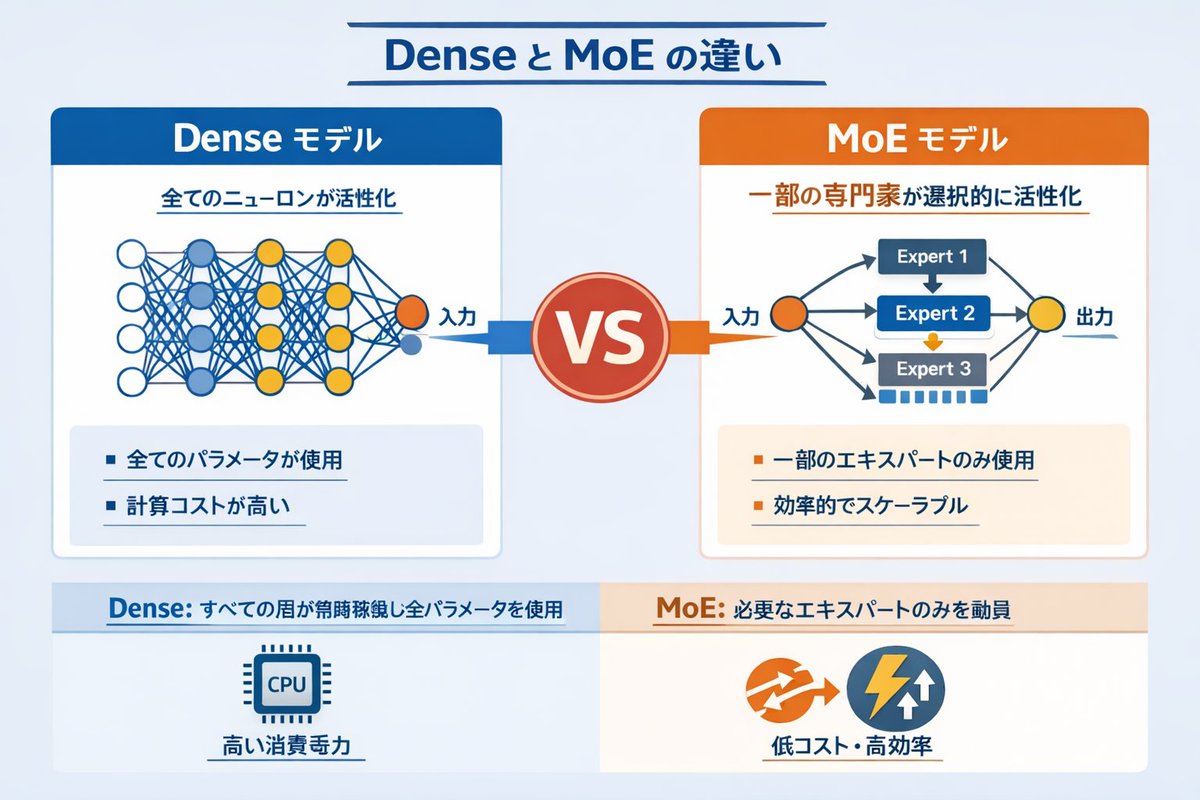
高密度ニューラルネットワークとMoEニューラルネットワークのインフォグラフィック
ネットワーク図と箇条書きを用いて、密なAIモデルとエキスパート混合モデル(MoE)を比較した技術的なインフォグラフィック。
これはグラフィック&ポスター向けのGPT Image 2プロンプトケースです。以下のコピー可能なプロンプトを使用して同様のビジュアルを生成し、再利用する前にAwesome GPT Image 2 Prompts帰属表示と商用利用権を確認してください。
プロンプトセット全体が必要ですか? グラフィック&ポスター 関連する例をもっと見るにはトピックハブを開くか、 GPT Image 2 プロンプトカタログ 完全な例の索引、再利用可能な構造、および出典の明記については、こちらをご覧ください。
Free 1K preview
Generate one preview image instantly, no sign-up required.
2106/4000
プロンプト
コピー準備完了プロンプト
{
  "type": "インフォグラフィック比較図",
  "header": {
    "title": "{argument name=\"main title\" default=\"Dense と MoE の違い\"}"
  },
  "layout": {
    "structure": "中央に VS バッジがあり、上下に分割されたフッターがある 2 つのメイン列",
    "sections": [
      {
        "position": "左側の列",
        "theme_color": "blue",
        "header": "{argument name=\"left model name\" default=\"Dense モデル\"}",
        "subtitle": "すべてのニューロンが活性化",
        "diagram": {
          "type": "完全結合ニューラルネットワーク",
          "elements": [
            "「Input」とラベル付けされた 1 つのオレンジ色の入力ノード",
            "4、5、4、2 個のノードを持つ 4 つの隠れ層",
            "白、青、黄色のノード",
            "隣接するすべてのノード間の密な交差接続線"
          ]
        },
        "bullet_points": {
          "count": 2,
          "items": [
            "{argument name=\"left bullet point\" default=\"すべてのパラメータが使用\"}",
            "計算コストが高い"
          ]
        }
      },
      {
        "position": "右側の列",
        "theme_color": "orange",
        "header": "{argument name=\"right model name\" default=\"MoE モデル\"}",
        "subtitle": "一部の専門家が選択的に活性化",
        "diagram": {
          "type": "エキスパートの混合ネットワーク",
          "elements": [
            "「Input」とラベル付けされた 1 つのオレンジ色の入力ノード",
            "Expert 1、Expert 2、Expert 3 とラベル付けされた 3 つの長方形のブロック",
            "「Output」とラベル付けされた 1 つの黄色の出力ノード",
            "入力からエキスパートへ、エキスパートから出力への分岐矢印"
          ]
        },
        "bullet_points": {
          "count": 2,
          "items": [
            "{argument name=\"right bullet point\" default=\"一部のエキスパートのみ使用\"}",
            "効率的でスケーラブル"
          ]
        }
      },
      {
        "position": "center",
        "element": "テキスト VS が書かれた赤い円形のバッジ",
        "connections": "左を指す青い矢印、右を指すオレンジ色の矢印"
      },
      {
        "position": "footer left",
        "background": "light blue",
        "text": "Dense: すべての層が常時稼働し全パラメータを使用",
        "icon": "1 つの CPU チップのグラフィック",
        "label": "高い消費電力"
      },
      {
        "position": "footer right",
        "background": "light orange",
        "text": "MoE: 必要なエキスパートのみを動員",
        "icons": "2 つの円形のグラフィック (オレンジ色の矢印、青い稲妻)",
        "label": "低コスト・高効率"
      }
    ]
  }
}
プロンプト変数
プロンプトに表示される編集可能な引数プレースホルダーと、それらのデフォルト値。
変数
main title
デフォルト
Dense と MoE の違い
変数
left model name
デフォルト
Dense モデル
変数
left bullet point
デフォルト
全てのパラメータが使用
変数
right model name
デフォルト
MoE モデル
変数
right bullet point
デフォルト
一部のエキスパートのみ使用
Best for
- - グラフィック&ポスター visual exploration
- - Image generation and reference-image edits
- - Reusable briefs that keep source attribution visible
Change these parts
- - Subject, product, character, or scene
- - Aspect ratio, camera, lighting, and background
- - Brand, text, color, and output constraints
Recommended model and settings
- - Model: gpt-image-2
- - Input mode: テキストから画像
- - Aspect ratio: source
- - Commercial status: review original source
How to use this prompt
- 1. Copy the prompt and preserve its structure for the first test.
- 2. Replace the subject, context, and publishing channel.
- 3. Change one camera, lighting, or style variable per iteration.
- 4. Inspect the output, source, text, and rights before reuse.
Limitations, source, and reuse cautions
- - Generated output is an editable draft, not factual, legal, or rights evidence.
- - Review the linked source, people, brands, logos, text, and third-party media before commercial use.
Awesome GPT Image 2 Promptsからインポートされました。出典の明記が必要です。商用利用の可否はallowedです。有料利用の前に、出典元の権利をご確認ください。
このカテゴリーのその他の事例
カテゴリー、入力モードの互換性、品質、およびリスクの低さに基づいて優先順位付けされています。






再利用と出典に関する注記
ケースを事前に確認してから、このプロンプトを安全に使用してください。
- 1.プロンプトをコピーするか、生成ボタンを使ってDovooで直接開いてください。
- 2.ご自身の用途に合わせて、変数、アスペクト比、および参照画像を調整してください。
- 3.公開または有料利用の前に、情報源の権利、帰属表示の要件、およびブランドまたは肖像権に関するリスクを確認してください。