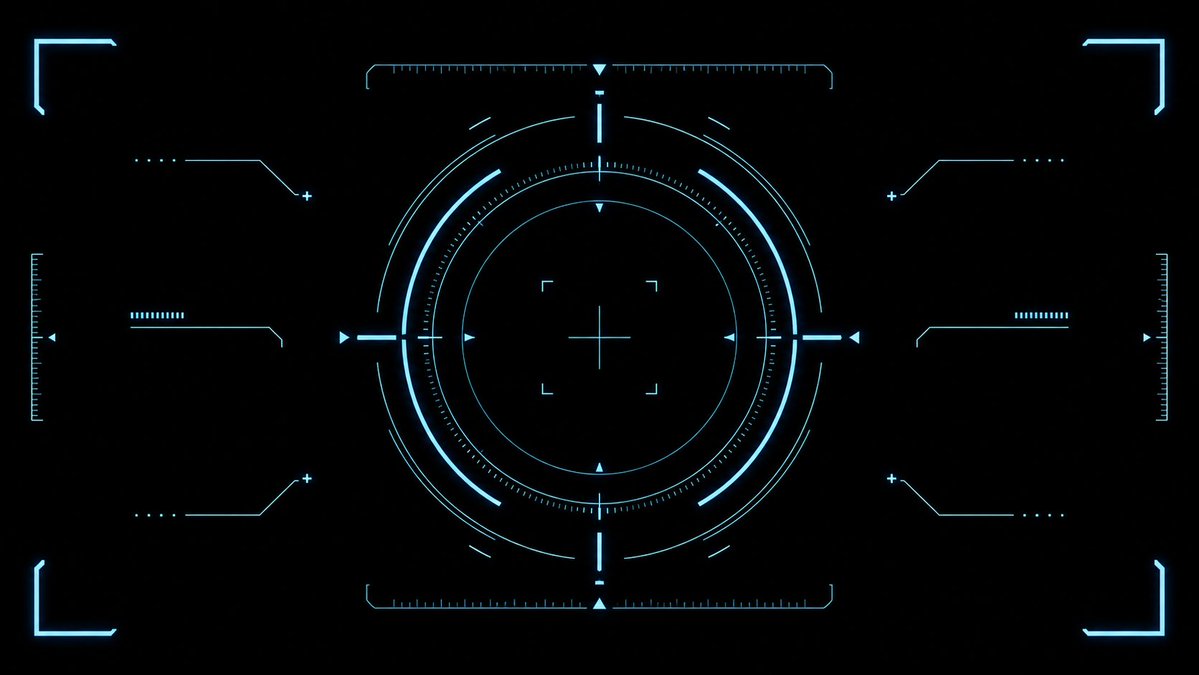
シアン色のSF風HUDレティクルオーバーレイ
ゲームのUI、ビデオオーバーレイ、SFインターフェースデザイン向けに、クリーンで未来的なシアン色のターゲットHUDエフェクトアセットを生成します。
これはアニメ&ゲーム向けのGPT Image 2プロンプトケースです。以下のコピー可能なプロンプトを使用して同様のビジュアルを生成し、再利用する前にAwesome GPT Image 2 Prompts帰属表示と商用利用権を確認してください。
プロンプトセット全体が必要ですか? アニメ&ゲーム 関連する例をもっと見るにはトピックハブを開くか、 GPT Image 2 プロンプトカタログ 完全な例の索引、再利用可能な構造、および出典の明記については、こちらをご覧ください。
Free 1K preview
Generate one preview image instantly, no sign-up required.
2652/4000
プロンプト
コピー準備完了プロンプト
{
  "type": "futuristic sci-fi HUD interface effect asset",
  "format": "wide 16:9 transparent-style graphic on pure black background",
  "style": "minimal high-tech vector UI, clean cyan neon glow, thin luminous strokes, symmetrical targeting overlay, game interface / cockpit scanner aesthetic, no text, no logos, no humans",
  "color_palette": {
    "primary": "{argument name=\"glow color\" default=\"electric cyan blue\"}",
    "background": "{argument name=\"background color\" default=\"deep black\"}",
    "line_weight": "ultra-thin technical lines with soft bloom"
  },
  "composition": {
    "overall": "perfectly centered, horizontally symmetrical heads-up display reticle with large circular target in the middle and decorative interface brackets around the edges",
    "canvas": "{argument name=\"aspect ratio\" default=\"16:9 widescreen\"}",
    "central_elements": {
      "count": 10,
      "items": [
        "1 large outer circular ring made from segmented arcs",
        "1 bright inner circular ring",
        "1 dotted micro-tick circular scale surrounding the inner ring",
        "1 thin innermost circle",
        "1 central crosshair with horizontal and vertical lines",
        "4 small corner focus brackets around the crosshair",
        "4 cardinal triangular pointers at top, bottom, left, and right of the circle",
        "4 short bright radial bars at the cardinal directions",
        "multiple fine calibration ticks along the circle",
        "small broken outer orbit arcs for motion-graphic detail"
      ]
    },
    "side_elements": {
      "count": 6,
      "items": [
        "3 left-side connector-line HUD widgets: top, middle, bottom",
        "3 right-side connector-line HUD widgets: top, middle, bottom"
      ],
      "details": "each side widget uses angled circuit-like lines, small dots, plus signs, and short ruler bars, mirrored left to right"
    },
    "edge_elements": {
      "count": 8,
      "items": [
        "4 glowing corner frame brackets, one in each corner",
        "2 vertical ruler scales at the far left and far right edges",
        "2 horizontal ruler scales centered near the top and bottom of the main circle",
        "small triangular side markers near the left and right edges"
      ]
    }
  },
  "lighting": "soft neon bloom around every line, crisp dark negative space, high contrast",
  "rendering": "2D vector effect material, sharp clean geometry, anti-aliased, suitable as a transparent overlay or VFX asset",
  "negative_prompt": "no words, no numbers, no icons with meaning, no cluttered background, no gradients except glow, no realistic objects, no characters"
}
プロンプト変数
プロンプトに表示される編集可能な引数プレースホルダーと、それらのデフォルト値。
変数
glow color
デフォルト
electric cyan blue
変数
background color
デフォルト
deep black
変数
aspect ratio
デフォルト
16:9 widescreen
Best for
- - アニメ&ゲーム visual exploration
- - Image generation and reference-image edits
- - Reusable briefs that keep source attribution visible
Change these parts
- - Subject, product, character, or scene
- - Aspect ratio, camera, lighting, and background
- - Brand, text, color, and output constraints
Recommended model and settings
- - Model: gpt-image-2
- - Input mode: テキストから画像
- - Aspect ratio: source
- - Commercial status: review original source
How to use this prompt
- 1. Copy the prompt and preserve its structure for the first test.
- 2. Replace the subject, context, and publishing channel.
- 3. Change one camera, lighting, or style variable per iteration.
- 4. Inspect the output, source, text, and rights before reuse.
Limitations, source, and reuse cautions
- - Generated output is an editable draft, not factual, legal, or rights evidence.
- - Review the linked source, people, brands, logos, text, and third-party media before commercial use.
Awesome GPT Image 2 Promptsからインポートされました。出典の明記が必要です。商用利用の可否はallowedです。有料利用の前に、出典元の権利をご確認ください。
このカテゴリーのその他の事例
カテゴリー、入力モードの互換性、品質、およびリスクの低さに基づいて優先順位付けされています。






再利用と出典に関する注記
ケースを事前に確認してから、このプロンプトを安全に使用してください。
- 1.プロンプトをコピーするか、生成ボタンを使ってDovooで直接開いてください。
- 2.ご自身の用途に合わせて、変数、アスペクト比、および参照画像を調整してください。
- 3.公開または有料利用の前に、情報源の権利、帰属表示の要件、およびブランドまたは肖像権に関するリスクを確認してください。