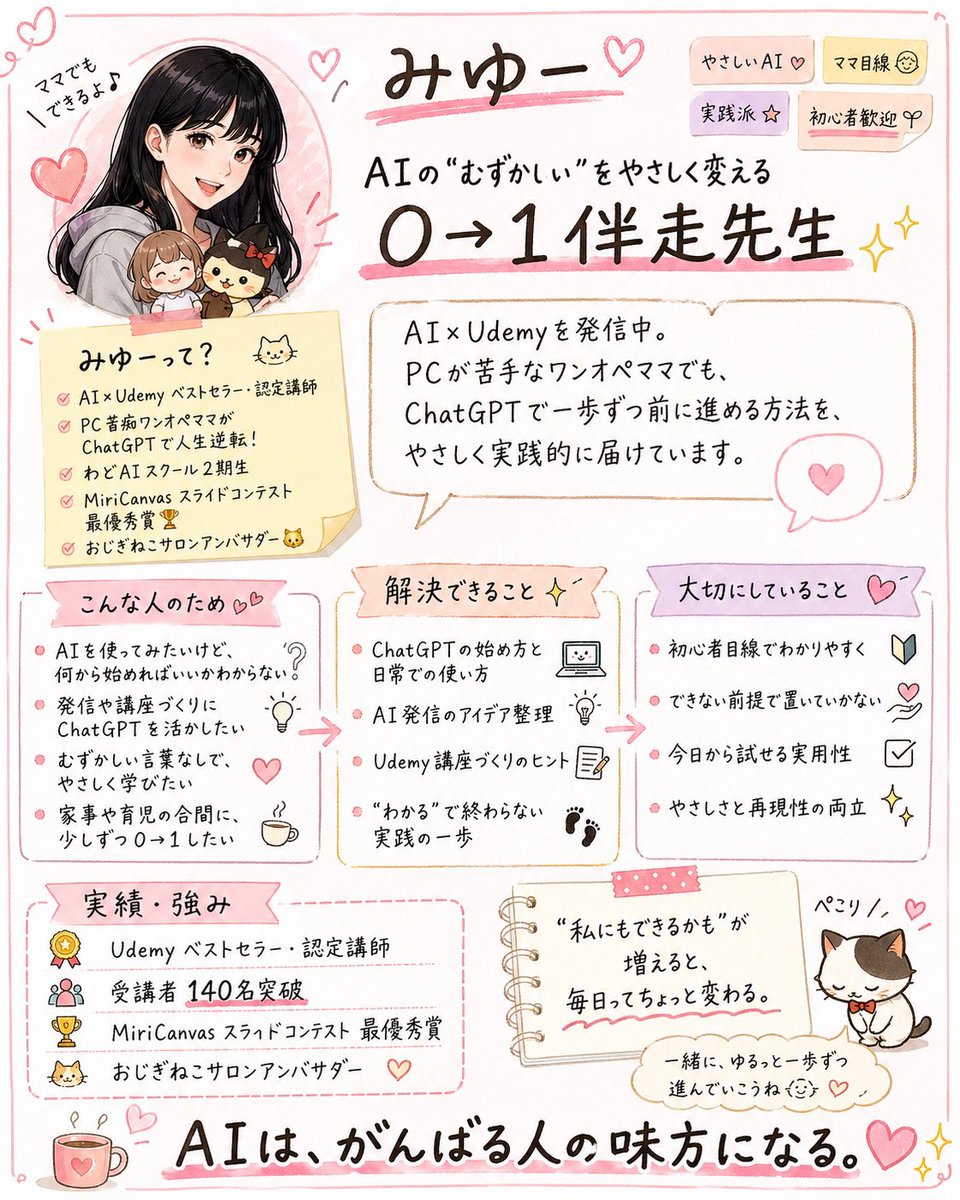
かわいい手書きのプロフィール概要ポスター
このプロンプトは、ソーシャルメディアのプロフィール画面のスクリーンショットを、クリエイターのブランド、オーディエンス、強み、実績をまとめた洗練された日本語のインフォグラフィックチラシに変換し、ソーシャルメディアでのプロモーションに役立てます。
これはグラフィック&ポスター向けのGPT Image 2プロンプトケースです。以下のコピー可能なプロンプトを使用して同様のビジュアルを生成し、再利用する前にAwesome GPT Image 2 Prompts帰属表示と商用利用権を確認してください。
プロンプトセット全体が必要ですか? グラフィック&ポスター 関連する例をもっと見るにはトピックハブを開くか、 GPT Image 2 プロンプトカタログ 完全な例の索引、再利用可能な構造、および出典の明記については、こちらをご覧ください。
Free 1K preview
Generate one preview image instantly, no sign-up required.
Free text preview doesn’t preserve reference-image consistency.
1566/4000
プロンプト
コピー準備完了プロンプト
Using the provided reference image, turn the X/Twitter profile screenshot into a cute handwritten Japanese infographic poster that summarizes the account’s personal brand and offerings. Keep the same person identity, pink feminine tone, AI/Udemy theme, cat motif, and the key achievement of 140 students, but replace the screenshot UI with an illustrated one-page flyer on a clean white background with soft pink doodle borders, hearts, sparkles, and sticky-note styling. Recreate the person as a friendly manga-style portrait in the upper left, still paired with the small chibi companions from the reference. Add a large handwritten headline with the account name and a subheadline about making difficult AI easy and helping beginners go from 0 to 1. Organize the content into 7 clearly separated sections: 1) top title area with short tag stickers, 2) a self-introduction memo card, 3) a speech-bubble profile summary, 4) “who this is for” with 4 bullet points, 5) “what problems can be solved” with 4 bullet points, 6) “core values” with 4 bullet points, 7) “achievements and strengths” with 4 bullet points. Also add 1 small notebook-style motivational quote card near the bottom center and 1 cute cat illustration with a name label at the bottom right. Include a large closing slogan across the bottom stating that AI supports people who are doing their best. Preserve the Japanese language throughout, use legible hand-drawn typography, warm pastel colors, and a polished social-media-friendly layout that feels approachable, practical, and beginner-friendly.
Best for
- - グラフィック&ポスター visual exploration
- - Image generation and reference-image edits
- - Reusable briefs that keep source attribution visible
Change these parts
- - Subject, product, character, or scene
- - Aspect ratio, camera, lighting, and background
- - Brand, text, color, and output constraints
Recommended model and settings
- - Model: gpt-image-2
- - Input mode: 画像から画像
- - Aspect ratio: source
- - Commercial status: review original source
How to use this prompt
- 1. Copy the prompt and preserve its structure for the first test.
- 2. Replace the subject, context, and publishing channel.
- 3. Change one camera, lighting, or style variable per iteration.
- 4. Inspect the output, source, text, and rights before reuse.
Limitations, source, and reuse cautions
- - Generated output is an editable draft, not factual, legal, or rights evidence.
- - Review the linked source, people, brands, logos, text, and third-party media before commercial use.
Awesome GPT Image 2 Promptsからインポートされました。出典の明記が必要です。商用利用の可否はallowedです。有料利用の前に、出典元の権利をご確認ください。
このカテゴリーのその他の事例
カテゴリー、入力モードの互換性、品質、およびリスクの低さに基づいて優先順位付けされています。






再利用と出典に関する注記
ケースを事前に確認してから、このプロンプトを安全に使用してください。
- 1.プロンプトをコピーするか、生成ボタンを使ってDovooで直接開いてください。
- 2.ご自身の用途に合わせて、変数、アスペクト比、および参照画像を調整してください。
- 3.公開または有料利用の前に、情報源の権利、帰属表示の要件、およびブランドまたは肖像権に関するリスクを確認してください。