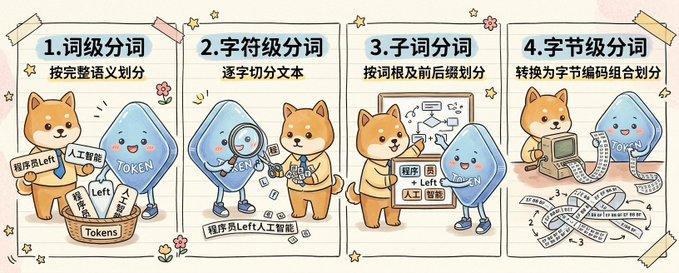
かわいい4パネルのトークン化インフォグラフィック
このプロンプトは、2体のマスコットキャラクターが4つのトークン化方法を説明する、手描きの大型インフォグラフィックを生成します。これは、AIとNLPに関するソーシャルメディアの教育投稿に最適です。
これはグラフィック&ポスター向けのGPT Image 2プロンプトケースです。以下のコピー可能なプロンプトを使用して同様のビジュアルを生成し、再利用する前にAwesome GPT Image 2 Prompts帰属表示と商用利用権を確認してください。
プロンプトセット全体が必要ですか? グラフィック&ポスター 関連する例をもっと見るにはトピックハブを開くか、 GPT Image 2 プロンプトカタログ 完全な例の索引、再利用可能な構造、および出典の明記については、こちらをご覧ください。
Free 1K preview
Generate one preview image instantly, no sign-up required.
Free text preview doesn’t preserve reference-image consistency.
4000/4000
プロンプト
コピー準備完了プロンプト
{
  "type": "hand-drawn educational infographic illustration",
  "style": "cute notebook doodle style, hand-painted handbook aesthetic, warm beige paper background with faint texture, playful sketchy outlines, soft pastel colors, small flower and star doodles, taped paper-card layout",
  "aspect_ratio": "wide horizontal",
  "subject": {
    "characters": [
      {
        "name": "{argument name=\"dog character name\" default=\"Chai Xiaoqi\"}",
        "species": "Shiba Inu mascot",
        "appearance": "cute orange-brown Shiba Inu with cream muzzle and belly, round face, upright ears, friendly expression, simplified cartoon anatomy"
      },
      {
        "name": "{argument name=\"blue character name\" default=\"Token\"}",
        "species": "blue token mascot",
        "appearance": "rounded triangular blue droplet-shaped character with glossy gradient body, tiny arms and legs, rosy cheeks, smiling face, the word \"{argument name=\"token label\" default=\"TOKEN\"}\" written across the body in white"
      }
    ],
    "theme": "compare four levels of text segmentation in a friendly science-explainer format"
  },
  "layout": {
    "sections": [
      {
        "title": "1. Word-level Segmentation",
        "position": "far left panel",
        "count": 1,
        "subtitle": "Divided according to complete semantics",
        "scene": "A Shiba Inu and a blue Token character stand next to a basket labeled \"Tokens\", which is filled with slips of paper. Visible slips and labels are written with \"Programmer\", \"Left\", \"Artificial Intelligence\", and a small sign next to it reads \"ProgrammerLeft\". The Token character points to the basket, while the Shiba Inu displays sorted fragments."
      },
      {
        "title": "2. Character-level tokenization",
        "position": "left-center panel",
        "count": 1,
        "subtitle": "Splitting the text character by character",
        "scene": "A blue Token character uses a magnifying glass to examine small character blocks scattered on the floor, while a Shiba Inu organizes them nearby. A label strip at the bottom reads \"ProgrammerLeftArtificialIntelligence\", serving as a continuous text sample broken down into individual characters."
      },
      {
        "title": "3. Subword tokenization",
        "position": "right-center panel",
        "count": 1,
        "subtitle": "Divide by root words and prefixes",
        "scene": "The Shiba Inu points to a project demonstrating root word splitting and arrows, with a blue Token mascot standing next to it. Small paper labels contain mixed fragments such as \"program\", \"member\", \"Left\", \"artificial\", \"intelligence\", emphasizing morpheme or subword groupings."
      },
      {
        "title": "4. Byte-level tokenization",
        "position": "far right panel",
        "count": 1,
        "subtitle": "Convert to byte encoding combinations for division",
        "scene": "the Shiba Inu uses a retro computer with a long printed strip emerging from it, and the blue token character stands to the side. Across the lower half are ribbon-like strips filled with repeated byte numbers and symbols, especially \"1\", \"2\", \"3\", \"4\", and \"-3\", illustrating byte encoding combinations."
      }
    ],
    "decorations": {
      "count": 10,
      "items": [
        "4 pieces of taped corners in pale yellow and pink",
        "small five-point stars scattered around panels",
        "tiny flower doodles between panels",
        "curved motion lines near character gestures",
        "notebook-style vertical panel dividers",
        "rounded rectangular panel frames",
        "light shadows behind paper panels",
        "faint horizontal paper grain",
        "small spark icons",
        "hand-drawn accent marks"
      ]
    }
  },
  "composition": "four equal vertical panels arranged left to right across one canvas, each panel with a bold numbered Chinese heading and a smaller subtitle beneath it, each panel showing the two mascots acting out a different tokenization concept",
  "text": {
    "headings": [
      "1. Word-level Segmentation",
      "2. Character-level tokenization",
      "3. Subword tokenization",
      "4. Byte-level tokenization"
    ],
    "subtitles": [
      "Divided according to complete semantics",
      "Splitting the text character by character",
      "Divide by root words and prefixes",
      "Convert to byte encoding combinations for division"
    ]
  },
  "quality": "clean, polished, adorable, presentation-ready educational visual",
  "use_case": "social media science explainer comparing tokenization methods for AI and NLP"
}
プロンプト変数
プロンプトに表示される編集可能な引数プレースホルダーと、それらのデフォルト値。
変数
dog character name
デフォルト
Chai Xiaoqi
変数
blue character name
デフォルト
Token
変数
token label
デフォルト
TOKEN
Best for
- - グラフィック&ポスター visual exploration
- - Image generation and reference-image edits
- - Reusable briefs that keep source attribution visible
Change these parts
- - Subject, product, character, or scene
- - Aspect ratio, camera, lighting, and background
- - Brand, text, color, and output constraints
Recommended model and settings
- - Model: gpt-image-2
- - Input mode: 画像から画像
- - Aspect ratio: source
- - Commercial status: review original source
How to use this prompt
- 1. Copy the prompt and preserve its structure for the first test.
- 2. Replace the subject, context, and publishing channel.
- 3. Change one camera, lighting, or style variable per iteration.
- 4. Inspect the output, source, text, and rights before reuse.
Limitations, source, and reuse cautions
- - Generated output is an editable draft, not factual, legal, or rights evidence.
- - Review the linked source, people, brands, logos, text, and third-party media before commercial use.
Awesome GPT Image 2 Promptsからインポートされました。出典の明記が必要です。商用利用の可否はallowedです。有料利用の前に、出典元の権利をご確認ください。
このカテゴリーのその他の事例
カテゴリー、入力モードの互換性、品質、およびリスクの低さに基づいて優先順位付けされています。






再利用と出典に関する注記
ケースを事前に確認してから、このプロンプトを安全に使用してください。
- 1.プロンプトをコピーするか、生成ボタンを使ってDovooで直接開いてください。
- 2.ご自身の用途に合わせて、変数、アスペクト比、および参照画像を調整してください。
- 3.公開または有料利用の前に、情報源の権利、帰属表示の要件、およびブランドまたは肖像権に関するリスクを確認してください。