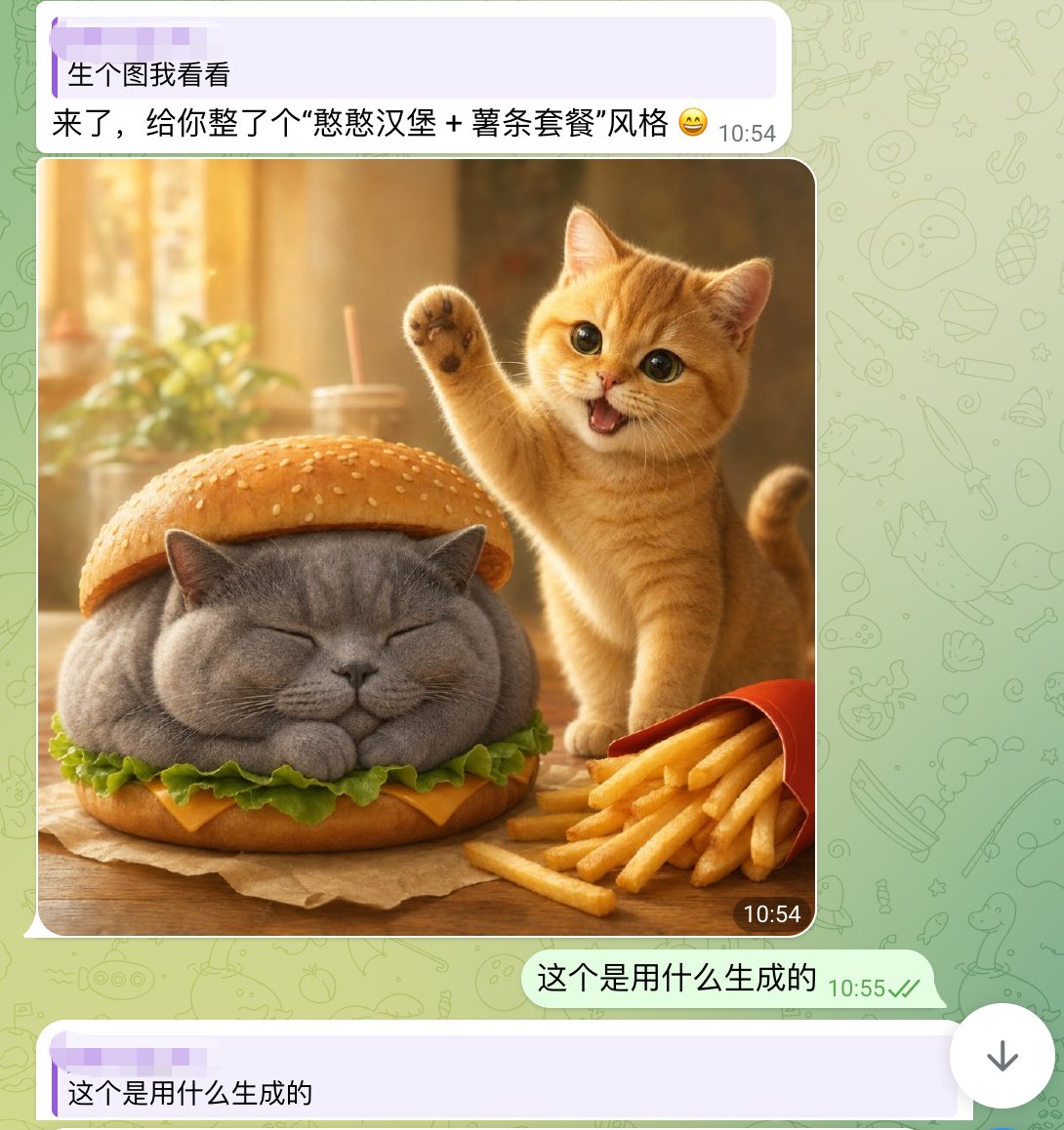
かわいい猫バーガーチャットのスクリーンショット
ソーシャルメディアで拡散されるAI画像共有投稿を再現するのに役立つ、フォトリアルなかわいい猫のハンバーガー画像が特徴の、WhatsApp風のスマートフォンチャットのスクリーンショット。
これは肖像画とキャラクター向けのGPT Image 2プロンプトケースです。以下のコピー可能なプロンプトを使用して同様のビジュアルを生成し、再利用する前にAwesome GPT Image 2 Prompts帰属表示と商用利用権を確認してください。
プロンプトセット全体が必要ですか? 肖像画とキャラクター 関連する例をもっと見るにはトピックハブを開くか、 GPT Image 2 プロンプトカタログ 完全な例の索引、再利用可能な構造、および出典の明記については、こちらをご覧ください。
Free 1K preview
Generate one preview image instantly, no sign-up required.
1903/4000
プロンプト
コピー準備完了プロンプト
A realistic and fun mobile chat screenshot displayed in full screen, with an interface similar to WhatsApp. The background is a light green with faint doodle icons. At the top is a light purple receive message bubble containing two lines of Chinese text, with a timestamp on the right. The first line reads: “生个图我看看” (Show me a generated image), and the second line reads: “来了,给你整了个“憨憨汉堡 + 薯条套餐”风格 😄” (Here, I've created a “Silly Burger + Fries Combo” style for you 😄). Below is a large, rounded image in the chat. The generated image depicts a warm and inviting desktop food scene: a chubby gray British Shorthair cat is designed as a burger, with its eyes closed and paws tucked in, sandwiched between the top and bottom sesame seed bun layers. Green lettuce and a slice of yellow cheese are visible around the cat's body. To the right of the burger cat is a small orange cat, lively and cute, standing upright with one paw raised in a waving gesture, its mouth open in a happy smile, and large, bright eyes looking at the camera. In the lower right foreground is a slightly tilted red fries box, with golden fries spilling out. The table is wooden, and a brown baking paper is placed under the burger cat. The photo background is softly blurred, presenting a golden sunlight effect with out-of-focus images of cups, straws, and plants. Add a dark rounded timestamp label “10:54” in the lower right corner of the image. Below the image, add a right-aligned light green send message bubble with the Chinese text “这个是用什么生成的” (What was this generated with?), accompanied by a gray-green timestamp “10:55” and two checkmarks. At the very bottom, display another light purple receive bubble, starting with “这个是用什么生成的” (What was this generated with?). The overall composition should fully simulate a mobile chat screenshot, combining lovely, photo-realistic animal food art with a simple social software UI.
Best for
- - 肖像画とキャラクター visual exploration
- - Image generation and reference-image edits
- - Reusable briefs that keep source attribution visible
Change these parts
- - Subject, product, character, or scene
- - Aspect ratio, camera, lighting, and background
- - Brand, text, color, and output constraints
Recommended model and settings
- - Model: gpt-image-2
- - Input mode: テキストから画像
- - Aspect ratio: source
- - Commercial status: review original source
How to use this prompt
- 1. Copy the prompt and preserve its structure for the first test.
- 2. Replace the subject, context, and publishing channel.
- 3. Change one camera, lighting, or style variable per iteration.
- 4. Inspect the output, source, text, and rights before reuse.
Limitations, source, and reuse cautions
- - Generated output is an editable draft, not factual, legal, or rights evidence.
- - Review the linked source, people, brands, logos, text, and third-party media before commercial use.
Awesome GPT Image 2 Promptsからインポートされました。出典の明記が必要です。商用利用の可否はallowedです。有料利用の前に、出典元の権利をご確認ください。
このカテゴリーのその他の事例
カテゴリー、入力モードの互換性、品質、およびリスクの低さに基づいて優先順位付けされています。






再利用と出典に関する注記
ケースを事前に確認してから、このプロンプトを安全に使用してください。
- 1.プロンプトをコピーするか、生成ボタンを使ってDovooで直接開いてください。
- 2.ご自身の用途に合わせて、変数、アスペクト比、および参照画像を調整してください。
- 3.公開または有料利用の前に、情報源の権利、帰属表示の要件、およびブランドまたは肖像権に関するリスクを確認してください。