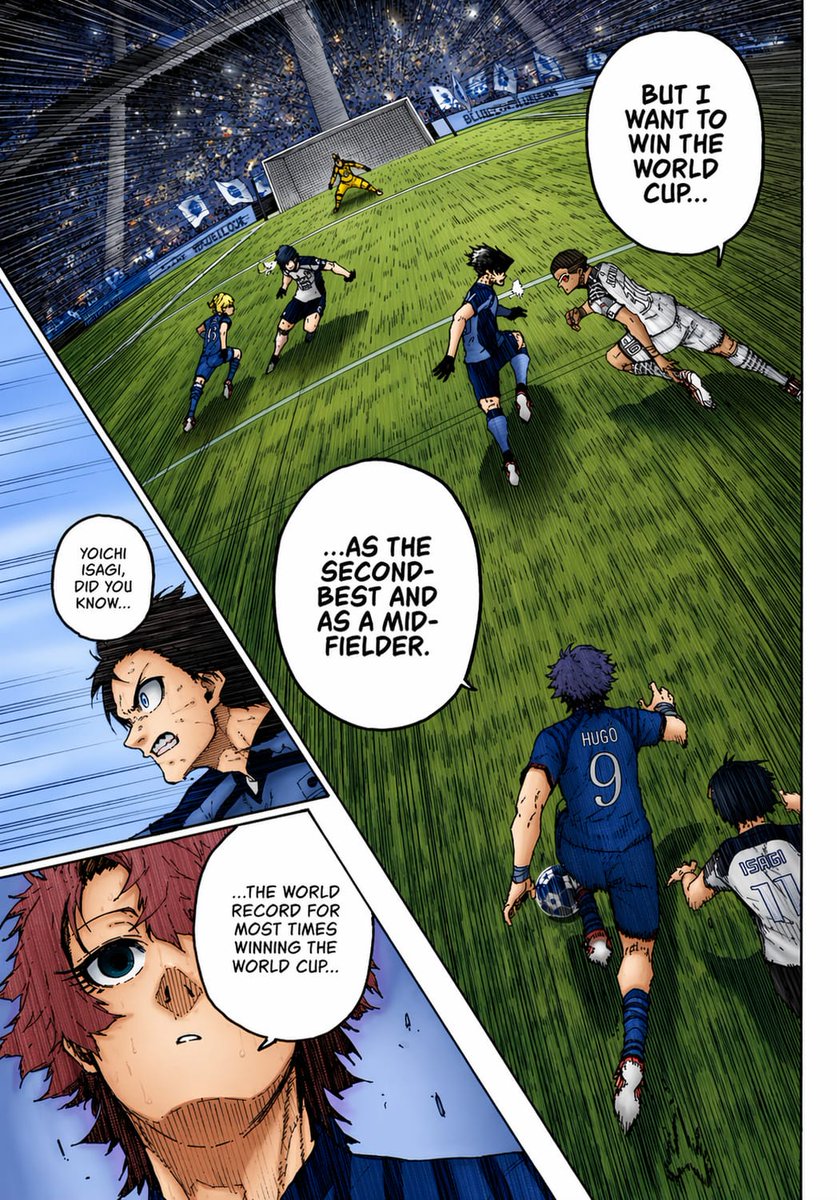
カラー化されたサッカー漫画のページ
これにより、傾いたスタジアムのサッカーシーン、挿入されたクローズアップパネル、大胆なセリフなどを含む、ドラマチックなフルカラーのスポーツマンガページが生成されます。マンガの着色テストやアニメスタイルのコミックアートに最適です。
これはアニメ&ゲーム向けのGPT Image 2プロンプトケースです。以下のコピー可能なプロンプトを使用して同様のビジュアルを生成し、再利用する前にAwesome GPT Image 2 Prompts帰属表示と商用利用権を確認してください。
プロンプトセット全体が必要ですか? アニメ&ゲーム 関連する例をもっと見るにはトピックハブを開くか、 GPT Image 2 プロンプトカタログ 完全な例の索引、再利用可能な構造、および出典の明記については、こちらをご覧ください。
Free 1K preview
Generate one preview image instantly, no sign-up required.
2358/4000
プロンプト
コピー準備完了プロンプト
A full-color manga page in the style of a dramatic sports manga, showing an intense soccer match inside a huge domed stadium packed with a blue-and-white crowd. Use sharp ink lines, dense crosshatching, screentone texture, dynamic speed lines, and vivid anime coloring as if a black-and-white manga page has been professionally colorized. The composition is a single page with 3 panels: 1 large main panel covering most of the page, plus 2 narrow diagonal inset panels stacked along the left side. In the main panel, show a steeply tilted wide-angle view of the penalty area and goal from an elevated sideline perspective, with the green grass stretched by perspective and filled with directional hatching. Count 6 visible players in the main panel: 4 blue-uniform players and 2 white-uniform players, plus 1 goalkeeper in yellow at the goal. The most prominent player is seen from behind in the lower center-right wearing a blue jersey with “HUGO” and the number 9, running toward the play with one arm extended. Near him on the lower right edge, show another player in a white jersey labeled “ISAGI” with the number 11, also running forward. In the midground, show 4 more field players contesting the ball: 3 in blue and 1 in white, with one white-uniform player diving or lunging horizontally from the right toward the center. The goal stands near the top center-left, with the yellow goalkeeper bracing in front of the net. Add 3 speech bubbles in the main panel, large white manga balloons with hand-lettered uppercase English text: “BUT I WANT TO WIN THE WORLD CUP...”, “...AS THE SECOND-BEST AND AS A MID-FIELDER.”, and “...THE WORLD RECORD FOR MOST TIMES WINNING THE WORLD CUP...”. In the left-side inset area, create 2 diagonal panels. The upper inset panel shows a close-up of a dark-haired character in blue, partly obscured by a soft rectangular blur over the center of the face and torso area, with a small speech bubble that says, “YOICHI ISAGI, DID YOU KNOW...”. The lower inset panel shows a close-up of a reddish-haired character with a wide blue eye, sweat on the face, and a pale blue background, looking surprised or stunned. Maintain bold black panel borders, dramatic foreshortening, and a high-energy tournament atmosphere. Use a blue, green, white, and yellow palette with strong contrast and authentic manga-page coloring aesthetics.
Best for
- - アニメ&ゲーム visual exploration
- - Image generation and reference-image edits
- - Reusable briefs that keep source attribution visible
Change these parts
- - Subject, product, character, or scene
- - Aspect ratio, camera, lighting, and background
- - Brand, text, color, and output constraints
Recommended model and settings
- - Model: gpt-image-2
- - Input mode: テキストから画像
- - Aspect ratio: source
- - Commercial status: review original source
How to use this prompt
- 1. Copy the prompt and preserve its structure for the first test.
- 2. Replace the subject, context, and publishing channel.
- 3. Change one camera, lighting, or style variable per iteration.
- 4. Inspect the output, source, text, and rights before reuse.
Limitations, source, and reuse cautions
- - Generated output is an editable draft, not factual, legal, or rights evidence.
- - Review the linked source, people, brands, logos, text, and third-party media before commercial use.
Awesome GPT Image 2 Promptsからインポートされました。出典の明記が必要です。商用利用の可否はallowedです。有料利用の前に、出典元の権利をご確認ください。
このカテゴリーのその他の事例
カテゴリー、入力モードの互換性、品質、およびリスクの低さに基づいて優先順位付けされています。






再利用と出典に関する注記
ケースを事前に確認してから、このプロンプトを安全に使用してください。
- 1.プロンプトをコピーするか、生成ボタンを使ってDovooで直接開いてください。
- 2.ご自身の用途に合わせて、変数、アスペクト比、および参照画像を調整してください。
- 3.公開または有料利用の前に、情報源の権利、帰属表示の要件、およびブランドまたは肖像権に関するリスクを確認してください。