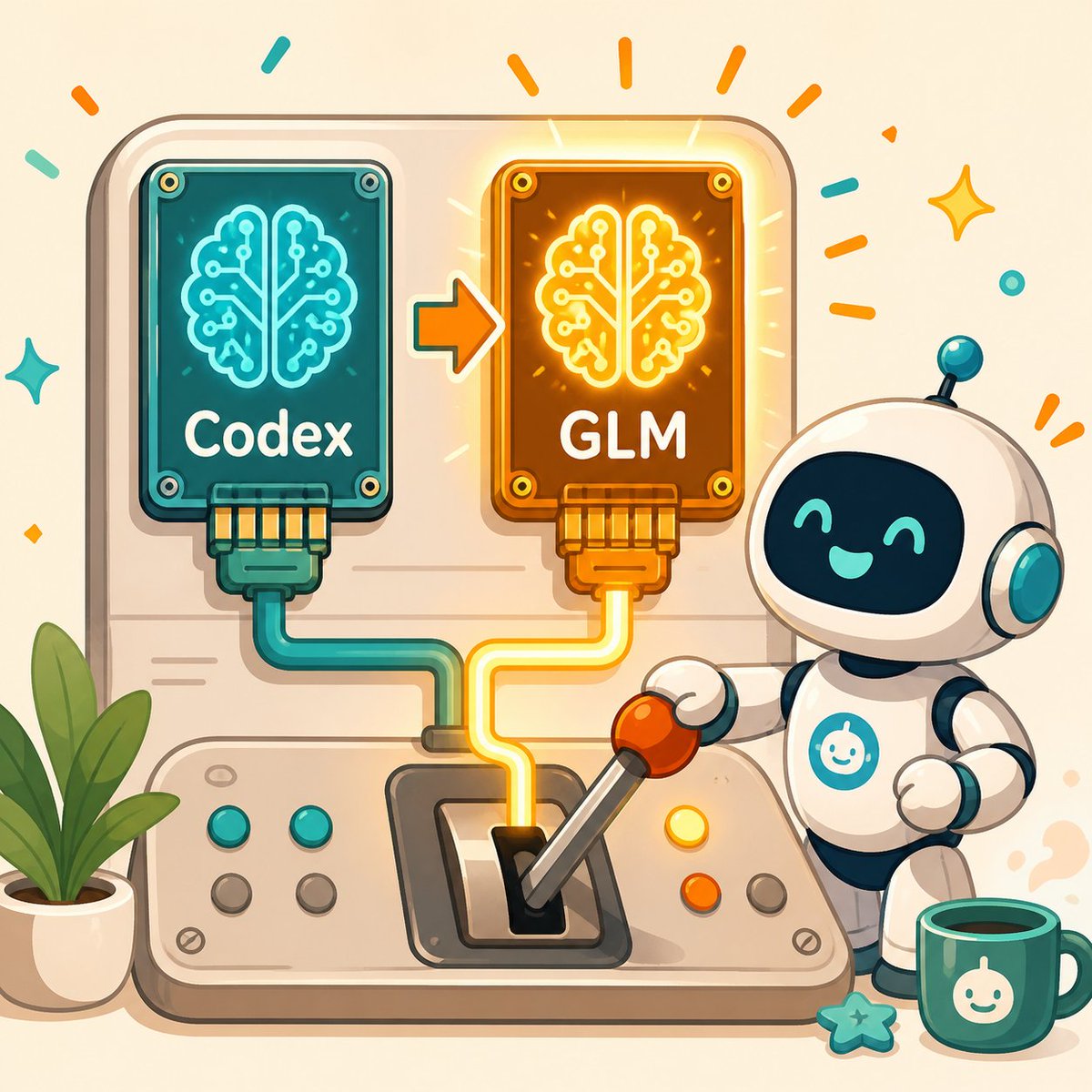
Kawaii AI Model Switch Machine
A cheerful square tech mascot illustration showing a robot switching an AI brain chip from Codex to GLM, useful for blog or social posts about changing AI models.
これはイラスト&アート向けのGPT Image 2プロンプトケースです。以下のコピー可能なプロンプトを使用して同様のビジュアルを生成し、再利用する前にAwesome GPT Image 2 Prompts帰属表示と商用利用権を確認してください。
プロンプトセット全体が必要ですか? イラスト&アート 関連する例をもっと見るにはトピックハブを開くか、 GPT Image 2 プロンプトカタログ 完全な例の索引、再利用可能な構造、および出典の明記については、こちらをご覧ください。
Free 1K preview
Generate one preview image instantly, no sign-up required.
1922/4000
プロンプト
コピー準備完了プロンプト
Create a cheerful square 1:1 kawaii tech illustration showing an AI model switch-over machine. The scene is a rounded beige control panel on a warm cream background. On the upper left of the panel, place a teal circuit-board chip labeled {argument name="left chip label" default="Codex"}, with a glowing cyan brain-shaped circuit icon, four visible corner screws, and a teal cable plugged into its bottom. On the upper right, place an orange/gold circuit-board chip labeled {argument name="right chip label" default="GLM"}, with a glowing yellow brain-shaped circuit icon, four visible corner screws, and a yellow cable plugged into its bottom. Between the chips, draw one orange arrow pointing from the left chip to the right chip to indicate switching. The right chip should emit warm glow rays and celebratory orange marks.

At the bottom center, show a physical lever console with the yellow cable routed into the lever slot; the lever is tilted toward the right and has an orange ball handle held by a cute small white robot on the right side. The robot has a glossy white rounded body, a black face screen with turquoise smiling eyes and mouth, teal ear-like side disks, a tiny antenna with a teal ball, dark blue joints, and a teal circular chest emblem with a simple smiling bot icon. Include exactly six round console buttons: two teal buttons on the left row, two gray buttons below them, one yellow button near the robot, and one orange button below it, plus one gray button further right. Add a potted green plant on the lower left, a teal mug with the same white smiling bot icon on the lower right, and a small teal star charm near the mug. Decorate the background with confetti strokes and sparkles in orange and teal. Use soft rounded shapes, clean outlines, gentle shadows, warm highlights, vector-like digital art, friendly startup mascot style, no photorealism, no extra text beyond the two chip labels.
プロンプト変数
プロンプトに表示される編集可能な引数プレースホルダーと、それらのデフォルト値。
変数
left chip label
デフォルト
Codex
変数
right chip label
デフォルト
GLM
Best for
- - イラスト&アート visual exploration
- - Image generation and reference-image edits
- - Reusable briefs that keep source attribution visible
Change these parts
- - Subject, product, character, or scene
- - Aspect ratio, camera, lighting, and background
- - Brand, text, color, and output constraints
Recommended model and settings
- - Model: gpt-image-2
- - Input mode: テキストから画像
- - Aspect ratio: source
- - Commercial status: review original source
How to use this prompt
- 1. Copy the prompt and preserve its structure for the first test.
- 2. Replace the subject, context, and publishing channel.
- 3. Change one camera, lighting, or style variable per iteration.
- 4. Inspect the output, source, text, and rights before reuse.
Limitations, source, and reuse cautions
- - Generated output is an editable draft, not factual, legal, or rights evidence.
- - Review the linked source, people, brands, logos, text, and third-party media before commercial use.
Awesome GPT Image 2 Promptsからインポートされました。出典の明記が必要です。商用利用の可否はallowedです。有料利用の前に、出典元の権利をご確認ください。
このカテゴリーのその他の事例
カテゴリー、入力モードの互換性、品質、およびリスクの低さに基づいて優先順位付けされています。

再利用と出典に関する注記
ケースを事前に確認してから、このプロンプトを安全に使用してください。
- 1.プロンプトをコピーするか、生成ボタンを使ってDovooで直接開いてください。
- 2.ご自身の用途に合わせて、変数、アスペクト比、および参照画像を調整してください。
- 3.公開または有料利用の前に、情報源の権利、帰属表示の要件、およびブランドまたは肖像権に関するリスクを確認してください。