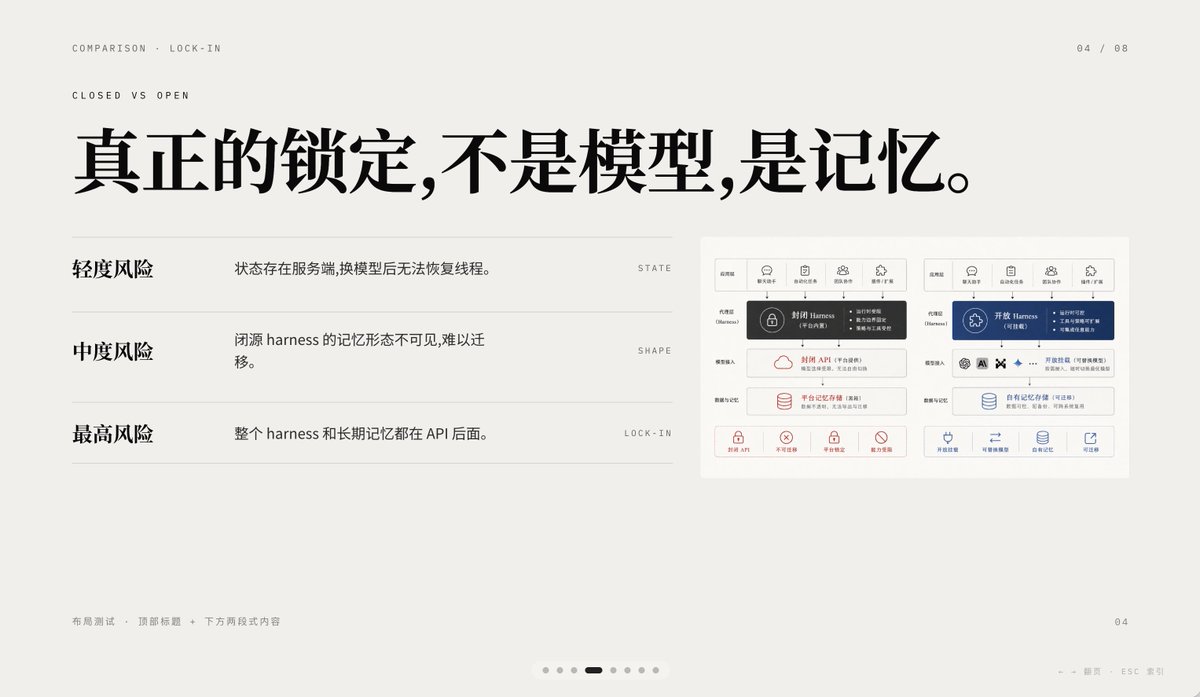
AIの囲い込みを最小限に抑えた比較スライド
このプロンプトは、クローズドAIとオープンAIのメモリロックインを比較する、洗練された中国語のプレゼンテーションスライドを生成します。基調講演の資料、製品戦略に関する講演、および高品質なインフォグラフィックPPTに適しています。
これはグラフィック&ポスター向けのGPT Image 2プロンプトケースです。以下のコピー可能なプロンプトを使用して同様のビジュアルを生成し、再利用する前にAwesome GPT Image 2 Prompts帰属表示と商用利用権を確認してください。
プロンプトセット全体が必要ですか? グラフィック&ポスター 関連する例をもっと見るにはトピックハブを開くか、 GPT Image 2 プロンプトカタログ 完全な例の索引、再利用可能な構造、および出典の明記については、こちらをご覧ください。
Free 1K preview
Generate one preview image instantly, no sign-up required.
2878/4000
プロンプト
コピー準備完了プロンプト
A 16:9 minimalist editing style presentation Slides with a warm, light gray paper background, ample whitespace, and a layout following a refined Swiss style grid, possessing a high-end PPT/Keynote design aesthetic. This Slides is a comparison page about “Lock-in”, using elegant Chinese typography and mixing in tiny English navigation text. Place two lines of small, uppercase English breadcrumb navigation in the upper left corner: “COMPARISON · LOCK-IN” and below it “CLOSED VS OPEN”, using a narrow, light-weight sans-serif font with wide letter spacing. Place a page number indicator “04 / 08” in the upper right corner. In the upper half, centered slightly to the left, add a large, bold, black Chinese font title: “True lock-in is not the model, it’s the memory.” Below the title, in the left area, create three lines of a comparison list, separated by thin horizontal lines. The first line has a bold Chinese label “Light Risk” on the left, and an explanation on the right: “State exists on the server, and threads cannot be restored after changing the model.”, aligned with a small, uppercase English keyword on the far right: “STATE”. The second line has a bold label “Medium Risk”, with the explanation “The memory form of a closed-source harness is invisible and difficult to migrate.”, and the keyword “SHAPE” on the far right. The third line has a bold label “Highest Risk”, with the explanation “The entire harness and long-term memory are behind the API.”, and the keyword “LOCK-IN” on the far right. Place a small embedded comparison chart card on the right side of the Slides, with a white background and a subtle border, containing two side-by-side system architecture panels. The left panel represents a closed system, decorated with dark gray and soft red accents; the right panel represents an open system, decorated with dark blue accents. Each panel should have 5 small icon labels at the top, with a highlighted harness module in the center, and multiple rounded rectangle modules stacked below, with a row of 4 small capability icons with short Chinese labels at the bottom. Keep the embedded chart details rich but the size small, so it serves as a supporting visual element rather than the visual focus. Add small, light gray Chinese footer text in the lower left corner: “Layout Test · Top Title + Two-Section Content”. Place a small page number “04” in the lower right corner. Add a carousel indicator centered along the bottom edge, containing 7 small dots, with the 4th dot as a short, dark rounded capsule representing the current page, and the other 6 as light gray dots. Add a faint navigation prompt in the lower right edge: “← → Page ESC Close”. Use clear vector text rendering, understated contrast, elegant spacing, and a calm, high-end infographic style suitable for AI platform comparison and API memory lock-in business presentations.
Best for
- - グラフィック&ポスター visual exploration
- - Image generation and reference-image edits
- - Reusable briefs that keep source attribution visible
Change these parts
- - Subject, product, character, or scene
- - Aspect ratio, camera, lighting, and background
- - Brand, text, color, and output constraints
Recommended model and settings
- - Model: gpt-image-2
- - Input mode: テキストから画像
- - Aspect ratio: source
- - Commercial status: review original source
How to use this prompt
- 1. Copy the prompt and preserve its structure for the first test.
- 2. Replace the subject, context, and publishing channel.
- 3. Change one camera, lighting, or style variable per iteration.
- 4. Inspect the output, source, text, and rights before reuse.
Limitations, source, and reuse cautions
- - Generated output is an editable draft, not factual, legal, or rights evidence.
- - Review the linked source, people, brands, logos, text, and third-party media before commercial use.
Awesome GPT Image 2 Promptsからインポートされました。出典の明記が必要です。商用利用の可否はallowedです。有料利用の前に、出典元の権利をご確認ください。
このカテゴリーのその他の事例
カテゴリー、入力モードの互換性、品質、およびリスクの低さに基づいて優先順位付けされています。






再利用と出典に関する注記
ケースを事前に確認してから、このプロンプトを安全に使用してください。
- 1.プロンプトをコピーするか、生成ボタンを使ってDovooで直接開いてください。
- 2.ご自身の用途に合わせて、変数、アスペクト比、および参照画像を調整してください。
- 3.公開または有料利用の前に、情報源の権利、帰属表示の要件、およびブランドまたは肖像権に関するリスクを確認してください。