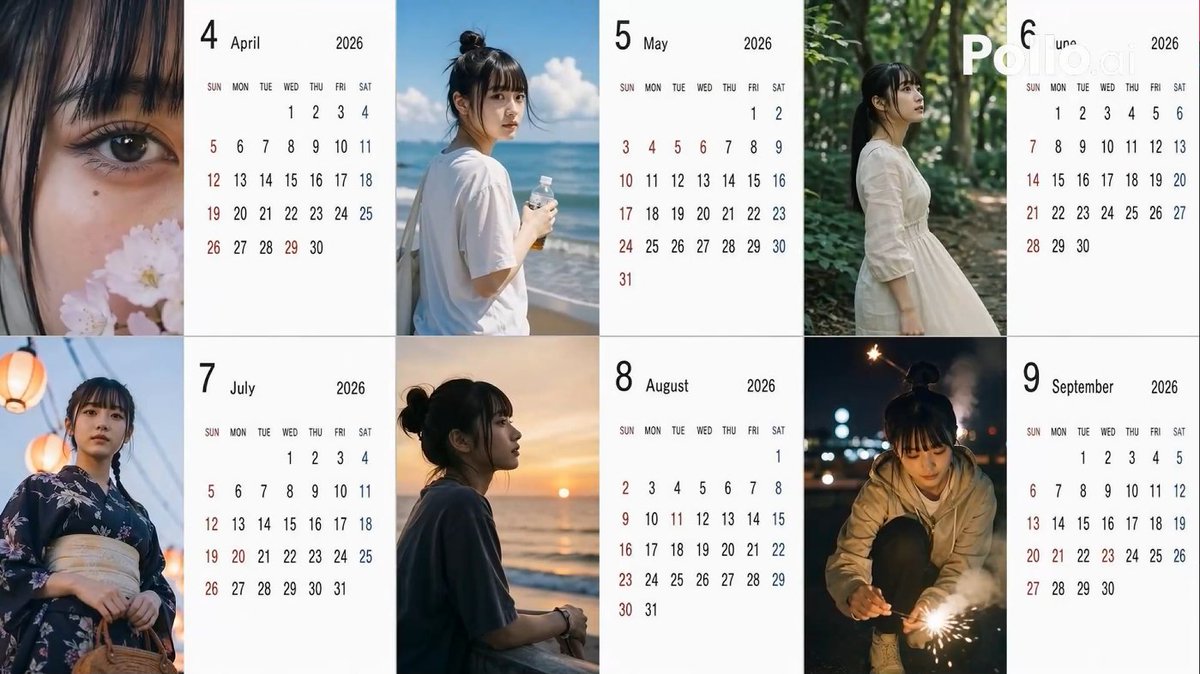
2026年日本カレンダーの気の利いた質問
角度、髪型、ポーズにランダム変数を用いて「自然なスマートフォン写真」のような雰囲気を作り出し、2026年の6ヶ月分の日本式カレンダーを作成するための、非常に構造化されたプロンプト。
これは製品および商業向けのGPT Image 2プロンプトケースです。以下のコピー可能なプロンプトを使用して同様のビジュアルを生成し、再利用する前にAwesome GPT Image 2 Prompts帰属表示と商用利用権を確認してください。
プロンプトセット全体が必要ですか? 製品および商業 関連する例をもっと見るにはトピックハブを開くか、 GPT Image 2 プロンプトカタログ 完全な例の索引、再利用可能な構造、および出典の明記については、こちらをご覧ください。
Free 1K preview
Generate one preview image instantly, no sign-up required.
Free text preview doesn’t preserve reference-image consistency.
1371/4000
プロンプト
コピー準備完了プロンプト
[Theme] A Japanese calendar for {argument name="year" default="2026"} from {argument name="period" default="April to September"} ({argument name="number of months" default="6"} months), using the person in the reference image as the model.
[Calendar] The background of the calendar portion should be white for readability.
[Image] Everyday photos taken by amateurs with an iPhone, themed after the seasons of each month.

[Location] Leave to AI according to the season.
[Distance] Randomly select one for each month: extreme_close, close, bust, mid, far, candid.
[Angle] Randomly select one for each month: eye, low, high, side, back.
[Exposure/Tone] Randomly select one for each month: overexp, natural, warm, cool, dark.
[Hairstyle] Randomly select one for each month: ponytail, bun, down, half_up, messy, wet, short, bob, braid, twin.
[Clothing] Leave to AI according to the season.
[Noise] Randomly select one for each month: low, mid, high, film.
[Blur/Focus] Randomly select one for each month: sharp, slight, motion, soft.
[Pose] Randomly select one for each month: natural_stand, sitting, walking, phone, wall_lean, crouch, look_back.
[Holding] Randomly select one for each month: none, smartphone, bottle, coffee, umbrella, bag, towel, script.
[Time of day] Randomly select one for each month: early_morning, morning, noon, afternoon, evening, night, late_night.
プロンプト変数
プロンプトに表示される編集可能な引数プレースホルダーと、それらのデフォルト値。
変数
year
デフォルト
2026
変数
period
デフォルト
April to September
変数
number of months
デフォルト
6
Best for
- - 製品および商業 visual exploration
- - Image generation and reference-image edits
- - Reusable briefs that keep source attribution visible
Change these parts
- - Subject, product, character, or scene
- - Aspect ratio, camera, lighting, and background
- - Brand, text, color, and output constraints
Recommended model and settings
- - Model: gpt-image-2
- - Input mode: 画像から画像
- - Aspect ratio: source
- - Commercial status: review original source
How to use this prompt
- 1. Copy the prompt and preserve its structure for the first test.
- 2. Replace the subject, context, and publishing channel.
- 3. Change one camera, lighting, or style variable per iteration.
- 4. Inspect the output, source, text, and rights before reuse.
Limitations, source, and reuse cautions
- - Generated output is an editable draft, not factual, legal, or rights evidence.
- - Review the linked source, people, brands, logos, text, and third-party media before commercial use.
Awesome GPT Image 2 Promptsからインポートされました。出典の明記が必要です。商用利用の可否はallowedです。有料利用の前に、出典元の権利をご確認ください。
このカテゴリーのその他の事例
カテゴリー、入力モードの互換性、品質、およびリスクの低さに基づいて優先順位付けされています。






再利用と出典に関する注記
ケースを事前に確認してから、このプロンプトを安全に使用してください。
- 1.プロンプトをコピーするか、生成ボタンを使ってDovooで直接開いてください。
- 2.ご自身の用途に合わせて、変数、アスペクト比、および参照画像を調整してください。
- 3.公開または有料利用の前に、情報源の権利、帰属表示の要件、およびブランドまたは肖像権に関するリスクを確認してください。