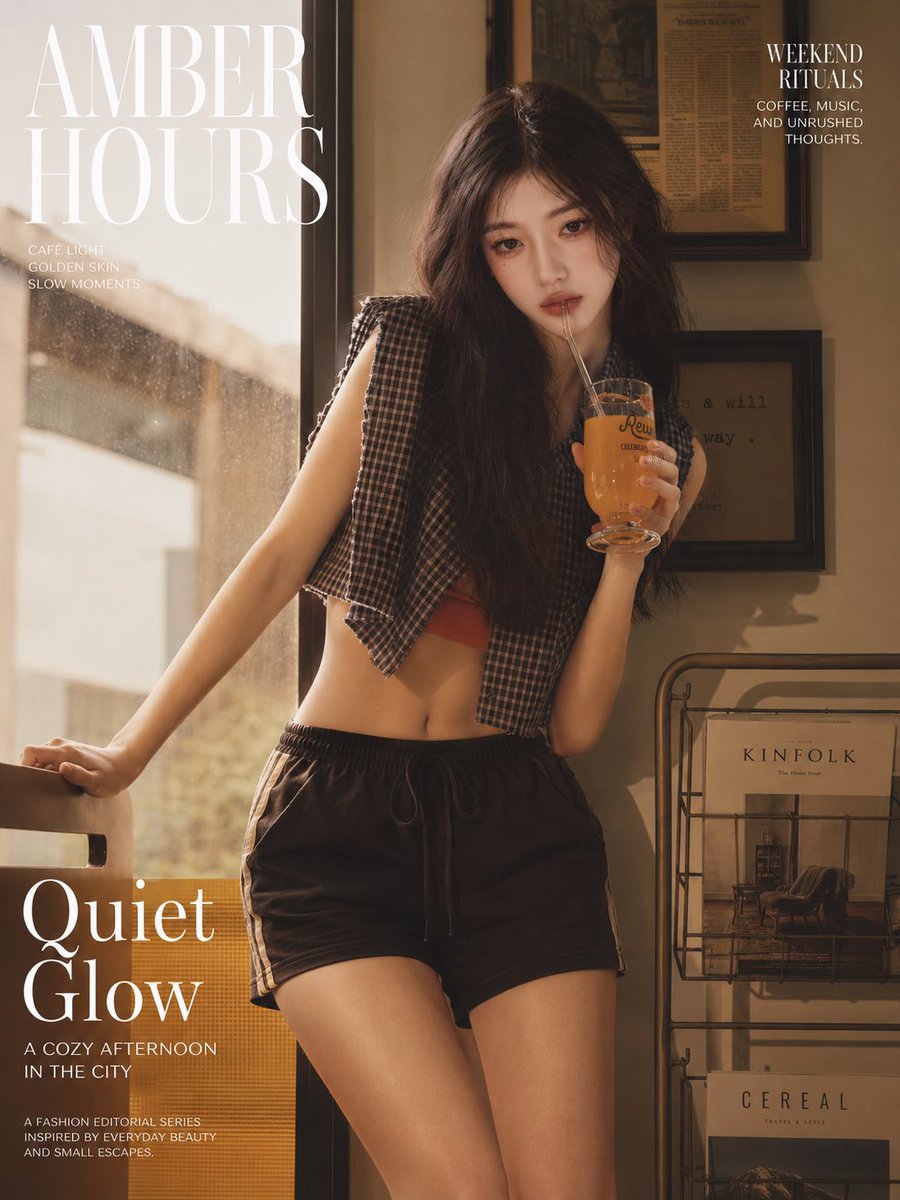
Amber Café Magazine Editorial
Generates a warm vertical café fashion poster with a relaxed young woman, golden window light, and elegant magazine-style typography.
これはファッション&ビューティー向けのGPT Image 2プロンプトケースです。以下のコピー可能なプロンプトを使用して同様のビジュアルを生成し、再利用する前にAwesome GPT Image 2 Prompts帰属表示と商用利用権を確認してください。
プロンプトセット全体が必要ですか? ファッション&ビューティー 関連する例をもっと見るにはトピックハブを開くか、 GPT Image 2 プロンプトカタログ 完全な例の索引、再利用可能な構造、および出典の明記については、こちらをご覧ください。
Free 1K preview
Generate one preview image instantly, no sign-up required.
2163/4000
プロンプト
コピー準備完了プロンプト
Create a vertical 3:4 fashion magazine editorial poster photographed in warm afternoon café light. The main subject is a young Asian woman with {argument name="hair color" default="dark brown"} long, loose, slightly messy wavy hair, natural delicate features, a calm distant expression, relaxed weekend mood, and no exaggerated posing. She stands indoors beside a large sunlit café window, leaning one hand on the back of a chair while holding a clear goblet-style glass of amber iced drink with a straw near her mouth. Show every face clearly with natural, detailed facial features, while the body, clothing, and environment remain realistic and detailed. Outfit: cropped sleeveless plaid button shirt worn open over a muted red bandeau or crop top, black drawstring athletic shorts with side trim, casual bare midriff, understated natural styling. Environment: cozy urban café corner with golden dust-speckled window light on the left, beige walls, framed vintage newspaper or typography art on the right wall, and a metal magazine rack on the lower right containing exactly 2 visible magazines labeled “KINFOLK” and “CEREAL.” Use a cinematic amber-brown color grade, soft shadows, film grain, shallow depth of field, glossy magazine photography, relaxed lifestyle editorial mood. Add elegant white serif magazine typography: large top-left masthead text {argument name="masthead text" default="AMBER HOURS"}; small left subtitle with exactly 3 lines: “CAFÉ LIGHT”, “GOLDEN SKIN”, “SLOW MOMENTS”; top-right block with headline {argument name="right headline" default="WEEKEND RITUALS"} and small copy “COFFEE, MUSIC, AND UNRUSHED THOUGHTS.”; large bottom-left feature title {argument name="feature title" default="Quiet Glow"}; below it the subheading {argument name="subheading" default="A COZY AFTERNOON IN THE CITY"}; and a final small footer with exactly 3 lines: “A FASHION EDITORIAL SERIES”, “INSPIRED BY EVERYDAY BEAUTY”, “AND SMALL ESCAPES.” Keep the composition balanced with the subject centered slightly right, typography mainly on the left and upper right, realistic skin texture, no plastic look, no extra limbs, no additional people, no watermark.プロンプト変数
プロンプトに表示される編集可能な引数プレースホルダーと、それらのデフォルト値。
変数
hair color
デフォルト
dark brown
変数
masthead text
デフォルト
AMBER HOURS
変数
right headline
デフォルト
WEEKEND RITUALS
変数
feature title
デフォルト
Quiet Glow
変数
subheading
デフォルト
A COZY AFTERNOON IN THE CITY
Best for
- - ファッション&ビューティー visual exploration
- - Image generation and reference-image edits
- - Reusable briefs that keep source attribution visible
Change these parts
- - Subject, product, character, or scene
- - Aspect ratio, camera, lighting, and background
- - Brand, text, color, and output constraints
Recommended model and settings
- - Model: gpt-image-2
- - Input mode: テキストから画像
- - Aspect ratio: source
- - Commercial status: review original source
How to use this prompt
- 1. Copy the prompt and preserve its structure for the first test.
- 2. Replace the subject, context, and publishing channel.
- 3. Change one camera, lighting, or style variable per iteration.
- 4. Inspect the output, source, text, and rights before reuse.
Limitations, source, and reuse cautions
- - Generated output is an editable draft, not factual, legal, or rights evidence.
- - Review the linked source, people, brands, logos, text, and third-party media before commercial use.
Awesome GPT Image 2 Promptsからインポートされました。出典の明記が必要です。商用利用の可否はallowedです。有料利用の前に、出典元の権利をご確認ください。
このカテゴリーのその他の事例
カテゴリー、入力モードの互換性、品質、およびリスクの低さに基づいて優先順位付けされています。






再利用と出典に関する注記
ケースを事前に確認してから、このプロンプトを安全に使用してください。
- 1.プロンプトをコピーするか、生成ボタンを使ってDovooで直接開いてください。
- 2.ご自身の用途に合わせて、変数、アスペクト比、および参照画像を調整してください。
- 3.公開または有料利用の前に、情報源の権利、帰属表示の要件、およびブランドまたは肖像権に関するリスクを確認してください。