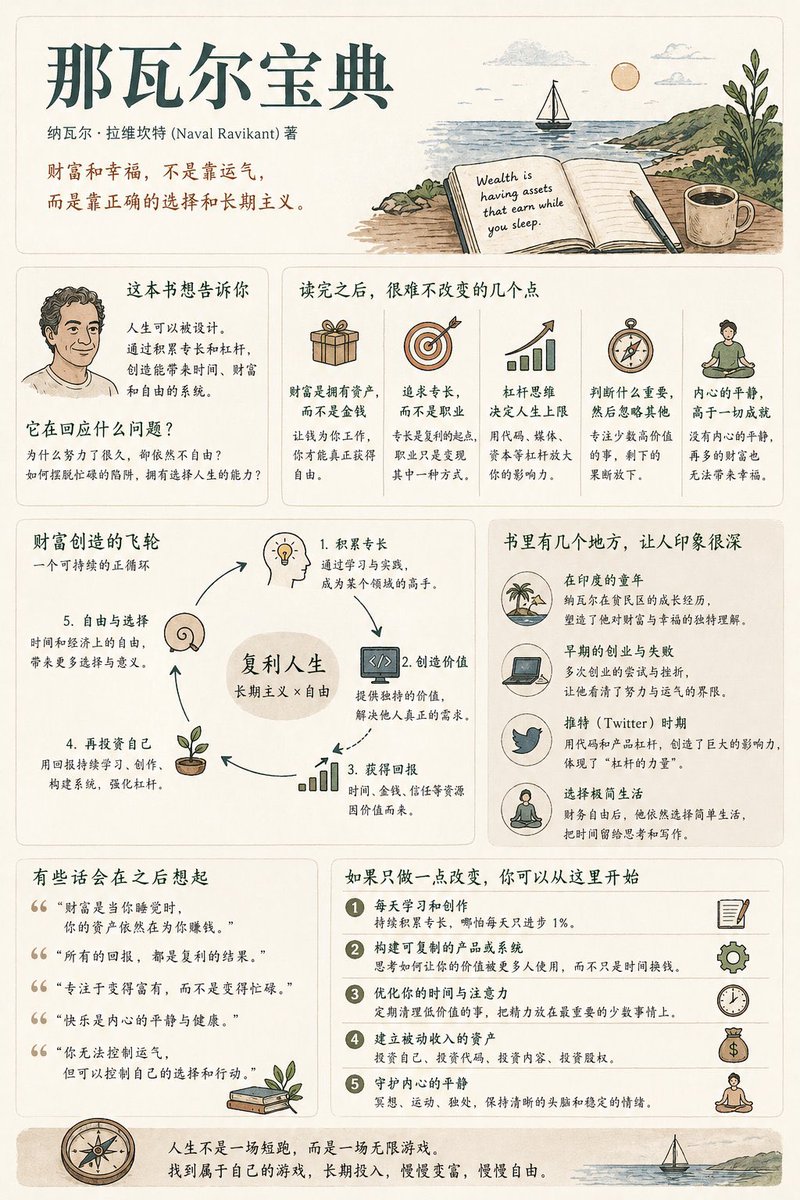
書籍概要インフォグラフィックポスター
現代的なUIとビンテージ風のイラストスタイルを用いて、中程度の情報密度を持つ書籍要約ポスターを作成するための、包括的で体系的な手順書。
これはグラフィック&ポスター向けのGPT Image 2プロンプトケースです。以下のコピー可能なプロンプトを使用して同様のビジュアルを生成し、再利用する前にAwesome GPT Image 2 Prompts帰属表示と商用利用権を確認してください。
プロンプトセット全体が必要ですか? グラフィック&ポスター 関連する例をもっと見るにはトピックハブを開くか、 GPT Image 2 プロンプトカタログ 完全な例の索引、再利用可能な構造、および出典の明記については、こちらをご覧ください。
Free 1K preview
Generate one preview image instantly, no sign-up required.
1544/4000
プロンプト
コピー準備完了プロンプト
Generate a [medium information density] book summary infographic poster with the theme "{argument name="book title" default="Book Title"}".

---

Step 0 (Critical Pre-assessment)

Before starting generation, determine which category this book belongs to (multiple choice possible):
* Cognitive Growth (Thinking / Self-improvement)
* Business / Wealth (Earning / Career / Investment)
* Psychology / Emotion (Relationships / Inner Self / Human Nature)
* Novel / Story (Narrative / Character / Metaphor)

Adjust content logic based on category.

[Overall Style]
Modern Minimalist UI + Light Vintage Illustration style. Soft light backgrounds (Cream / Beige / Light Gray). Low saturation palette (Deep Green / Deep Blue / Brown).
Keywords: Quiet, Substantial, Readable.

[Core Principles]
Do not use fixed module titles. Do not force structural completeness. Organize information naturally based on book type.

[Content Modules]
1. Opening: Book Title, Author, One-sentence insight.
2. Core Understanding: "What this book is really saying is..."
3. Highlights: Key takeaways adjusted by category.
4. Visual Structure: Decision paths, leverage systems, or character maps.
5. Examples/Fragments: Memorable scenes or cases.
6. Quotes: Meaningful sentences.
7. Actions: Practical steps to take after reading.

[Design Details]
Adaptive grid layout, card-based info, 6:4 image-to-text ratio, unified illustration style, clear hierarchy.

[Tone of Voice]
Should sound like a human explaining the book with insight and realization, not like a dry summary.
プロンプト変数
プロンプトに表示される編集可能な引数プレースホルダーと、それらのデフォルト値。
変数
book title
デフォルト
Book Title
Best for
- - グラフィック&ポスター visual exploration
- - Image generation and reference-image edits
- - Reusable briefs that keep source attribution visible
Change these parts
- - Subject, product, character, or scene
- - Aspect ratio, camera, lighting, and background
- - Brand, text, color, and output constraints
Recommended model and settings
- - Model: gpt-image-2
- - Input mode: テキストから画像
- - Aspect ratio: source
- - Commercial status: review original source
How to use this prompt
- 1. Copy the prompt and preserve its structure for the first test.
- 2. Replace the subject, context, and publishing channel.
- 3. Change one camera, lighting, or style variable per iteration.
- 4. Inspect the output, source, text, and rights before reuse.
Limitations, source, and reuse cautions
- - Generated output is an editable draft, not factual, legal, or rights evidence.
- - Review the linked source, people, brands, logos, text, and third-party media before commercial use.
Awesome GPT Image 2 Promptsからインポートされました。出典の明記が必要です。商用利用の可否はallowedです。有料利用の前に、出典元の権利をご確認ください。
このカテゴリーのその他の事例
カテゴリー、入力モードの互換性、品質、およびリスクの低さに基づいて優先順位付けされています。






再利用と出典に関する注記
ケースを事前に確認してから、このプロンプトを安全に使用してください。
- 1.プロンプトをコピーするか、生成ボタンを使ってDovooで直接開いてください。
- 2.ご自身の用途に合わせて、変数、アスペクト比、および参照画像を調整してください。
- 3.公開または有料利用の前に、情報源の権利、帰属表示の要件、およびブランドまたは肖像権に関するリスクを確認してください。