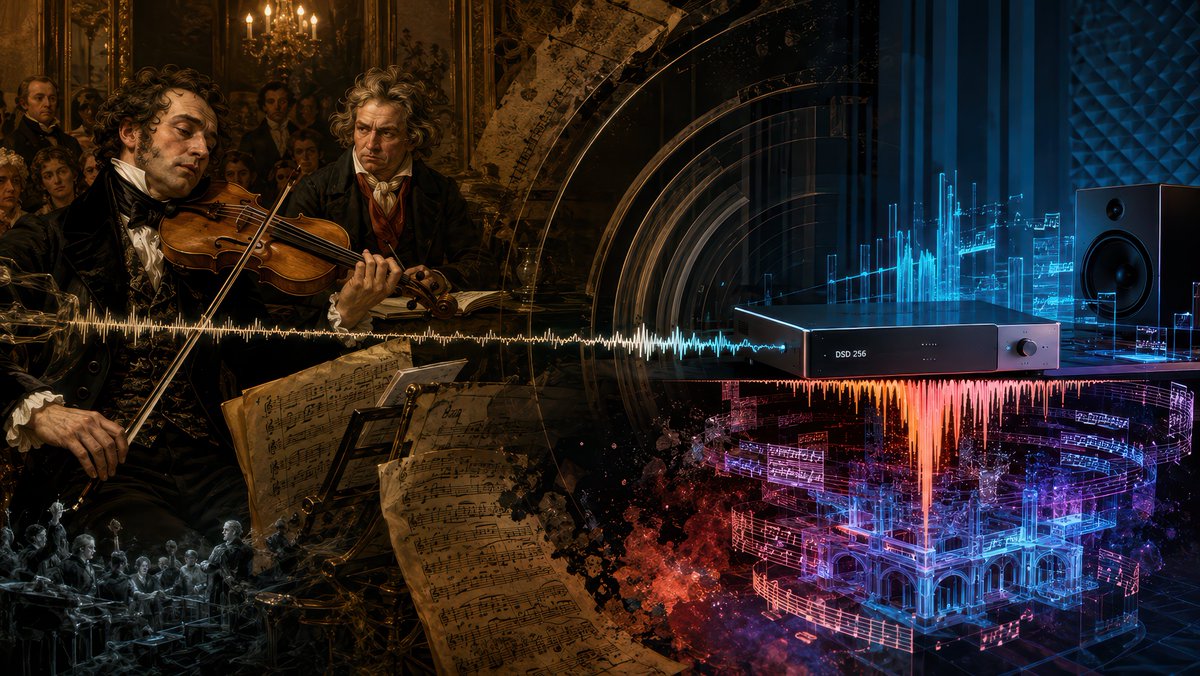
Beethoven Sonata DSD 256 Collage
A cinematic historical-to-futuristic music collage visualizing Beethoven's sonata performance transformed by modern DSD 256 audio.
これはイラスト&アート向けのGPT Image 2プロンプトケースです。以下のコピー可能なプロンプトを使用して同様のビジュアルを生成し、再利用する前にAwesome GPT Image 2 Prompts帰属表示と商用利用権を確認してください。
プロンプトセット全体が必要ですか? イラスト&アート 関連する例をもっと見るにはトピックハブを開くか、 GPT Image 2 プロンプトカタログ 完全な例の索引、再利用可能な構造、および出典の明記については、こちらをご覧ください。
Free 1K preview
Generate one preview image instantly, no sign-up required.
Free text preview doesn’t preserve reference-image consistency.
2853/4000
プロンプト
コピー準備完了プロンプト
Goal: Create a cinematic widescreen digital collage about Beethoven's Violin Sonata Op. 96 being rediscovered through modern high-resolution audio, blending a 19th-century Viennese salon performance with a futuristic DSD listening studio.

Canvas: 16:9 horizontal composition, dark dramatic chiaroscuro, ultra-detailed, painterly realism mixed with cybernetic audio visualization. The image should read left-to-right as a transformation from old classical performance to modern digital sound.

Layout: Split the scene into two connected halves with no hard border. Left half is a warm amber-brown historical oil-painting scene inside an ornate Viennese salon. Right half is a cool blue-black futuristic audiophile studio. A single horizontal audio waveform runs across the entire center of the image, starting as gold on the historical side and shifting into white, cyan, orange, magenta, and blue on the digital side.

Historical left side: Show exactly 2 main historical men in the foreground: 1 famous violinist in black formal 19th-century clothing playing a violin with a languid, tired expression, and 1 intense curly-haired Beethoven-like composer standing behind him, watching sternly. Add a small salon audience in the background, candlelit chandeliers, gilded walls, dark framed paintings, and aristocratic spectators. In the lower center-left foreground, include several large aged sheet-music pages with handwritten notation, tilted toward the viewer. Add a small monochrome ghostly orchestra scene in the lower-left corner as a memory-like vignette.

Modern right side: Show exactly 1 sleek black rectangular digital audio converter on a table, labeled "DSD 256" on its front panel, with a small round knob on the right. Place exactly 1 large black studio monitor speaker on the far right. Behind and around the device, create glowing cyan holographic equalizer bars, translucent circuit-like panels, soundwave diagrams, and floating fragments of musical notation. Below the device, show a vivid red-orange waveform falling downward like molten sound, merging into a glowing blue and magenta holographic architectural concert hall made of music staves and light.

Visual style: Hyper-detailed, moody, cinematic lighting, baroque oil-painting texture on the left, glossy high-tech cyber-audio rendering on the right, dense layered transparency, gold dust and smoky particles, deep blacks, amber candlelight, electric cyan and magenta neon. Make the transition feel emotional and profound, as if the true meaning of {argument name="musical work" default="Beethoven Violin Sonata Op. 96"} is revealed by {argument name="audio format" default="DSD 256"} in {argument name="recording year" default="2025"}.

Text constraints: The only readable device text should be "DSD 256". Do not add captions, titles, logos, watermarks, or extra typography.
プロンプト変数
プロンプトに表示される編集可能な引数プレースホルダーと、それらのデフォルト値。
変数
musical work
デフォルト
Beethoven Violin Sonata Op. 96
変数
audio format
デフォルト
DSD 256
変数
recording year
デフォルト
2025
Best for
- - イラスト&アート visual exploration
- - Image generation and reference-image edits
- - Reusable briefs that keep source attribution visible
Change these parts
- - Subject, product, character, or scene
- - Aspect ratio, camera, lighting, and background
- - Brand, text, color, and output constraints
Recommended model and settings
- - Model: gpt-image-2
- - Input mode: 画像から画像
- - Aspect ratio: source
- - Commercial status: review original source
How to use this prompt
- 1. Copy the prompt and preserve its structure for the first test.
- 2. Replace the subject, context, and publishing channel.
- 3. Change one camera, lighting, or style variable per iteration.
- 4. Inspect the output, source, text, and rights before reuse.
Limitations, source, and reuse cautions
- - Generated output is an editable draft, not factual, legal, or rights evidence.
- - Review the linked source, people, brands, logos, text, and third-party media before commercial use.
Awesome GPT Image 2 Promptsからインポートされました。出典の明記が必要です。商用利用の可否はallowedです。有料利用の前に、出典元の権利をご確認ください。
このカテゴリーのその他の事例
カテゴリー、入力モードの互換性、品質、およびリスクの低さに基づいて優先順位付けされています。






再利用と出典に関する注記
ケースを事前に確認してから、このプロンプトを安全に使用してください。
- 1.プロンプトをコピーするか、生成ボタンを使ってDovooで直接開いてください。
- 2.ご自身の用途に合わせて、変数、アスペクト比、および参照画像を調整してください。
- 3.公開または有料利用の前に、情報源の権利、帰属表示の要件、およびブランドまたは肖像権に関するリスクを確認してください。